
Solutions · Small business owners
PDF workflows for small business owners
A small business owner is also the billing department, HR and the contracts desk. The week's PDFs include quotes and invoices, a customer agreement, a vendor's W-9 request, a new hire's W-4 and I-9, a credit application from a supplier, and a lease or loan document that needs a signature by Friday.
Reviewed

Small business
Quotes, invoices, contracts, W-9s and new-hire forms without a back office. Edit, sign and send the documents a small business handles every week.
- Invoice no.INV-0042
- Bill toClearwater Café
- DueNet 15
- Total$1,860.00
Time goes to formatting and chasing: rebuilding an invoice in a word processor, printing a contract to sign and scan it back, re-typing the same customer details into three documents, and searching email for the signed copy when a dispute comes up.
PDFBetter keeps your quote, invoice and agreement as templates, fills and signs PDFs others send you, sends your own documents for signature with a completion certificate, and publishes simple forms such as customer intake or credit applications as a link.
Recurring work
5 workflows, each with the tool that does it
- 01
Quote, invoice and get paid faster
Fill an estimate or invoice template with formula fields that total line items, export it, and send it by email or link. Add your payment processor's link to the document.
- 02
Sign what customers and suppliers send you
Open a contract, credit application or lease, fill it, add your signature and send it back without printing or scanning.
- 03
Send your own agreements for signature
Send a service agreement or NDA to a customer with signature and date fields. You get the completed PDF and a certificate of completion.
- 04
Hire your first employees
Fill the current W-4 and I-9, send the offer letter for signature, and keep the onboarding checklist with each hire's file.
- 05
Convert and clean up everyday files
Turn Word and Excel files into PDFs, compress large attachments, and combine receipts for your bookkeeper. Merging and image-to-PDF run in your browser for free.
In the app
What one of these looks like in PDFBetter
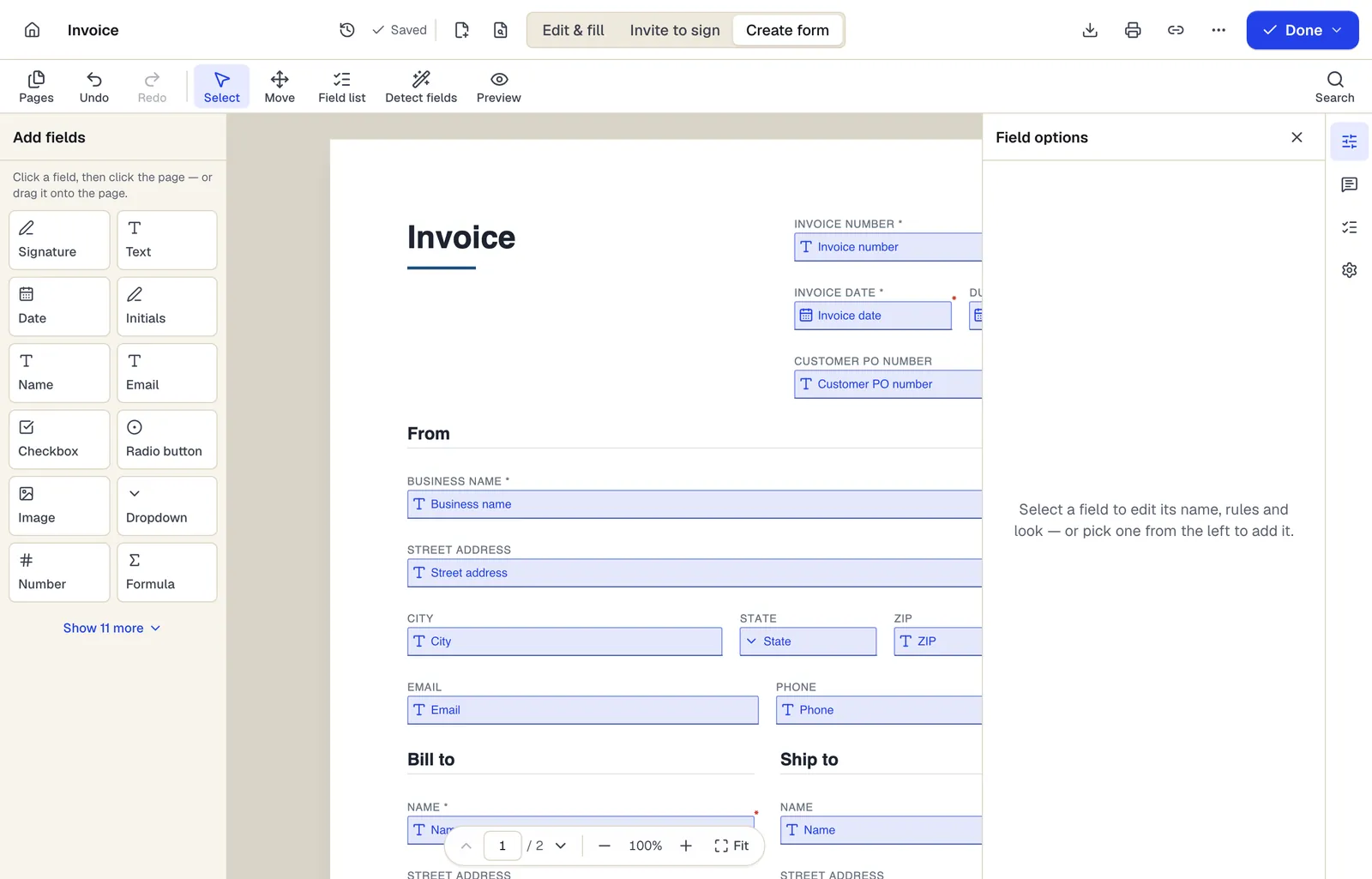
- Pick a field type, then click the page — or drag it
- Detect fields finds the boxes and lines on a flat PDF
- Every field keeps a label, a name and its own rules
The editor in Create form mode. Sample content; names and companies are fictional.
Start from a template
Templates for small business owners
Invoice
82 fields · 2 pages
A clean, fillable invoice with bill-to and ship-to, 12 line items, discount, sales tax and balance due that calculate as you type. Fill, sign and send free.
Estimate
67 fields · 2 pages
Fillable estimate with job description, line items, tax, a stated allowance for variance and an optional customer approval. Totals calculate as you type.
Sales receipt
57 fields · 2 pages
Fillable sales receipt with item lines, sales tax, payment method, amount tendered and change due. For markets, pop-up shops and small retail without a POS.
Purchase order
104 fields · 3 pages
Fillable purchase order with vendor, ship-to, item numbers, units, tax, shipping and an approval signature. Line totals and the PO total calculate for you.
Service Agreement
31 fields · 3 pages
Plain-English service agreement with scope, fees, payment terms, termination and signature lines. Fill it online, then sign or send it for signature.
Mutual Non-Disclosure Agreement (NDA)
24 fields · 3 pages
Two-way non-disclosure agreement for partnership talks, vendor reviews or deals. Set the purpose, term and governing state, then sign online.
Business credit application
54 fields · 3 pages
Fillable business credit application: company details, principals, bank and trade references, requested limit, terms, credit check authorization and guaranty.
Vendor registration form
37 fields · 2 pages
Fillable vendor registration form: legal name, entity type, EIN, remit-to address, contacts, products, certifications, payment method and signed certification.
Official forms
Forms you'll file
Opened from the issuing agency, so you get the current revision.
- Form W-9 Request for Taxpayer Identification Number and CertificationInternal Revenue Service (IRS)
- Form W-4 Employee's Withholding CertificateInternal Revenue Service (IRS)
- Form I-9 Employment Eligibility VerificationU.S. Citizenship and Immigration Services (USCIS)
- Form SS-4 Application for Employer Identification NumberInternal Revenue Service (IRS)
- Form 941 Employer's Quarterly Federal Tax ReturnInternal Revenue Service (IRS)
- Form 1099-NEC Nonemployee CompensationInternal Revenue Service (IRS)
Good to know before you rely on it
- Templates are general starting points. Have contracts that matter, such as customer agreements and leases, reviewed by a lawyer licensed in your state; PDFBetter is not a law firm.
- Payroll tax forms like the 941 have filing deadlines and deposit rules that a PDF editor doesn't track. Use payroll software or an accountant for filing.
- Never collect full card numbers or bank login details on a PDF or form. Use a payment processor link instead.
- The Free plan includes 3 edited-document downloads and 3 signature requests a month. A business sending contracts weekly will likely need Pro.
Small business owners: questions people ask
Do I need an account to sign a PDF?
You can sign and prepare documents without one. Downloading the edited file needs a free account, which includes 3 downloads a month.
Is there a one-off option without a subscription?
The Day Pass gives 24 hours of Pro for a one-time $6 and doesn't renew.
Can invoices calculate totals?
Yes. Formula fields can multiply quantity by price and add line totals and tax as you type.
Are e-signatures valid for business contracts?
In the US, the ESIGN Act and state UETA laws generally give e-signatures the same effect as handwritten ones for most business contracts, with exceptions such as wills. Check the rules for your document type.
Can my bookkeeper access my documents?
Share specific files with a link, or use a shared team workspace on the Business plan.