
To use AI on confidential documents in PDFBetter, switch Settings → Data & privacy → AI processing mode to Private AI. Private mode reads your document for one request and keeps nothing afterwards: no stored text index, no embeddings, no saved chat. If the deployment's operator has configured their own model endpoint, model calls go there; if not, they go to the hosted AI provider with storage turned off, and the settings page tells you which applies. Tools that run in your browser are more private still, because the file never leaves your device.
Browser tools
Where it runs: Your device. The file isn't uploaded.
What's kept: Nothing on our servers
Private AI
Where it runs: Our servers for one request, then the operator's own model endpoint if configured — otherwise the hosted provider with storage off.
What's kept: Nothing after the answer: no text index, embeddings or chat
Standard AI
Where it runs: Our servers, then the hosted AI provider with storage off.
What's kept: Extracted text, search index and chat history, kept in our database
Three levels of privacy, stated plainly
Browser tools (merge, split, rotate, extract pages, images to PDF and others) run on your device. The file is not uploaded, so there's nothing on our servers to keep or delete.
Private AI mode processes your document on our servers for the length of one request. Page text and search data stay in memory and are discarded when the answer is sent. Chat answers aren't saved.
Standard AI mode also sends document text to the hosted AI provider with storage turned off, but it keeps each document's extracted text and search index in our database. That makes repeat questions faster and cheaper, and it saves chat history so you can come back to a conversation.
Where model calls go
Where model calls go
PDFBetter can be configured with a private, OpenAI-compatible model endpoint: for example a self-hosted vLLM or Ollama server in the operator's own environment. In private mode, summaries, chat, translation and other text features are sent there instead of the hosted provider.
If no private endpoint is configured, private mode still applies its no-retention rules, but model calls go to the hosted provider's API with storage turned off. The settings page shows whether a private endpoint is configured. It shows a yes or no only; the endpoint address is never displayed.
Open Data & privacy settings
In your account, go to Settings → Data & privacy and find the AI processing section.
Choose Private AI
Switching deletes the stored AI index for every document you own right away. Your documents themselves are not touched.
Check the endpoint line
It says whether model calls in private mode go to an operator-run endpoint or to the hosted provider with storage off.
Use AI tools as usual
Summaries, chat and search work the same way, but each request reads the document again and nothing is saved afterwards.
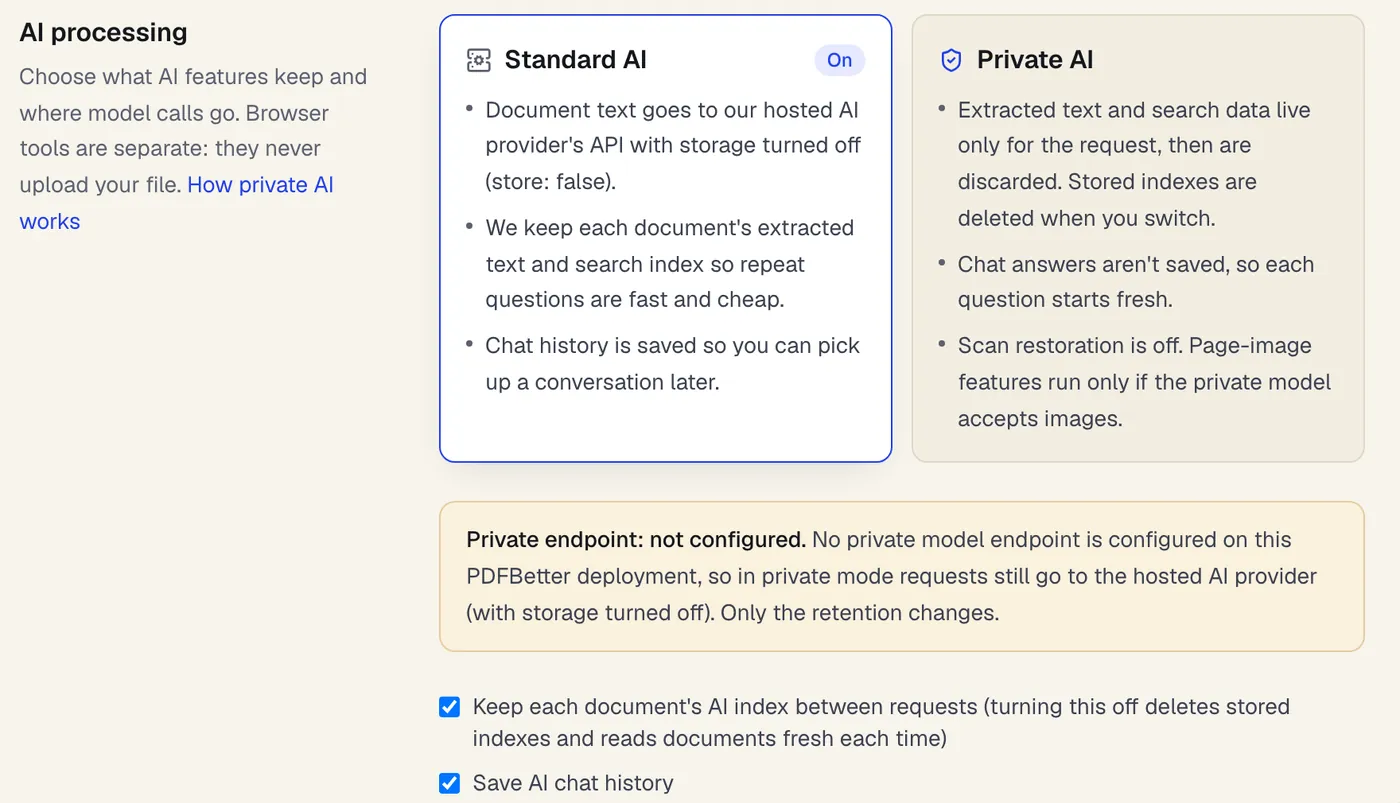
- Standard keeps a text index so repeat questions are faster
- Private reads the document for one request and keeps nothing
- Says whether a private model endpoint is configured
Settings → Data & privacy → AI processing, on a deployment without a private endpoint.
What changes in private mode
What changes in private mode
Search by meaning uses the private endpoint's embedding model when one is configured. Otherwise search matches keywords, which finds exact terms but not paraphrases.
Features that send page images (form-field detection and AI text recognition for scans) work only if the private endpoint accepts images. Scan restoration, which uses a third-party image service, is always off in private mode.
We're testing small document-parsing models, such as Granite Docling, and layout-aware parsers to see whether they can run privately at good quality. They are evaluation candidates, not features you can use today.
Plans
What each plan includes
| Free | Pro | Business | |
|---|---|---|---|
| AI credits per month | 20 | 500 | 2,000 |
AI actions cost a set number of credits each; the full list is on the pricing page. Compare all plans
What it doesn't do
- Private mode is not a compliance certification. PDFBetter doesn't claim HIPAA, GDPR or SOC 2 certification for it and doesn't sign BAAs.
- Without an operator-configured private endpoint, document text still goes to the hosted AI provider (with storage turned off). Only retention changes.
- Documents are read again for every request, so long documents are slower and very long ones may need fewer pages per request.
- Chat doesn't remember earlier questions in private mode, because nothing is saved between messages.
- Your documents themselves are still stored in your workspace until you delete them. Private mode covers AI-derived data, not the files you upload.
Private document AI: questions people ask
Does private mode mean my document never leaves my computer?
No. Private AI runs on servers. Only browser tools keep the file on your device. Private mode means nothing derived from the document (text index, embeddings, chat answers) is kept after the request.
Who runs the private model endpoint?
The operator of the PDFBetter deployment configures it, for example a self-hosted model server in their own environment. If none is configured, the settings page says so, and private mode uses the hosted provider with storage turned off.
What happens to my existing AI index when I switch?
It's deleted immediately for every document you own. You can also delete it at any time with “Delete stored AI index now”, and optionally delete saved AI chat history too.
Why is scan restoration unavailable in private mode?
Restoration sends page images to a third-party image service. Private mode never does that, so the feature is turned off. OCR on our conversion servers still works.
Does private mode cost more AI credits?
No. Each action costs the same credits listed on the pricing page. Private mode just repeats the reading step on every request instead of reusing a stored index.
Can I use it for medical, legal or client records?
That depends on your own obligations, not on a setting. PDFBetter makes no compliance or certification claims for private mode and doesn't sign BAAs. If your rules forbid sending text to a third-party model, use private mode only with an operator-run endpoint, or keep to browser tools.
Should I redact a document before asking AI about it?
If the AI doesn't need the personal details to answer, yes. AI redaction review suggests names, ID numbers, card numbers and IBANs to remove, and once you apply them, AI tools read the redacted version of the document.
Are Granite Docling or other small models used today?
Not yet. We're measuring them against the current text extraction on invoices, scans, tables and Turkish and English documents. We'll only switch a workload if the results are better.