
To see who opened a PDF you shared, create the link in PDFBetter's Share dialog and open Activity: it shows, per link and per day, when the document was viewed, downloaded, commented on or filled in, alongside responses to your published forms. For links limited to specific people, each event shows the verified email of the account that opened it. For anyone-with-the-link links you see counts, a coarse browser family and country — visitors are counted with a hash that changes every day, so no one can be followed across days, and no IP address is stored.
One share link, 14 days
Sample data
28 views9 downloads
- Viewed#2ac136Firefox on Windows
- Downloaded#91cfedSafari on iOS
- Wrong password#5e0b44Chrome on macOS
What is recorded
For each share link: when it was viewed, downloaded, commented on or filled in through the link, when someone entered a wrong password, and when someone opened it after it expired. Public form submissions are counted from the responses you already collect.
With each event we keep a coarse browser family such as “Chrome on macOS”, the country your CDN reports (when it does), and a visitor hash: an HMAC of the network address and browser family, keyed with a secret that changes every day. The same visitor on the same day gets the same hash, so repeat views within 30 minutes count once and a day's unique visitors can be counted. Tomorrow the hash is unrelated.
On links restricted to specific email addresses, the event records the email address the visitor signed in and verified. That shows which invited account opened it — it is not proof of who was at the keyboard.
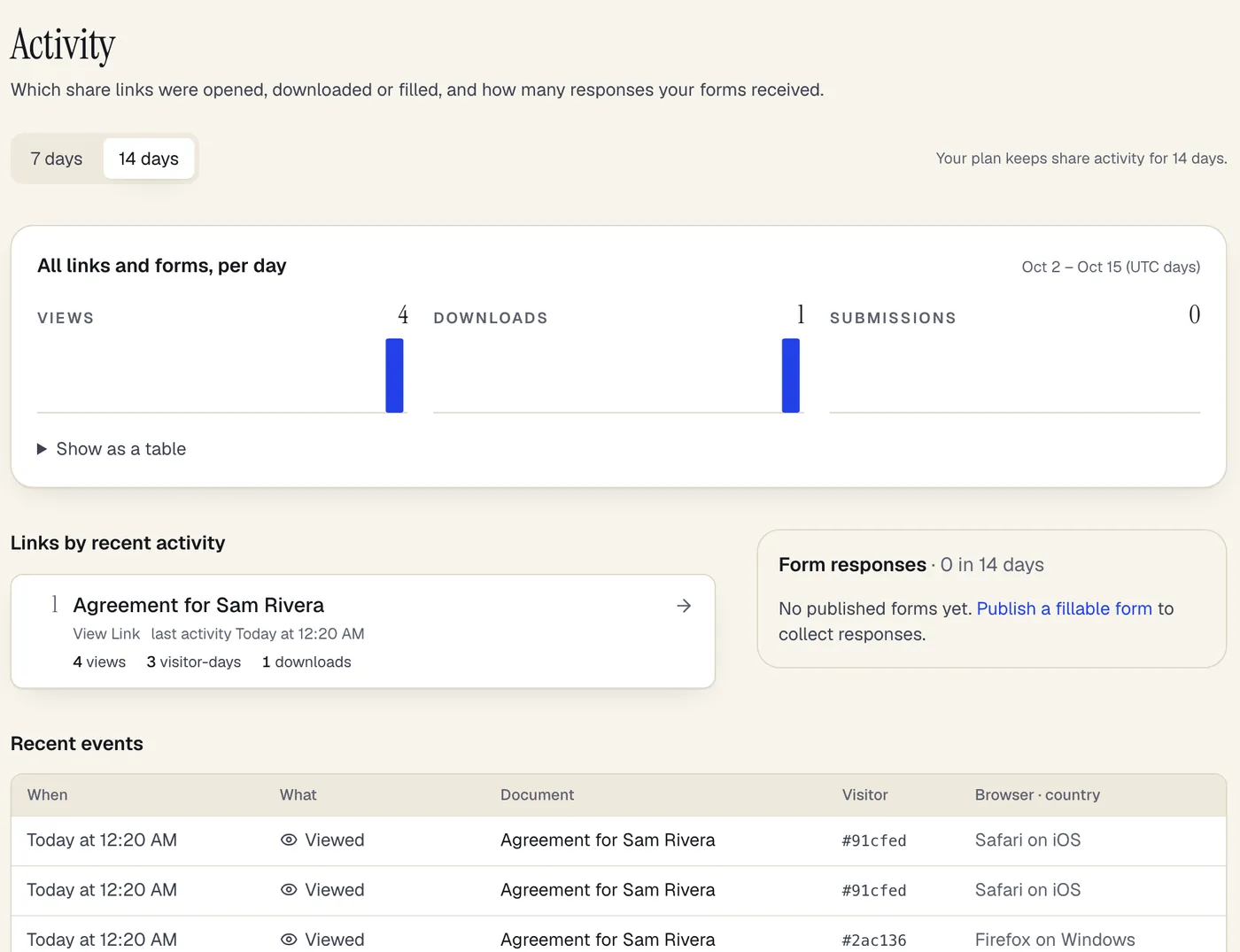
- Views, downloads and form submissions per day
- Links ranked by their most recent activity
- A daily visitor hash and a browser family — no IP address
The Activity page after a shared link was opened in three browsers. Sample content; names are fictional.
What is not recorded
What is not recorded
No IP address and no raw user-agent string is stored. Nothing about the document's content, what was typed into fields, or how long someone read a page is recorded — PDFBetter does not measure read time or scroll depth.
Visitors whose browser sends Do-Not-Track or Global Privacy Control are recorded as an event and a time only: no hash, browser, country or email.
How to use it
How to use it
Activity is on by default for share links you create with a free account.
Share a document
Create a share link from the editor's Share dialog, or publish a fillable form. Optionally set an expiry date, a password, or turn off downloads.
Limit it to specific people (optional)
Turn on “Only specific people” and list their email addresses. They sign in with those emails to open the link, and Activity shows which of them did.
Open Activity
Links are ranked by most recent activity, with a per-day chart of views, downloads and submissions.
Pick a link
See its timeline and recent events, then follow up or turn the link off from the document.
How long activity is kept
How long activity is kept
Events are deleted automatically after your plan's share-activity history period, and the Activity page only lets you look back that far.
Activity is kept for 14 days on Free, 90 days on Pro, 365 days on Business.
Plans
What each plan includes
| Free | Pro | Business | |
|---|---|---|---|
| Share-link activity (views, downloads, submissions) | Included | Included | Included |
What it doesn't do
- A view is not verified identity. Anyone with the link can open it, and a shared network or browser can make two people look like one visitor.
- Link previewers and bots can still register views. PDFBetter filters common crawlers and preview fetchers by user agent; this filter is basic and not exhaustive.
- Because the visitor hash changes daily, the same person returning on two days counts as two visitor-days. Unique people over a longer period can't be counted — by design.
- Activity is recorded from the moment this feature is enabled; earlier views only appear in the link's simple view counter.
Document share analytics: questions people ask
Can I see who opened my document?
Not by name for “anyone with the link” links — only that a visitor opened it, roughly where and with what browser family. For links limited to specific emails, you see the verified email address of the account that opened it.
How long is the activity history kept?
Activity is kept for 14 days on Free, 90 days on Pro, 365 days on Business.
Do you store IP addresses?
No. The network address is used for a moment to compute a daily-rotating hash and is then discarded.
Do you track read time or which pages were read?
No. PDFBetter does not record read time, scroll depth or page-by-page reading.
What happens with Do-Not-Track?
The event is kept with its type and time only, without a visitor hash, browser, country or email.
Why do I see a view I don't recognise?
It may be a link-preview service (chat apps and email scanners fetch links) that our basic bot filter didn't recognise, or someone the link was forwarded to.
Can my agent read this activity?
Yes. An agent connected over MCP with the analytics:read scope can call get_share_activity and list_form_submissions.