
Solutions · Contractors and subcontractors
PDF workflows for contractors and subcontractors
Construction paperwork follows the job: an estimate or bid, a contract, permits, change orders as the scope moves, daily logs and safety inspections on site, lien waivers with every payment application, and a closeout package at the end.
Reviewed

Money is lost when signatures lag. Work starts on a change order the owner never signed, a payment is held because one lower-tier lien waiver is missing, and a safety inspection exists only as photos on a superintendent's phone. Office staff then spend Friday afternoon assembling it all into something the GC or owner will accept.
PDFBetter lets a project manager send an estimate or change order for signature from a phone, fill lien waivers and inspection checklists on site, convert jobsite photos into PDF pages, and assemble the pay application packet in the order the GC requires.
Recurring work
5 workflows, each with the tool that does it
- 01
Get change orders signed before the work
Fill the change order with scope, price and schedule impact, and send it to the owner or GC for signature from the job site. The certificate of completion shows when it was approved.
- 02
Send estimates clients can approve
Build estimates from a template with formula fields for quantities and totals, and send them with a signature field for approval.
- 03
Assemble pay applications and lien waivers
Combine the pay application, schedule of values, invoices and each sub's lien waiver into one packet in the GC's order, with page numbers.
- 04
Turn jobsite photos into daily logs
Add the daily log form and the day's photos into one PDF, straighten photographed paperwork, and keep the file per day.
- 05
Mark up drawings and submittals
Add comments, arrows, clouds and highlights to drawings and submittals, and compare a revised sheet with the previous one to find changes.
In the app
What one of these looks like in PDFBetter
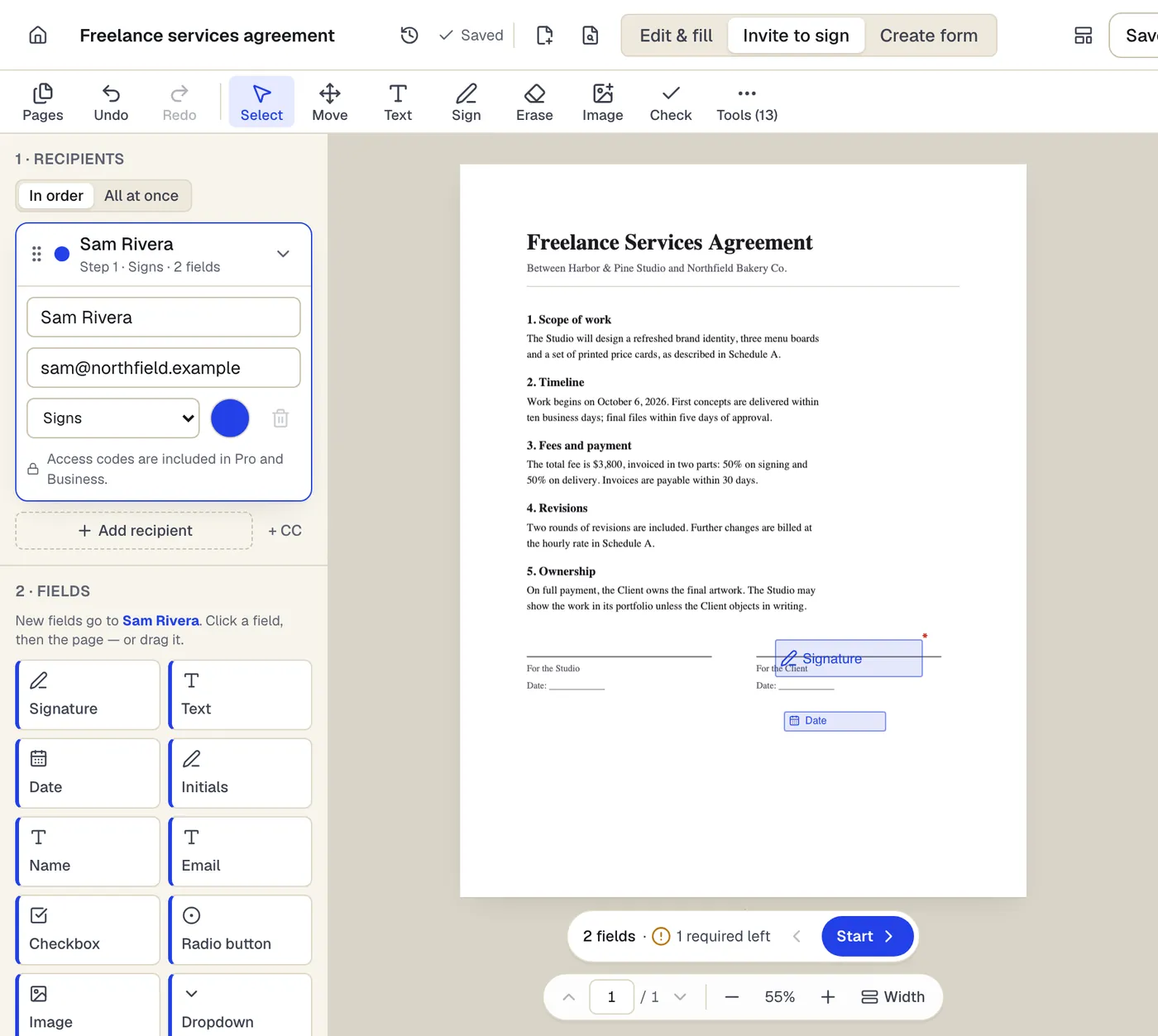
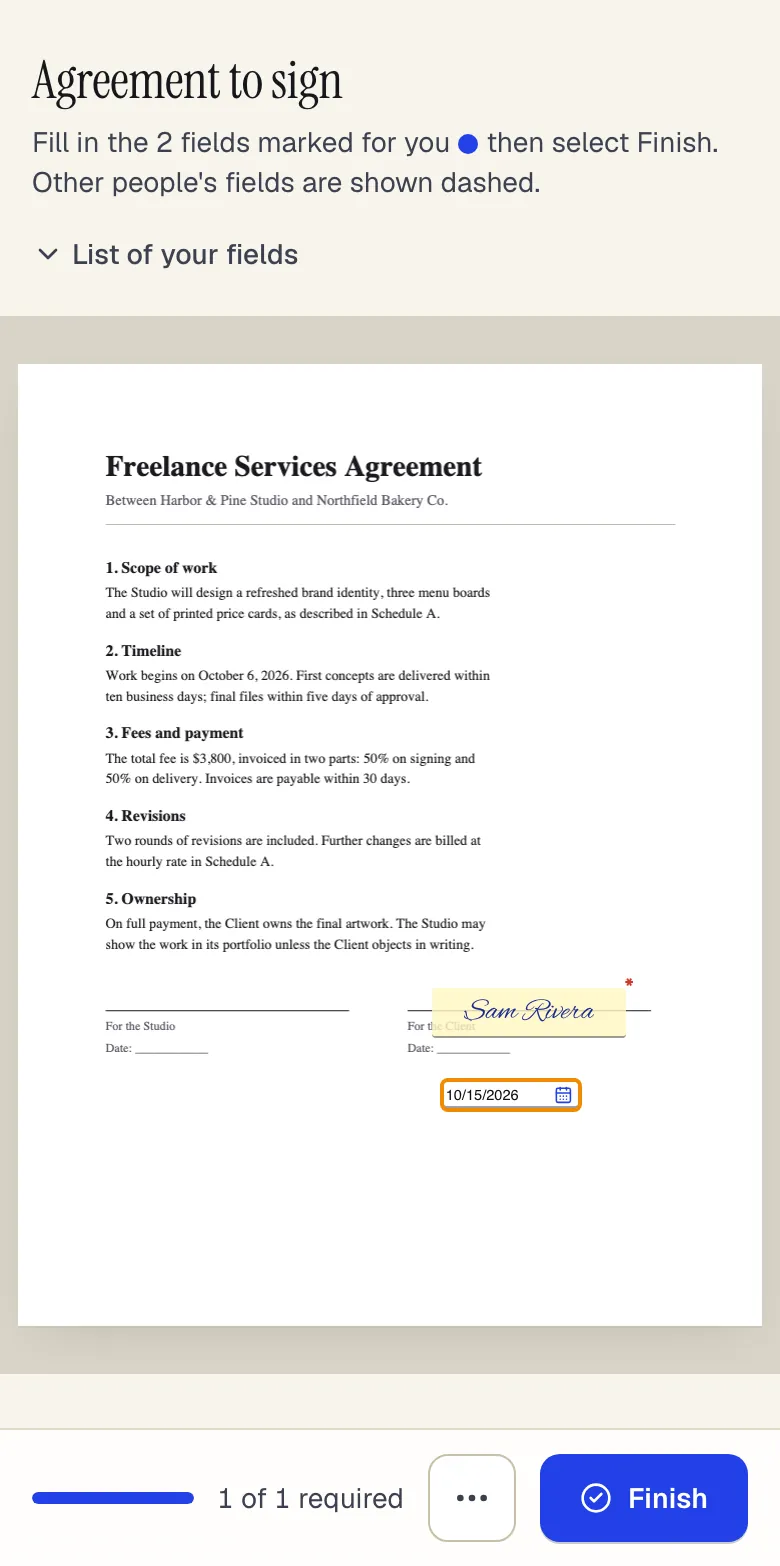
- Recipients sign in order, or all at once
- Fields take the color of the person who fills them
- Fields go to the selected recipient
Invite to sign in the editor, and what the signer sees on a phone. Sample content; names and companies are fictional.
Start from a template
Templates for contractors and subcontractors
Estimate
67 fields · 2 pages
Fillable estimate with job description, line items, tax, a stated allowance for variance and an optional customer approval. Totals calculate as you type.
Construction estimate
132 fields · 4 pages
Two-page construction estimate with labor, materials and subcontractor tables, contingency, overhead and profit, exclusions and a payment schedule.
Change order
50 fields · 2 pages
Fillable construction change order with description and reason, itemized cost, schedule impact in days, revised contract sum and owner and contractor sign-off.
Work order
70 fields · 2 pages
Fillable work order with request details, priority, assigned technician, work performed, labor and parts tables, completion status and customer sign-off.
Purchase order
104 fields · 3 pages
Fillable purchase order with vendor, ship-to, item numbers, units, tax, shipping and an approval signature. Line totals and the PO total calculate for you.
Safety inspection checklist
59 fields · 3 pages
Fillable workplace safety checklist: pass, fail or N/A for exits, fire, electrical, first aid, PPE and chemicals, plus a corrective action log with due dates.
Incident report
53 fields · 2 pages
Fillable workplace incident report for injuries, near misses and property damage: people involved, witnesses, treatment, root cause and corrective actions.
Independent Contractor Agreement
32 fields · 3 pages
Contractor agreement covering scope, rates, invoicing, taxes, IP ownership, confidentiality and termination. Fill online and collect both signatures.
Official forms
Forms you'll file
Opened from the issuing agency, so you get the current revision.
Good to know before you rely on it
- Several states require lien waivers to follow exact statutory wording, and a waiver on the wrong form can be unenforceable. Use your state's statutory form where one exists; PDFBetter does not provide state lien waiver forms.
- Change order, notice and payment terms are set by your contract. A signed change order in PDFBetter records approval, but whether it satisfies the contract's notice requirements is a contract question.
- OSHA recordkeeping (including the injury and illness log) uses specific OSHA forms and retention periods. An incident report template supports your process but doesn't replace those records.
- Large drawing sets can exceed plan limits for file size and pages per document. Split the set by discipline, or compress it, before uploading.
Contractors and subcontractors: questions people ask
Can the owner sign a change order on a phone?
Yes. The signing page works on phones without an app or account, and the completed PDF is emailed to everyone.
Can I measure distances on drawings?
PDFBetter doesn't include scaled measurement tools. Use it for markup, comments and comparison, and your takeoff software for measuring.
How big a drawing set can I open?
The Free plan accepts files up to 50 MB, Pro up to 250 MB and Business up to 500 MB. Larger sets should be split by discipline or compressed first.
Can estimates calculate totals?
Yes. Formula fields compute values such as quantity times unit price and add up line totals as the form is filled.
Do I need a scanner for paper waivers?
No. Photograph the page, convert it with JPG to PDF, and use Restore scanned PDF to straighten and clean it.