
Solutions · Clinics, therapists and dental practices
PDF workflows for clinics, therapists and dental practices
A small practice repeats the same paperwork with every new patient: an intake form, a medical history, consent to treatment, a financial policy acknowledgment and, for therapists and telehealth providers, a telehealth consent. Existing patients add records-release authorizations, school or work notes and updated histories each year.
Reviewed

The front desk loses time to clipboards. Handwritten intake forms get re-typed into the practice management system, a missing signature on a consent is found after the visit, and a records request sits in the fax tray because nobody can tell which version of the authorization the patient signed.
Before anything else, a plain statement: PDFBetter does not sign Business Associate Agreements (BAAs) and makes no HIPAA compliance claim. If your practice is a HIPAA covered entity, you need a BAA with any vendor that stores or transmits protected health information for you, so PDFBetter is not the right place for PHI. It can still help with forms before they hold patient data, with documents that aren't PHI, and with the browser-only tools that never upload a file.
Recurring work
5 workflows, each with the tool that does it
- 01
Design intake and consent forms
Turn your existing paper intake or consent into a clean fillable PDF with required fields, date pickers and signature fields, then load the blank form into the system your practice uses with patients.
- 02
Prepare documents that aren't patient records
Staff policies, vendor agreements, referral letters without patient data and practice handouts can be edited, signed and shared normally.
- 03
Merge and split files on your own device
Merge, split, rotate and convert images to PDF in the browser. These tools process the file on your computer and never upload it.
- 04
Remove identifiers before a file leaves the practice
When a document must go somewhere that doesn't need patient identifiers, such as a case discussion or a training set, apply true redaction so the text under each box is removed.
- 05
Control who opens what you share
For non-PHI documents, share with a password, an expiry date and a list of allowed emails, see when the link was opened, and revoke it. Signature requests produce a certificate of completion listing every event.
In the app
What one of these looks like in PDFBetter
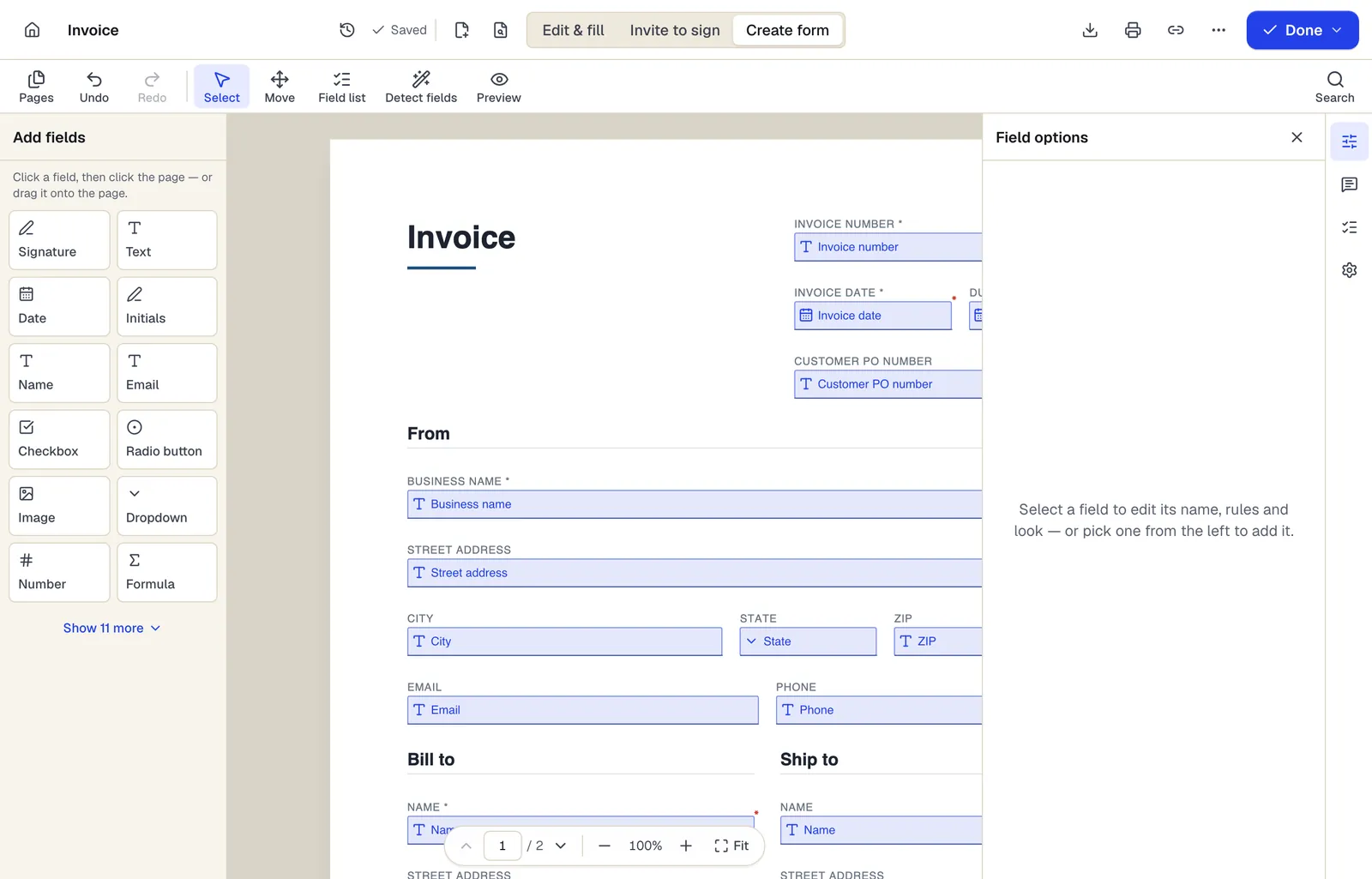
- Pick a field type, then click the page — or drag it
- Detect fields finds the boxes and lines on a flat PDF
- Every field keeps a label, a name and its own rules
The editor in Create form mode. Sample content; names and companies are fictional.
Start from a template
Templates for clinics, therapists and dental practices
Patient Intake Form
73 fields · 3 pages
New patient intake form with demographics, insurance, emergency contact, reason for visit, medications, allergies, conditions and consent signatures.
Medical History Form
86 fields · 2 pages
Detailed personal and family medical history form: conditions, surgeries, hospitalizations, medications, immunizations, lifestyle and family history.
General Consent to Treatment
16 fields · 2 pages
General outpatient consent to treatment covering routine exams, tests and procedures, the right to refuse, students in care and signature by representative.
Telehealth Informed Consent
21 fields · 2 pages
Telehealth consent explaining how video and phone visits work, technology and privacy risks, emergency plan, patient location and right to choose in person.
Medical Records Release Authorization
42 fields · 3 pages
Authorization to release health information with the core elements HIPAA lists: what, from whom, to whom, purpose, expiration, revocation and signature.
Therapy Intake Form
40 fields · 2 pages
Counseling intake form: presenting concerns, symptoms, prior treatment, safety screening, goals, limits of confidentiality and consent to begin therapy.
Photo and Video Release Form
23 fields · 2 pages
Photo and video release letting a photographer or organization use a person's image, with permitted uses, compensation, time limits and guardian consent.
Event Sign-In Sheet
114 fields · 1 page
Event and meeting sign-in sheet with name, organization, email, phone and opt-in for updates. Print for the door or fill on a tablet, then export to Excel.
Good to know before you rely on it
- PDFBetter does not sign BAAs and does not claim HIPAA compliance. If HIPAA applies to your practice, don't store, send or collect protected health information with PDFBetter's account features (forms, sharing, signing, storage, fax).
- Whether HIPAA applies depends on your practice, for example whether you bill insurance electronically. Ask your compliance advisor; PDFBetter is not a law firm.
- AI features send document text to OpenAI under API terms that exclude training. Never run them on patient records.
- A valid records-release authorization must contain specific elements (45 CFR 164.508), and state law often adds more, especially for mental health, substance use (42 CFR Part 2) and minors' records. Have the medical templates reviewed before use.
- Medical record retention periods are set by state law and payer contracts, often longer for minors. Keep the record of truth in your EHR or practice management system.
Clinics, therapists and dental practices: questions people ask
Is PDFBetter HIPAA compliant?
PDFBetter makes no HIPAA compliance claim and does not sign Business Associate Agreements. If your practice is a covered entity, don't use its account features for protected health information.
Will you sign a BAA?
No. We'd rather say so plainly than imply otherwise. Use a vendor that signs a BAA for patient-facing intake, signing and storage.
Which PDFBetter tools never upload my file?
Browser tools such as merge, split, rotate, extract pages and JPG to PDF run on your device. Each tool page states where processing happens.
Can I still use the medical templates?
Yes, as designs. Download the blank fillable PDF and load it into the patient-facing system your practice uses, after your own review of the wording.
We're a cash-only wellness practice. Does this change anything?
Possibly; some providers aren't HIPAA covered entities. That's a legal question for your advisor, and state privacy laws may still apply.