
Solutions · Solo attorneys and paralegals
PDF workflows for solo attorneys and paralegals
A small firm's PDF work is constant and unforgiving. Client intake forms and engagement letters at the start of a matter, scanned discovery and exhibits in the middle, court filings with redaction and size rules at the end. A solo attorney or a single paralegal does all of it, usually under a deadline.
Reviewed

The expensive mistakes are small: a Social Security number left visible in an exhibit, a black box drawn over text that can still be copied out, a draft sent back by opposing counsel with a changed clause nobody noticed, or a filing rejected because the scan isn't text-searchable or the file is over the court's size cap.
PDFBetter covers those steps without a desktop suite: real redaction that removes the content under the box, OCR for scanned exhibits, word-level comparison between drafts, and signature requests with a certificate of completion for engagement letters and releases.
Recurring work
6 workflows, each with the tool that does it
- 01
Redact before filing or producing
Mark names, account numbers and other protected text, then apply redaction. The content under each box is removed from the file, not just covered, and you can search the result to confirm.
- 02
Make scanned exhibits searchable
Run OCR on scanned discovery and exhibits so they can be searched and quoted. Straighten skewed copier scans first for better recognition.
- 03
Compare drafts from opposing counsel
Compare the version you sent with the version you got back to see every inserted, deleted and changed word, then comment on the clauses you need to push back on.
- 04
Open matters with intake and engagement letters
Publish an intake form for prospective clients, then send the engagement letter for signature. The certificate of completion records when the client signed.
- 05
Assemble exhibits and filing packets
Put the brief and its exhibits in order, add page numbers, split oversized filings into parts, and compress to meet the court's per-file limit.
- 06
Get oriented in a long record
Ask questions about a long deposition transcript or contract and get answers with page citations you can check. Decide first whether your confidentiality obligations allow sending the text to an AI provider.
In the app
What one of these looks like in PDFBetter
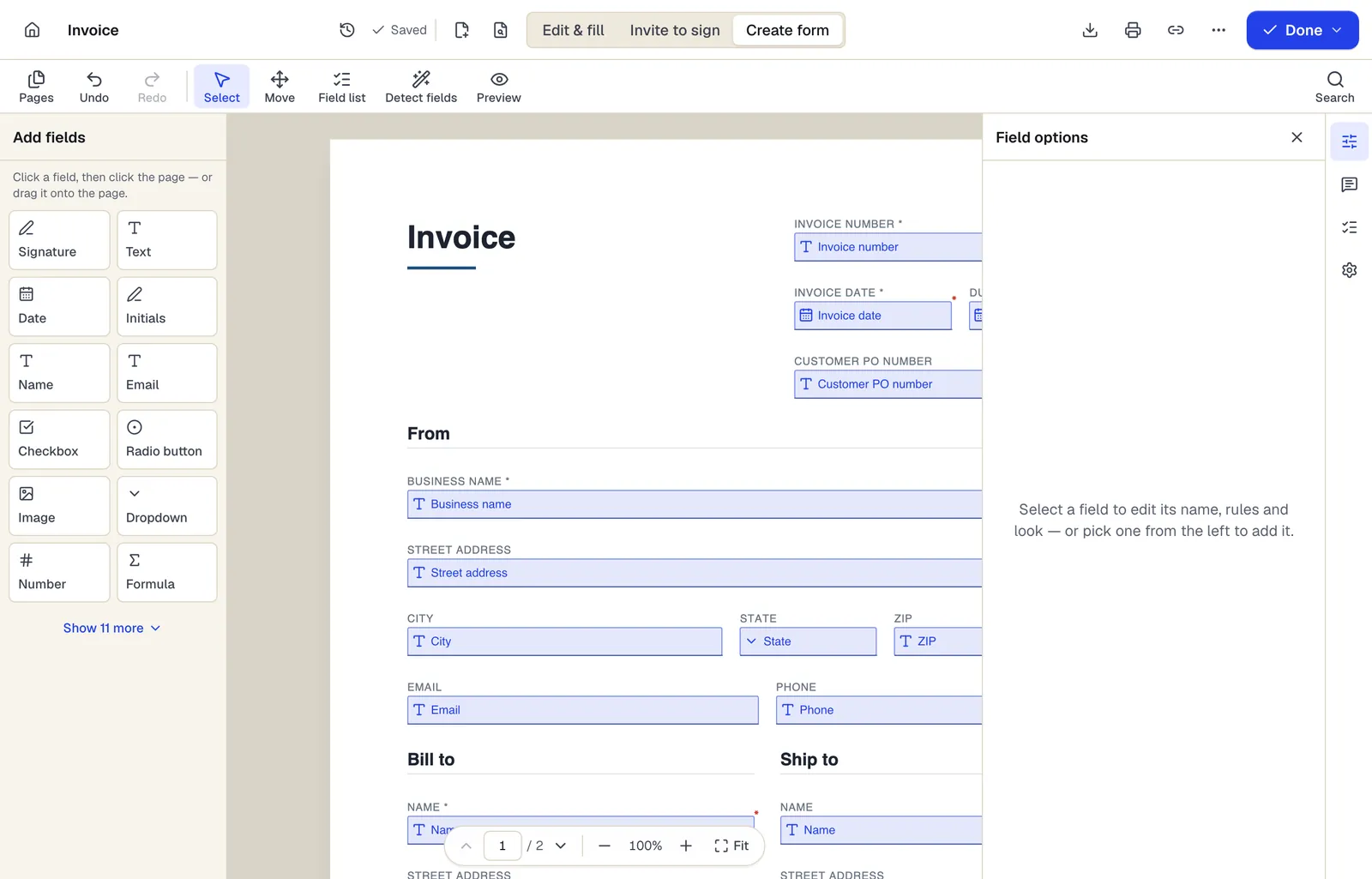
- Pick a field type, then click the page — or drag it
- Detect fields finds the boxes and lines on a flat PDF
- Every field keeps a label, a name and its own rules
The editor in Create form mode. Sample content; names and companies are fictional.
Start from a template
Templates for solo attorneys and paralegals
Mutual Non-Disclosure Agreement (NDA)
24 fields · 3 pages
Two-way non-disclosure agreement for partnership talks, vendor reviews or deals. Set the purpose, term and governing state, then sign online.
Service Agreement
31 fields · 3 pages
Plain-English service agreement with scope, fees, payment terms, termination and signature lines. Fill it online, then sign or send it for signature.
Consulting Agreement
32 fields · 3 pages
Consulting agreement for advisory work billed hourly or on retainer, with expenses, conflicts, confidentiality and ownership terms. Fill and sign online.
General Durable Power of Attorney
49 fields · 4 pages
General durable financial power of attorney naming an agent and successor, with powers you initial, effective date choice and notary section.
General Affidavit
25 fields · 2 pages
General affidavit for sworn statements of fact, with numbered statements, affiant details, oath language and a notary jurat section.
Release of Liability (Activity Waiver)
21 fields · 3 pages
Activity waiver with assumption of risk, release, medical authorization and parent signature for minors. For gyms, classes, rentals and events.
Promissory Note
31 fields · 3 pages
Simple promissory note with principal, interest, payment schedule and an estimated installment calculator. Includes optional co-signer line.
Customer intake form
24 fields · 1 page
Fillable new-client intake form for service businesses: contact details, services wanted, project goals, budget, timeline, referral source and contact consent.
Good to know before you rely on it
- PDFBetter is not a law firm and its templates are not legal advice. Treat every template as a draft for your own review.
- Federal Rule of Civil Procedure 5.2 and most state equivalents limit Social Security numbers, birth dates, minors' names and account numbers in filings. Courts also set their own e-filing size, format and text-searchability rules; check the local rules before filing.
- AI features send document text to OpenAI under API terms that exclude training. Review your duty of confidentiality (ABA Model Rule 1.6 and your state's version) and your client's instructions before using them on client files.
- Affidavits, powers of attorney and some estate documents need a notary or witnesses, and wills are excluded from many e-signature laws. PDFBetter doesn't provide notarization.
- Version history keeps earlier revisions for a period that depends on your plan. Keep the file of record in your practice management or document system.
Solo attorneys and paralegals: questions people ask
Is redaction in PDFBetter permanent?
Yes. Applying redaction removes the text, images and vector content under each box and burns in the box. Covering text with a shape or the Erase tool is not redaction.
Can I OCR a 500-page production?
Yes, within your plan's page and OCR allowances. Each recognized page uses one OCR page, so a large production may need Pro or Business.
Does the certificate of completion help if a signature is disputed?
It records the signer's email, the consent step, timestamps and the document's fingerprints. Each signer also signed with their own device key, bound to exactly what they entered, and the completed PDF is digitally sealed and independently time-stamped with that evidence built into the file, so any later change shows. Signers are identified by email (and an optional emailed code), not by ID documents. Whether that is enough evidence in a dispute is a question for the court.
Can I compare a Word draft with a PDF?
Convert the Word file to PDF first, then compare the two PDFs. Comparison works on text, so formatting-only changes may not show.
Can clients fill an intake form without an account?
Yes. Published forms open from a link with no sign-in. You can review and export responses from your account.