
To connect Claude, Cursor or another AI agent to your PDFs, use PDFBetter's remote MCP (Model Context Protocol) server: create an agent key in Settings → Agents (MCP), add https://pdfbetter.com/api/mcp/ with that key to your MCP client, and ask for what you need. The agent can then list your documents, fill form fields, merge, split, convert, compress and OCR files, extract invoice data to JSON, run workflows, ask across document workspaces, and answer questions with page citations. Results come back as new documents or revisions and short-lived download links; originals are not overwritten.
Your MCP client
you ›
Merge the three latest invoices into one PDF and give me the link
→ list_documents
→ merge_documents
→ export_document
PDFBetter MCP server
Only the tools the key's permissions allow. Each call acts as you, within your plan.
Documents
- list_documents
- fill_fields
- export_document
PDF tools
- merge_documents
- convert
- ocr_document
AI & data
- ask_document
- extract_document
- ask_workspace
Workflows & review
- run_workflow
- compare_documents
- suggest_redactions
What comes back
- A new document or revision — originals aren't overwritten
- A download link that expires after a few minutes
- Long jobs return a job id to poll
Connect in three steps
The endpoint is https://pdfbetter.com/api/mcp/ (keep the trailing slash). It speaks Streamable HTTP and authenticates with an Authorization: Bearer header.
Create an agent key
In Settings → Agents (MCP), name the key after the client that will use it and choose its permissions. The key starts with pb_mcp_ and is shown once.
Add the server to your client
Claude Code: claude mcp add --transport http pdfbetter https://pdfbetter.com/api/mcp/ --header "Authorization: Bearer pb_mcp_…". Cursor: add the URL and an Authorization header to mcp.json. The settings page has copy-paste snippets for each client, including Claude Desktop through the mcp-remote bridge.
Ask for an outcome
For example: “Merge the three latest invoices into one PDF and give me the link”, or “What is the notice period in the lease? Quote the page.”
1
Create an agent key
pb_mcp_…2
Add the server to your client
https://pdfbetter.com/api/mcp/3
Ask for an outcome
“What is the notice period in the lease? Quote the page.”
What the agent can do
What the agent can do
Documents: list and search documents, read details, import a PDF from a public URL, get an upload link for local files, list and fill form fields, export the filled PDF, start a document from a template, and read published forms and their responses.
PDF tools: merge, split, rotate and extract pages (each result is saved as a new document), convert PDF to Word, Excel, PowerPoint, CSV, text or images and Office files to PDF, compress, and add a searchable text layer to scans (OCR).
AI: a summary whose key points cite page numbers, and answers to questions with quotes that are checked word for word against the cited page. When the document doesn't contain the answer, the agent is told so instead of getting a guess.
Data extraction: list and create extraction schemas, extract one document with page evidence per value, start a batch, check its progress, record review decisions and export JSON, CSV or Excel.
Workflows and workspaces: list saved workflows, start a run on a document, check where it is and cancel it, and approve a review step only where you allowed agent approval. Create workspaces, add documents, ask across them with version-aware citations, and generate a cited brief or slide outline.
Review aids: compare two versions of a document and get the explained change list, request redaction suggestions (applying redaction stays with a person in the app), and read share-link activity and form submissions.
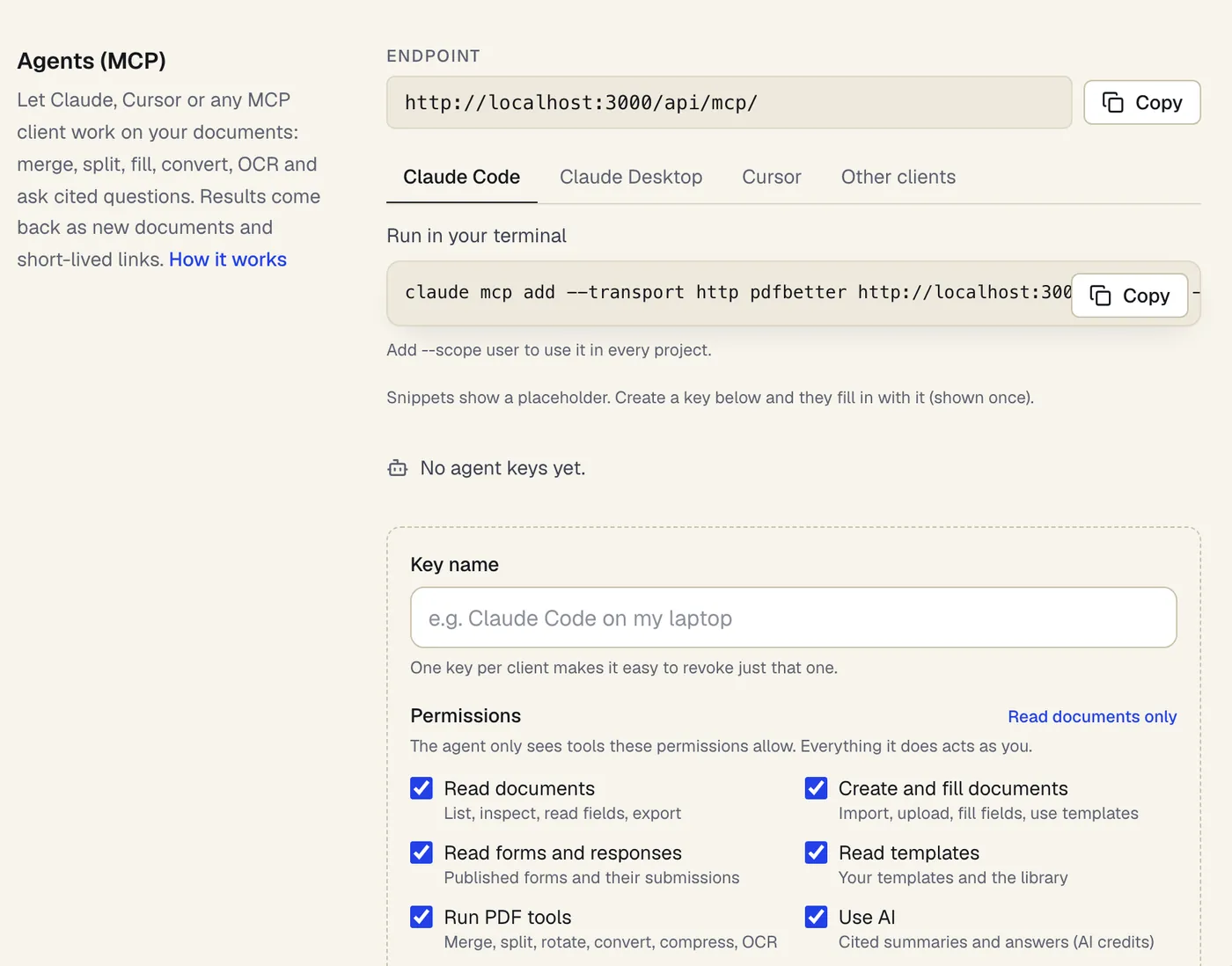
- The endpoint, ready to copy
- Copy-paste setup for each client
- Each key gets only the permissions you tick
Settings → Agents (MCP), where keys and client snippets live. Sample content; names are fictional.
Permissions and safety
Permissions and safety
Each key has permissions you choose when you create it: read documents, create and fill documents, read forms and responses, read templates, run PDF tools, use AI, read or run extractions, read or run workflows, read or manage workspaces, and read share analytics. The agent only sees and can only call the tools its key allows; a call outside them is refused.
Keys act as you, on your own documents and those shared with your team. Revoke a key in Settings and the client loses access immediately. We store only a hash of each key.
Changes to existing documents keep history: filling fields and OCR save a new revision, and page tools write new documents. Filling fields and OCR on an existing document are also recorded in its audit trail.
The endpoint refuses requests from web pages: keys belong in an MCP client or a server, never in a browser.
Pricing
Pricing
Agent access is included on every account plan, including Free. Each tool call counts one agent call; failed calls don't count.
Agent calls per month: 200 on Free, 5,000 on Pro, unlimited (fair use) on Business.
The work a call triggers uses the same allowances as doing it in the app: exported documents, server conversions (including compression), OCR pages and AI credits. A Business API key (pb_live_) also works on this endpoint.
Client configuration
Connect your MCP client
Endpoint https://pdfbetter.com/api/mcp/. Replace pb_mcp_YOUR_KEY with the agent key you create in Settings; the settings page fills it in for you.
claude mcp add --transport http pdfbetter https://pdfbetter.com/api/mcp/ --header "Authorization: Bearer pb_mcp_YOUR_KEY"Add --scope user to use it in every project.
{
  "mcpServers": {
    "pdfbetter": {
      "command": "npx",
      "args": [
        "-y",
        "mcp-remote",
        "https://pdfbetter.com/api/mcp/",
        "--header",
        "Authorization:${PDFBETTER_AUTH}"
      ],
      "env": {
        "PDFBETTER_AUTH": "Bearer pb_mcp_YOUR_KEY"
      }
    }
  }
}
Claude Desktop's custom connectors sign in with OAuth, which PDFBetter doesn't offer yet; this uses the open-source mcp-remote bridge (needs Node.js) to send your key.
{
  "mcpServers": {
    "pdfbetter": {
      "url": "https://pdfbetter.com/api/mcp/",
      "headers": {
        "Authorization": "Bearer pb_mcp_YOUR_KEY"
      }
    }
  }
}URL: https://pdfbetter.com/api/mcp/
Transport: Streamable HTTP (POST, stateless, JSON responses)
Header: Authorization: Bearer pb_mcp_YOUR_KEYKeep the trailing slash in the URL. Keys are secrets: use them from agents and servers, never in a web page.
Plans
What each plan includes
| Free | Pro | Business | |
|---|---|---|---|
| Connect AI agents (MCP) | Included | Included | Included |
| Agent (MCP) tool calls per month | 200 | 5,000 | Unlimited |
| Edited-document downloads per month | 3 | Unlimited | Unlimited |
| Office & advanced conversions per month | 10 | 500 | 2,000 |
| OCR pages per month | 20 | 1,000 | 5,000 |
| AI credits per month | 20 | 500 | 2,000 |
AI actions cost a set number of credits each; the full list is on the pricing page. Compare all plans
What it doesn't do
- An MCP server is not a scheduler or an autonomous agent: nothing runs unless your client calls a tool. For repeated steps on new documents, use workflow recipes.
- Agents act only within the key's scopes and your plan's limits. They can't send signature requests, manage webhooks, delete documents or change account settings.
- Long work (conversions, compression, OCR) returns a job id that the agent polls; it doesn't block the call until the file is ready.
- Sign-in is by key in a header. There is no OAuth sign-in yet, so clients that only support OAuth connectors need a bridge such as mcp-remote.
- Download links expire after a few minutes; the agent asks for a fresh one when needed.
- AI answers read the document's text layer. Scanned pages need OCR first, and pages beyond your plan's AI page limit are not read (the answer says which).
PDFBetter MCP server: questions people ask
Which MCP clients work with PDFBetter?
Any client that supports remote servers over Streamable HTTP with a custom Authorization header, including Claude Code and Cursor. Claude Desktop works through the open-source mcp-remote bridge until PDFBetter offers OAuth sign-in.
Does the agent change my original files?
No. Merge, split, rotate and extract pages create new documents. Filling fields and OCR save a new revision of the same document, and earlier revisions stay in its version history.
How are agent calls counted?
Every successful tool call counts one agent call against your monthly allowance; calls that fail (for example a missing permission or an invalid page range) don't. Exports, conversions, OCR pages and AI credits are counted by their own meters, exactly as in the app.
Can I limit what an agent can do?
Yes. Choose the permissions when you create the key, for example read-only access to documents. Tools outside those permissions are hidden from the agent and refused if called. Use one key per client so you can revoke them separately.
Can an agent work on a file from my computer?
Yes. The agent asks for an upload link, uploads the file to it, and then creates a document from the upload. Public files can also be imported by URL; private network addresses and redirects are refused.
Do I need to install anything?
No server to install. Claude Code and Cursor connect to the URL directly with your key in a header. Claude Desktop needs Node.js for the mcp-remote bridge, which the settings page's snippet runs with npx.
Can an agent extract invoice data or run my workflows?
Yes, if its key has the extraction or workflow permissions. It can extract fields to JSON with page evidence, run batches and exports, and start workflow runs. Review steps still wait for a person unless you allowed agent approval on that step.
Are the AI answers reliable?
Answers are drawn from the document's own text and cite pages. Each quote is checked against the text of the cited page and dropped if it isn't there; an answer with no verifiable quote is reported as not found. Check important answers against the cited pages.