
Solutions · Nonprofits and charities
PDF workflows for nonprofits and charities
Small nonprofits carry the paperwork of a larger organization with a fraction of the staff. Donation acknowledgments must go out for tax purposes, volunteers need applications, waivers and photo releases, events need registrations, and the board needs minutes approved and signed.
Reviewed
Most of the time goes to repetition at year end and before events: typing hundreds of donation receipts, chasing waivers on the morning of a volunteer day, and transcribing paper sign-in sheets into the donor database.
PDFBetter generates one receipt per donor from your donation export, publishes volunteer applications and waivers as links with signatures, and keeps minutes and board resolutions signed with a record of who signed when.
Recurring work
5 workflows, each with the tool that does it
- 01
Issue year-end donation receipts
Export donations from your CRM or accounting system, map donor, date, amount and goods-or-services columns to a receipt template, and get one named PDF per donor.
- 02
Collect volunteer applications
Publish a volunteer application with conditional questions for roles that involve minors or driving, and export responses to schedule people.
- 03
Get waivers and photo releases signed before the event
Send registrants a single form that includes the release of liability and photo consent, with a required signature, so nobody signs on a clipboard at the door.
- 04
Approve and sign board minutes
Fill the minutes template, send it to the secretary and chair for signature, and keep the completed PDF with its certificate in your records.
- 05
Assemble grant applications
Combine the narrative, budget, audited financials and letters of support in the funder's order, and compress the packet to the portal's limit.
In the app
What one of these looks like in PDFBetter
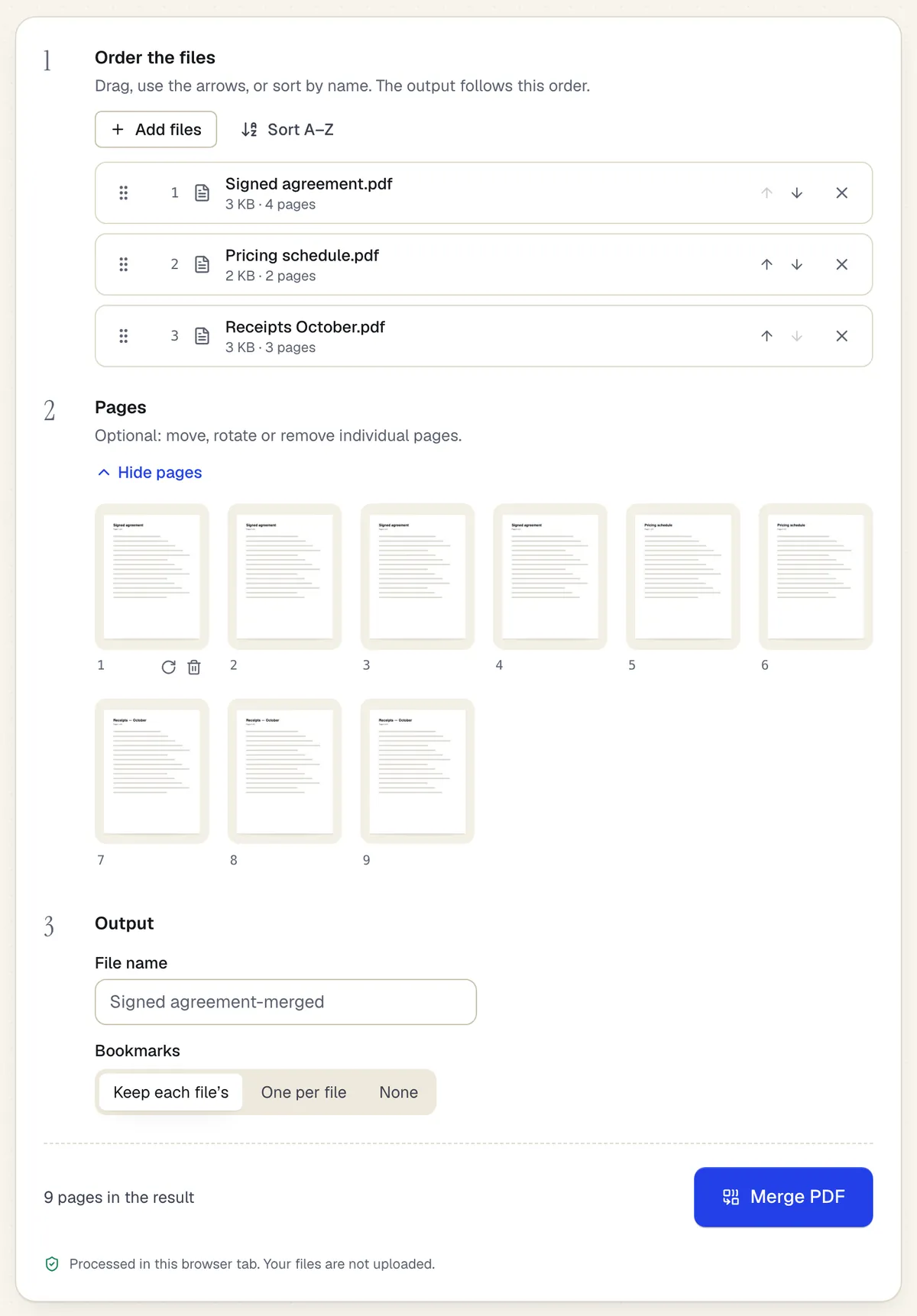
- Reorder whole files with drag or arrows
- Or move, rotate and remove single pages
- Processed in the browser tab — the files aren't uploaded
One group in the merge workspace. Sample content; names and companies are fictional.
Start from a template
Templates for nonprofits and charities
Donation receipt
18 fields · 2 pages
Fillable donation receipt for 501(c)(3) nonprofits with donor, date, cash or property gift, and the goods-or-services statement donors need for tax records.
Volunteer Application
52 fields · 2 pages
Volunteer application with interests, availability, skills, experience, references, background check consent where required, and emergency contact.
Event Registration Form
30 fields · 2 pages
Event registration form with attendee details, ticket type and quantity, auto-calculated total, dietary and accessibility needs and communication consent.
Release of Liability (Activity Waiver)
21 fields · 3 pages
Activity waiver with assumption of risk, release, medical authorization and parent signature for minors. For gyms, classes, rentals and events.
Photo and Video Release Form
23 fields · 2 pages
Photo and video release letting a photographer or organization use a person's image, with permitted uses, compensation, time limits and guardian consent.
Meeting minutes
59 fields · 2 pages
Fillable meeting minutes for boards, committees and teams: attendance, quorum, prior minutes, motions with votes, action items and the secretary's sign-off.
Event Sign-In Sheet
114 fields · 1 page
Event and meeting sign-in sheet with name, organization, email, phone and opt-in for updates. Print for the door or fill on a tablet, then export to Excel.
Vendor registration form
37 fields · 2 pages
Fillable vendor registration form: legal name, entity type, EIN, remit-to address, contacts, products, certifications, payment method and signed certification.
Good to know before you rely on it
- For a single gift of $250 or more, US donors need a written acknowledgment that states the amount and whether you provided goods or services in return (IRS Publication 1771). Quid pro quo gifts over $75 need an extra disclosure. Have your receipt wording checked.
- PDFBetter forms don't process payments or donations. Link to your payment processor and never collect card numbers on a PDF or form.
- Waiver enforceability varies by state, and releases signed for minors are treated differently. Have counsel review your release before relying on it.
- Programs serving children often require background checks and specific consents for volunteers. Your application form should match your safeguarding policy.
Nonprofits and charities: questions people ask
Is there a discount for nonprofits?
PDFBetter doesn't currently publish a nonprofit price. The Free plan includes 25 spreadsheet fill rows a month and 1 live form at no cost.
How many receipts can I generate at once?
Runs of up to 50 rows can be generated in your browser for free, and the spreadsheet and PDFs never leave your device. Larger runs are generated on PDFBetter's servers and count toward your monthly spreadsheet fill rows: 25 on Free, 500 on Pro and 5,000 on Business.
Can volunteers sign a waiver on their phone?
Yes. Published forms include signature fields and work in any mobile browser without an account.
Can the board chair sign remotely?
Yes. Send a signature request; the chair signs from an email link and everyone gets the completed PDF and a certificate of completion.