
Solutions · Landlords and property managers
PDF workflows for landlords and property managers
Property management paperwork repeats on a cycle. Every vacancy brings rental applications and screening consents, every new tenant a lease and a move-in inspection, every month rent receipts and maintenance work orders, and every move-out a notice, an inspection and a security deposit accounting.
Reviewed

Most of that time is spent re-typing. Applicants send photos of paper applications, the same unit details get typed into a new lease for each tenant, and move-in checklists end up as phone photos nobody can find when the deposit is disputed a year later.
PDFBetter lets you publish an application as a fillable form with a link or QR code for the yard sign, keep your lease as a reusable template, send it to every adult on the lease for signature, and generate a batch of receipts or notices from a spreadsheet of tenants.
Recurring work
5 workflows, each with the tool that does it
- 01
Take rental applications by link or QR code
Publish your application as an online form, put the QR code on the listing or the window, and export responses to a spreadsheet to compare applicants. Applicants don't need an account.
- 02
Send leases to every adult occupant
Save your lease as a template with fields for rent, dates and unit, fill it for the new tenancy, and route it to each tenant and then to you. The completed lease comes back with a certificate of completion.
- 03
Document move-in and move-out condition
Fill the inspection checklist on site, add the room photos as pages, and have the tenant sign. The same file is your evidence when the deposit is settled.
- 04
Generate receipts or notices for a whole building
Map columns from your rent roll (tenant, unit, amount, date) to a receipt or notice template and get one PDF per row, named by unit and tenant.
- 05
Handle vendor paperwork
Collect W-9s and insurance certificates from contractors, keep work orders signed on completion, and black out bank details before forwarding invoices to owners.
In the app
What one of these looks like in PDFBetter
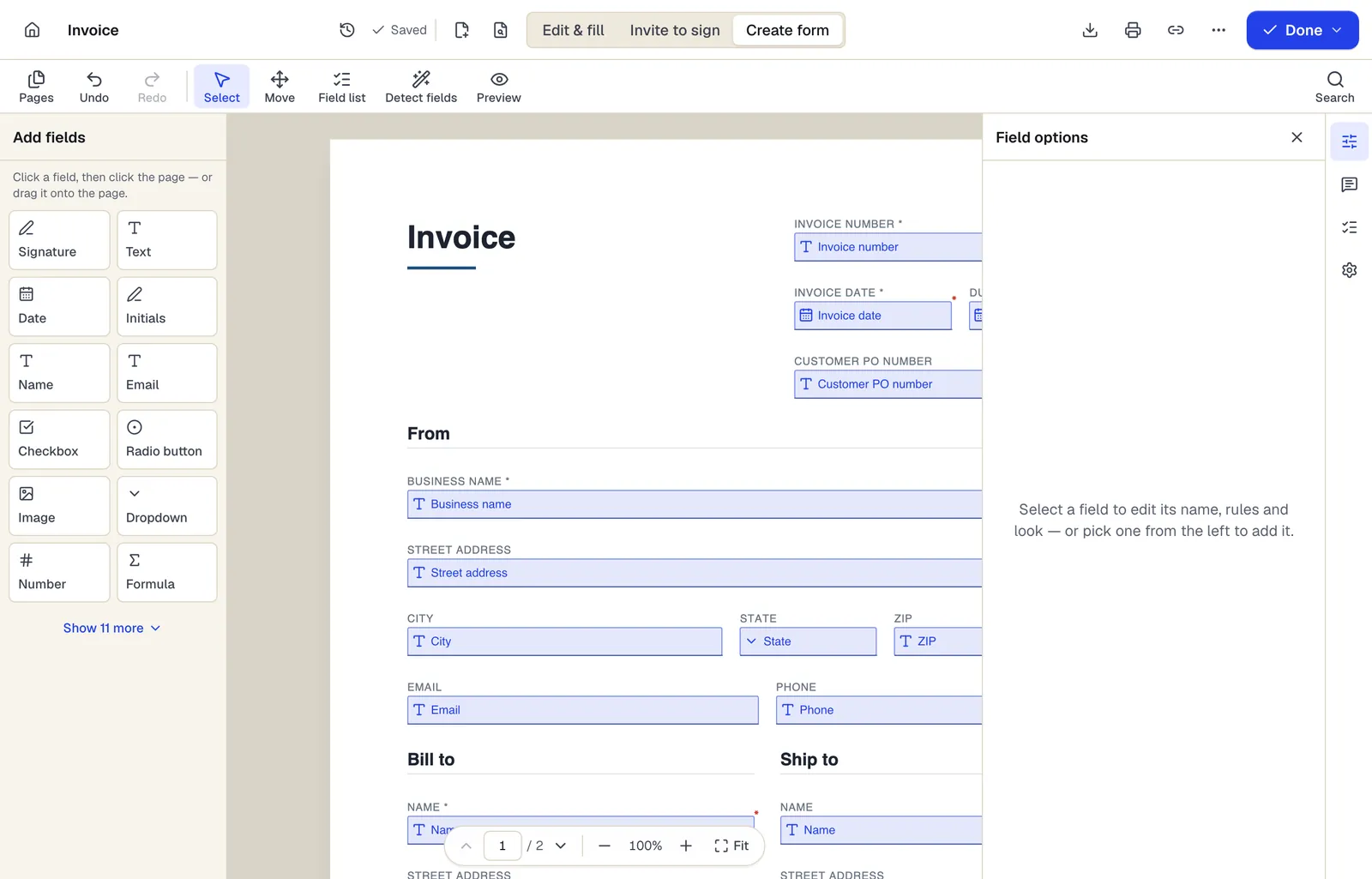
- Pick a field type, then click the page — or drag it
- Detect fields finds the boxes and lines on a flat PDF
- Every field keeps a label, a name and its own rules
The editor in Create form mode. Sample content; names and companies are fictional.
Start from a template
Templates for landlords and property managers
Rental Application
65 fields · 3 pages
Rental application covering applicant details, rental history, employment, income, occupants, pets and screening consent. Share it as a fillable form.
Residential Lease Agreement
43 fields · 4 pages
Fixed-term residential lease with rent, deposit, utilities, maintenance, pets, entry and renewal clauses. Add your state's required addenda before signing.
Month-to-Month Rental Agreement
32 fields · 3 pages
Periodic rental agreement that renews monthly until either side gives notice. Covers rent, deposit, utilities, rules and notice to end the tenancy.
Move-In / Move-Out Checklist
79 fields · 2 pages
Room-by-room rental inspection checklist recording condition at move-in and move-out, with notes, meter readings, keys and signatures from both parties.
Notice to Vacate
19 fields · 2 pages
Written notice ending a periodic tenancy or confirming move-out at lease end, usable by tenant or landlord. Not an eviction or pay-or-quit notice.
Rent receipt
20 fields · 1 page
Fillable rent receipt with property, rental period, rent due, late fees, other charges, amount paid and balance. Landlord signs; tenant keeps proof of payment.
Work order
70 fields · 2 pages
Fillable work order with request details, priority, assigned technician, work performed, labor and parts tables, completion status and customer sign-off.
Vendor registration form
37 fields · 2 pages
Fillable vendor registration form: legal name, entity type, EIN, remit-to address, contacts, products, certifications, payment method and signed certification.
Official forms
Forms you'll file
Opened from the issuing agency, so you get the current revision.
Good to know before you rely on it
- Landlord-tenant law is state and often city specific: required lease disclosures, security deposit limits, notice periods and fee caps differ widely. Have a local attorney or your state's landlord association review your lease template; PDFBetter's templates are starting points, not state-specific leases.
- Rental applications must follow fair housing law, and some cities limit questions about criminal history or source of income. Review every question on an application form before you publish it.
- Applications collect sensitive data such as Social Security numbers and income. Ask only for what your screening process needs, delete responses you no longer need, and redact numbers before sharing applications with owners.
- Federal lead-based paint disclosure applies to most housing built before 1978. Attach the required disclosure pamphlet and form to the lease packet.
Landlords and property managers: questions people ask
Do applicants need an account to apply?
No. A published form opens in any browser from its link or QR code, and submissions include a bot check.
How many applications can I collect?
The Free plan includes 1 live form and 50 responses a month, Pro 10 live forms and 1,000 responses, and Business unlimited live forms and 10,000 responses. Several listings open at once need one live form each, or one form with a unit dropdown.
Can co-tenants sign the same lease separately?
Yes. Add each adult as a recipient with their own signature fields, and choose whether they sign in order or all at once.
Can I reuse my lease for every unit?
Save it as a template. Each new lease starts from a copy with your clauses intact, and you only fill the tenancy details.
Can I charge the application fee through the form?
No. PDFBetter forms don't process payments. Link applicants to your payment processor or screening service, and never ask for a full card number on the form.