
Solutions · HR teams and people operations
PDF workflows for HR and people operations
HR paperwork follows the employee lifecycle, and the same packet repeats for every hire: a job application, an offer letter, tax and eligibility forms, direct deposit and emergency contact details, policy acknowledgments, and later PTO requests, reviews and, eventually, separation documents.
Reviewed

Time goes into assembling packets by hand, chasing one missing acknowledgment before a start date, re-typing the same name and address into five forms, and digging through email when someone asks whether an employee signed last year's handbook update.
PDFBetter turns your offer letter and onboarding documents into reusable templates, prefills them from a spreadsheet of new hires, collects signatures with a completion certificate, and publishes forms such as job applications and PTO requests as links your team can open on a phone.
Recurring work
6 workflows, each with the tool that does it
- 01
Take job applications by link
Publish an application form with required fields and conditional questions, share the link on job boards, and export responses to compare candidates.
- 02
Send offer letters for signature
Fill the offer template with title, pay and start date, then route it to the candidate and the hiring manager. The completed letter returns with a certificate of completion.
- 03
Prefill onboarding packets for a hiring class
Map a spreadsheet of new hires (name, title, manager, start date) to your onboarding checklist and acknowledgment forms, and get one named PDF per person.
- 04
Complete official forms
Open the current W-4 or I-9 directly from the issuing agency, fill it on screen, and sign or print according to your process.
- 05
Handle requests and reviews
Give employees a PTO request form link, and use review templates with manager and employee signature fields so both acknowledgments are recorded.
- 06
Protect personnel data when sharing
Redact Social Security numbers and bank details before forwarding documents to payroll or benefits vendors, and use password-protected links instead of attachments.
In the app
What one of these looks like in PDFBetter
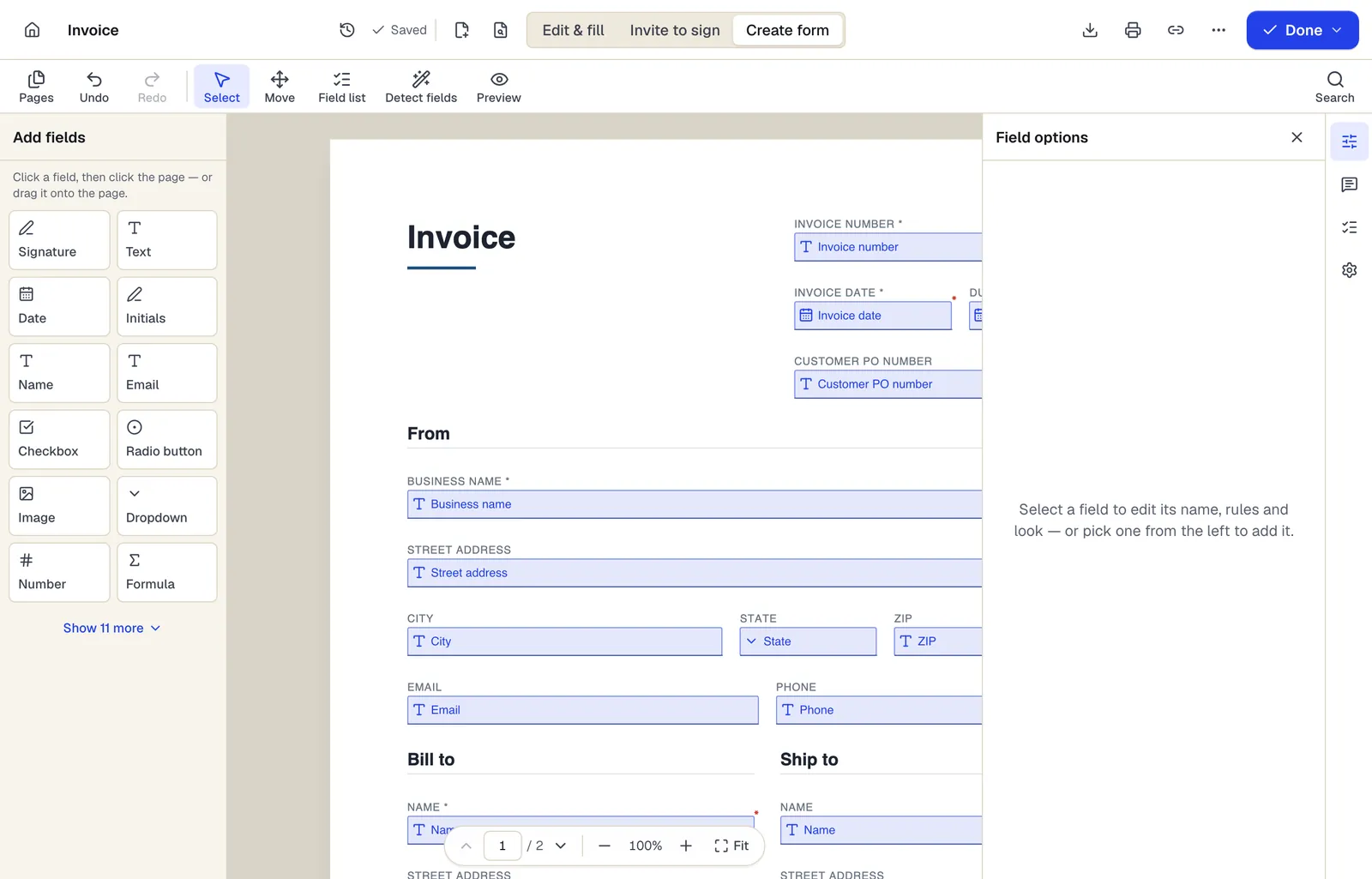
- Pick a field type, then click the page — or drag it
- Detect fields finds the boxes and lines on a flat PDF
- Every field keeps a label, a name and its own rules
The editor in Create form mode. Sample content; names and companies are fictional.
Start from a template
Templates for hr teams and people operations
Job Application Form
69 fields · 2 pages
General employment application with position, availability, work history, education, references and applicant certification. No protected-trait questions.
Job Offer Letter
31 fields · 2 pages
Employment offer letter with title, manager, start date, pay, exemption status, benefits, contingencies and at-will statement. Candidate signs to accept.
Employee Onboarding Checklist
34 fields · 2 pages
New-hire onboarding checklist covering paperwork, IT access, workspace, training and 30/60/90-day check-ins, with sign-off by manager and new employee.
PTO Request Form
22 fields · 2 pages
Paid time off request form with leave type, dates, hours requested, coverage plan and manager approval. Calculates total hours from days and hours per day.
Employee Performance Review
31 fields · 3 pages
Employee performance review with self-assessment, ratings on six competencies, goal results, development plan, overall rating and both signatures.
Employment Termination Letter
21 fields · 2 pages
Termination letter stating the separation date, final pay, benefits continuation, return of property and next steps. Neutral wording, ready to sign.
Independent Contractor Agreement
32 fields · 3 pages
Contractor agreement covering scope, rates, invoicing, taxes, IP ownership, confidentiality and termination. Fill online and collect both signatures.
Mutual Non-Disclosure Agreement (NDA)
24 fields · 3 pages
Two-way non-disclosure agreement for partnership talks, vendor reviews or deals. Set the purpose, term and governing state, then sign online.
Official forms
Forms you'll file
Opened from the issuing agency, so you get the current revision.
Good to know before you rely on it
- Form I-9 has its own rules for electronic completion, signatures and storage (8 CFR 274a.2), and the employer must physically or remotely examine documents under USCIS procedures. Filling the PDF on screen is fine; make sure your signing and retention process meets those rules. Keep each I-9 for 3 years after hire or 1 year after employment ends, whichever is later.
- Many states and cities restrict questions on job applications, such as salary history or criminal history before an offer. Review your application form for each location you hire in.
- Offer and termination letters can create contractual or legal exposure. Have employment counsel review templates; PDFBetter is not a law firm.
- Personnel, medical and I-9 records are usually kept in separate files with different access rules. Store completed documents in your HRIS or personnel files, not only in PDFBetter.
HR teams and people operations: questions people ask
Can new hires sign before their first day?
Yes. Signers get an email link that works on a phone or computer with no account. You'll see who has signed and can send reminders.
Is the W-4 the current version?
Official forms are fetched from the IRS website rather than re-hosted as old copies. If you need to be certain, check the revision date printed in the form's corner.
Can I send the same handbook acknowledgment to every employee at once?
Bulk send is included in the Business plan. On Pro, send individual requests or prefill copies from a spreadsheet.
Can managers on my team share templates?
Shared team workspaces with roles are part of the Business plan. On Pro, templates belong to one account.
Should employees email me a photo of their ID for the I-9?
Follow USCIS's examination procedures instead. Collecting identity document images by email creates data you then have to protect.