
Online form builder
Turn a document into a live form people fill out from a link, QR code or your website, and collect every response in one place.
Drop a file hereLet go to start
or paste with Ctrl/⌘+V
Start without an account. A free account includes 50 form responses a month. See plans
What it does
Online form builder, explained
An online form builder lets you place fields on a document, set rules for what people can enter, and publish it so respondents fill it out from a link — and you collect their answers as data. PDFBetter builds forms on top of your own document (PDF, Word file or a photo of a paper form) or a blank page, so the published form looks exactly like the paper version people already know.
Read more
There are 23 field types: text, name, email, number, date, signature, initials, checkbox, radio, dropdown, image, formula, USD and EUR currency, title, company, US ZIP, US phone, EIN, SSN, age, gender and US state. Each field can be required or read-only, carry help text and a placeholder, and enforce limits such as minimum and maximum, maximum length or a custom pattern. A preview mode shows exactly what respondents will see, in the tab order you set.
Branching and math are built in. Conditional rules show a field only when other answers match (“Show ‘Allergy details’ when ‘Any allergies?’ is Yes”); hidden fields never block submission. Formula fields calculate from other fields with sum, avg, min, max, round, if and basic arithmetic, so an order form totals itself. Publishing gives you a link, a QR code and an embed code; settings cover requiring an email, notifying you on each response, a response cap, a closing date, a confirmation message or redirect, and whether respondents may download their filled copy.
Responses are listed per form and export to CSV or Excel. Each publish is an edition: if you change a live form, earlier responses stay attached to the edition they were submitted against. If you only need a fillable PDF to email around, Create fillable PDF is simpler; to complete a form yourself, use Fill PDF. A free account includes 1 live form and 50 responses a month; Pro includes 10 live forms and 1,000 responses.
In the app
What it looks like
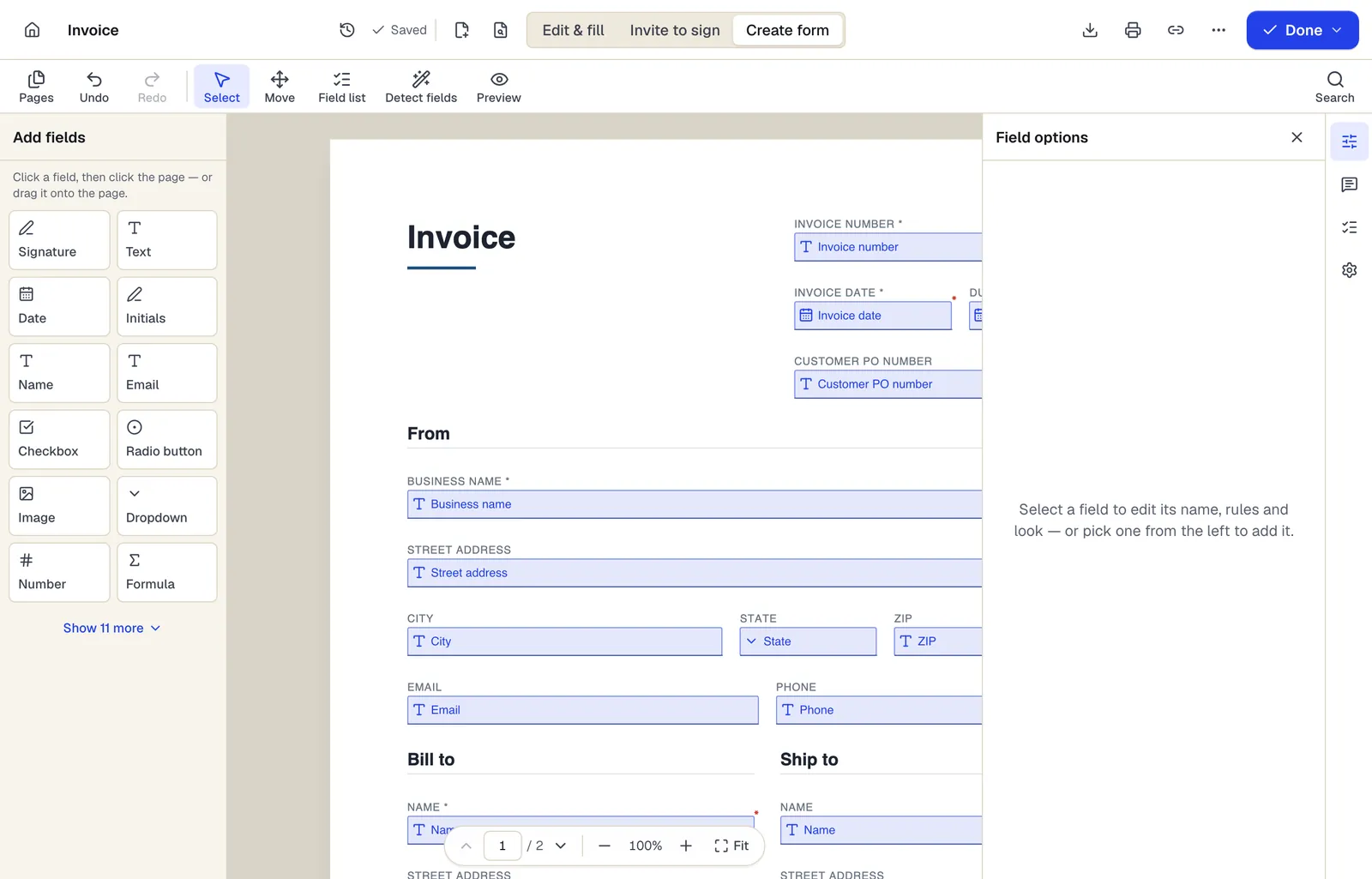
- Pick a field type, then click the page — or drag it
- Detect fields finds the boxes and lines on a flat PDF
- Every field keeps a label, a name and its own rules
The editor in Create form mode. Sample content; names and companies are fictional.
How to do it
Online form builder in 5 steps
1A flat PDF
2Place fields
3A fillable PDF
- 1
Start from a document or blank page
Upload a PDF, Word file or photo of a paper form, or start blank in the editor. Word files and images are converted to PDF first.
- 2
Add fields
Drag fields from the panel onto the page, or use auto-detect to propose fields and review them.
- 3
Set rules
Mark required fields, add validation, conditional visibility and formulas; set the tab order.
- 4
Preview
Fill the form yourself in preview to check rules, totals and order.
- 5
Publish and collect
Publish to get a link, QR code and embed code; watch responses arrive and export them to CSV or Excel.
Example
Before and after
A paper new-patient intake form for a small dental clinic, photographed with a phone and saved as JPG.
A published form with 31 fields: name, date of birth, US phone and email with validation, insurance details shown only when “Do you have dental insurance?” is Yes, a medical-history checkbox list, and a patient signature. The clinic posts the QR code at reception and exports responses to Excel weekly.
Settings & formats
What you can control
- Field types
- 23 kinds, from text and checkboxes to formulas, currency and US-specific formats like ZIP, EIN and SSN.
- Validation
- Required, read-only, min/max, max length, and custom patterns.
- Conditional logic
- Show a field when all or any rules match: equals, contains, is empty, greater than, checked and more.
- Formulas
- Calculated fields using other field names, e.g. qty * price, with sum, round and if.
- Publishing
- Link, QR code and embed code; response cap, closing date, email requirement, notifications and confirmation message.
Input
Output
Good to know before you start
- Conditional logic and formulas run in PDFBetter's form and signing pages. If you download the form as a fillable PDF, the fields remain but other PDF readers will not evaluate the rules.
- Format presets (ZIP, phone, EIN, SSN, state) follow US conventions; for other countries use text fields with your own pattern.
- Word files and images are converted to PDF before building; Word conversion uses one of your monthly Office conversions.
- Live forms and monthly responses are limited by plan: 1 form and 50 responses on Free, 10 forms and 1,000 responses on Pro.
If something goes wrong
If something goes wrong
- A respondent says the form will not submit.
- A required field is empty or fails validation. Preview the form, fill it like a respondent, and check each error message; relax the pattern if it is too strict.
- My formula field shows an error.
- Check that every field name in the formula exists and is spelled exactly as its database name, and that two formulas do not depend on each other in a loop.
Online form builder: questions people ask
Do respondents need an account?
No. Anyone with the link or QR code can fill and submit the form in a browser.
Where do the responses go?
Each response is saved to the form's response list in your account, and you can export all responses to CSV or Excel. You can also get an email for each new response.
What happens to responses if I edit a live form?
Republishing creates a new edition. Earlier responses stay linked to the edition they were submitted on, so their data is not mixed up.
Can I put the form on my website?
Yes. Copy the embed code from the publish dialog and paste it into your page, or link to the form directly.
Can respondents sign the form?
Yes. Add a signature field, or turn on the require-signature setting, and respondents sign in the browser before submitting.
Will my conditional fields work if someone opens the PDF in Acrobat?
No. Conditional rules and formulas are evaluated in PDFBetter's online form. A downloaded fillable PDF keeps all fields visible and static.
How is this different from Create fillable PDF?
Create fillable PDF gives you a PDF file with fields to download and send. Form builder publishes the form online and collects responses as data.