
Solutions · Real estate agents and brokers
PDF workflows for real estate agents and brokers
A single residential deal produces dozens of PDFs: the listing agreement, seller disclosures, the purchase contract and its counteroffers, addenda, inspection responses and the closing packet your broker files for compliance. Most of these arrive as forms from your state association or MLS, and most need at least two signatures from people who are rarely in the same room.
Reviewed

Time is lost in the gaps. A counteroffer goes out with one initial missing. A seller signs page 4 but not page 9. The broker's compliance reviewer sends the file back because the inspection addendum is a phone photo turned sideways. Each of these costs a day when the contract timeline is measured in days.
PDFBetter is built for that kind of work: fill the form you already have, place signature and initial fields for each party, send it in signing order, and assemble the final file in the order your brokerage wants. It does not replace your transaction management system or your association's forms library; it handles the PDFs those systems hand you.
Recurring work
5 workflows, each with the tool that does it
- 01
Fill association and MLS forms
Open the PDF your association or forms library exports, type into its existing fields, and add text where the form has no field. Fill PDF keeps the original fields so the file still works in other software.
- 02
Collect buyer and seller signatures in order
Assign signature, initial and date fields to each party, set the routing (buyers, then sellers, then both agents), and send. Each signer gets a link, and the completed PDF comes back with a certificate of completion listing every event.
- 03
Turn counteroffer changes into a clean redline
When the other side sends a revised counteroffer, compare it with your last version to see every changed word before you advise your client.
- 04
Build the compliance file
Combine the contract, disclosures, addenda and photographed inspection pages into one PDF in your brokerage's checklist order, straighten phone scans, and shrink the file below your system's upload limit.
- 05
Share disclosures without emailing attachments
Send a view-only link to a disclosure package with an expiry date and a list of allowed email addresses, and see when it was opened.
In the app
What one of these looks like in PDFBetter
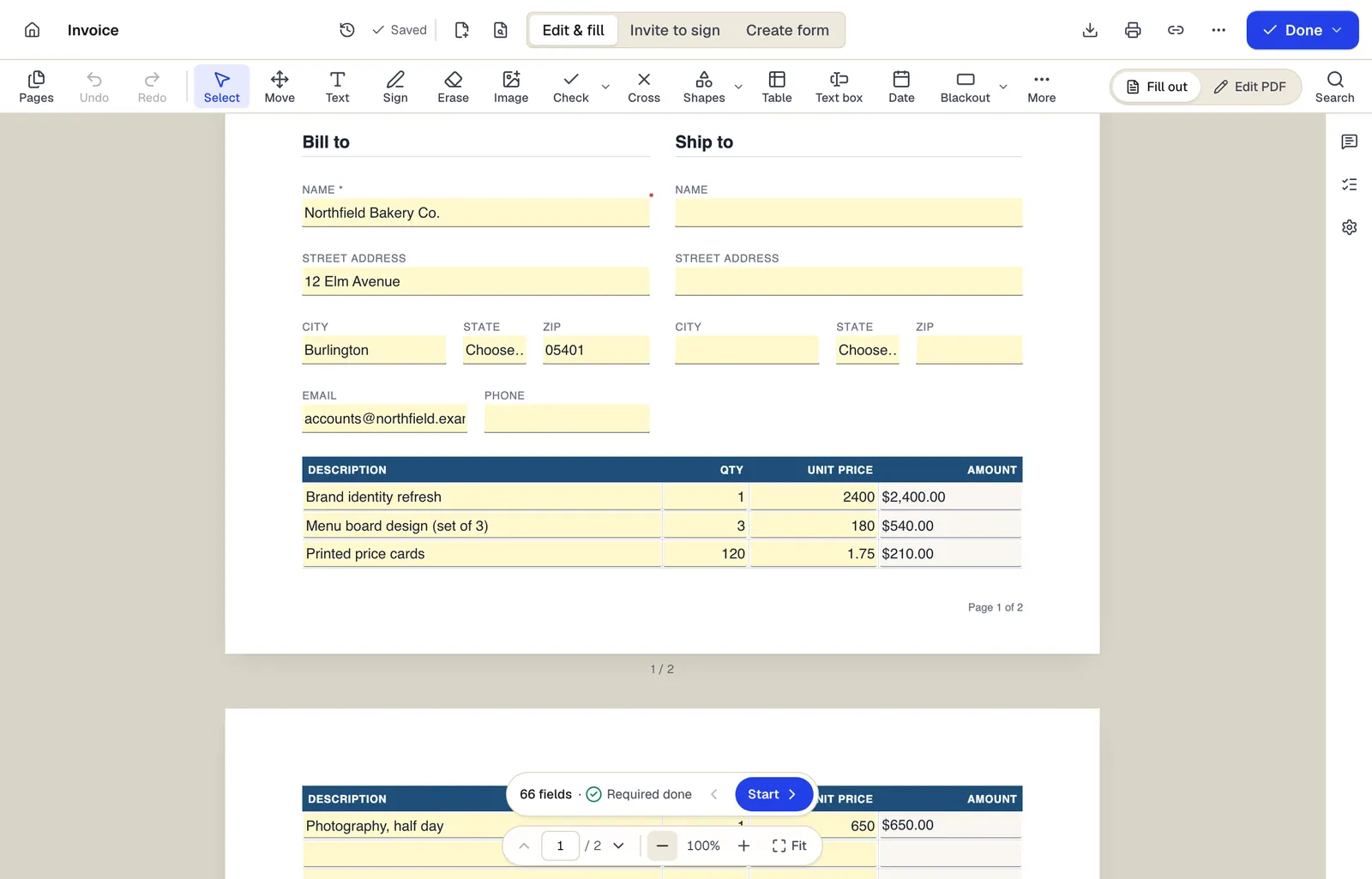
- Edit & fill, Invite to sign and Create form are three modes of the same editor
- Amounts are formula fields: they calculate as you type
- The field navigator counts what's left and jumps to the next field
The editor in Edit & fill mode on an invoice template. Sample content; names and companies are fictional.
Start from a template
Templates for real estate agents and brokers
Rental Application
65 fields · 3 pages
Rental application covering applicant details, rental history, employment, income, occupants, pets and screening consent. Share it as a fillable form.
Residential Lease Agreement
43 fields · 4 pages
Fixed-term residential lease with rent, deposit, utilities, maintenance, pets, entry and renewal clauses. Add your state's required addenda before signing.
Independent Contractor Agreement
32 fields · 3 pages
Contractor agreement covering scope, rates, invoicing, taxes, IP ownership, confidentiality and termination. Fill online and collect both signatures.
W-9 request letter
15 fields · 2 pages
Fillable cover letter asking a vendor or contractor to return IRS Form W-9, with deadline, secure return method and a link to the official form on irs.gov.
Customer intake form
24 fields · 1 page
Fillable new-client intake form for service businesses: contact details, services wanted, project goals, budget, timeline, referral source and contact consent.
General Affidavit
25 fields · 2 pages
General affidavit for sworn statements of fact, with numbered statements, affiant details, oath language and a notary jurat section.
Official forms
Forms you'll file
Opened from the issuing agency, so you get the current revision.
Good to know before you rely on it
- Purchase contracts, disclosures and listing agreements are usually your state association's copyrighted forms. Fill the versions you are licensed to use rather than recreating them; PDFBetter does not provide state real estate contract forms.
- E-signatures are generally valid for real estate contracts under the US ESIGN Act and state UETA laws, but deeds, mortgages and other documents that get recorded often need notarization or wet ink at the county. PDFBetter does not offer remote online notarization.
- Disclosure requirements and their deadlines vary by state and sometimes by county. Check your state's rules and your brokerage's policy; PDFBetter is not a law firm.
- State license law sets how long brokers keep transaction files, commonly several years after closing. Download completed files and the certificate of completion into your brokerage's system of record instead of relying on any single app.
Real estate agents and brokers: questions people ask
Can I fill the forms my association gives me?
Yes, if they are PDFs. Open the file, type into its existing fields, and add text or checkmarks where the form has none. Forms locked with a permissions password may need to be unlocked first, and only if you're allowed to.
Can buyers sign on their phones?
Yes. The signing page is built for phones: signers review the document, agree to sign electronically, then tap through their assigned fields. No app or account is needed.
How do I make sure nobody misses an initial?
Mark each signature and initial field as required. A signer can't finish until every required field assigned to them is complete.
Can my broker see who signed what and when?
Every completed request comes with a certificate of completion that lists signers, emails, timestamps, document hashes and each signer's device-key fingerprint. The signed PDF and certificate are digitally sealed and time-stamped, so a later change shows in PDF readers. Add both to the transaction file.
Will the combined compliance file be too big to upload?
Packets with phone photos often are. Run Compress PDF on the assembled file; text and form fields stay sharp while photos are re-encoded.