
Solutions · Schools and universities
PDF workflows for K-12 schools and universities
Schools run on seasonal paperwork. Enrollment and re-enrollment each spring, emergency contact and medical forms every fall, permission slips before every field trip, volunteer applications, event registrations, and certificates at the end of every course or program.
Reviewed

The cost is in collection, not creation. Paper slips come back crumpled or not at all, office staff type responses into spreadsheets, and a teacher spends an evening typing names onto fifty certificates. Universities add department forms that circulate for three signatures and get lost on the second.
PDFBetter publishes a form as a link or QR code parents can fill on a phone, exports the responses to a spreadsheet, routes forms through several signers in order, and generates certificates or letters from a roster in one run.
Recurring work
5 workflows, each with the tool that does it
- 01
Collect permission slips by link or QR code
Publish the permission slip as a form, send the link in the class newsletter or print the QR code, and see who has responded. Export the list for the trip roster.
- 02
Run enrollment and re-enrollment
Use conditional questions so families only see sections that apply, such as transportation or prior school records, and export responses for your student information system.
- 03
Generate certificates from a roster
Map a spreadsheet of names, courses and dates to a certificate template and download one PDF per student, or one combined file for printing.
- 04
Route department forms for approval
Send a form through an advisor, a department chair and a registrar in order, each with their own signature field, and keep the certificate of completion.
- 05
Translate and summarize for families
Produce a translated copy of a notice for families who read another language, and review the translation with a fluent speaker before sending.
In the app
What one of these looks like in PDFBetter
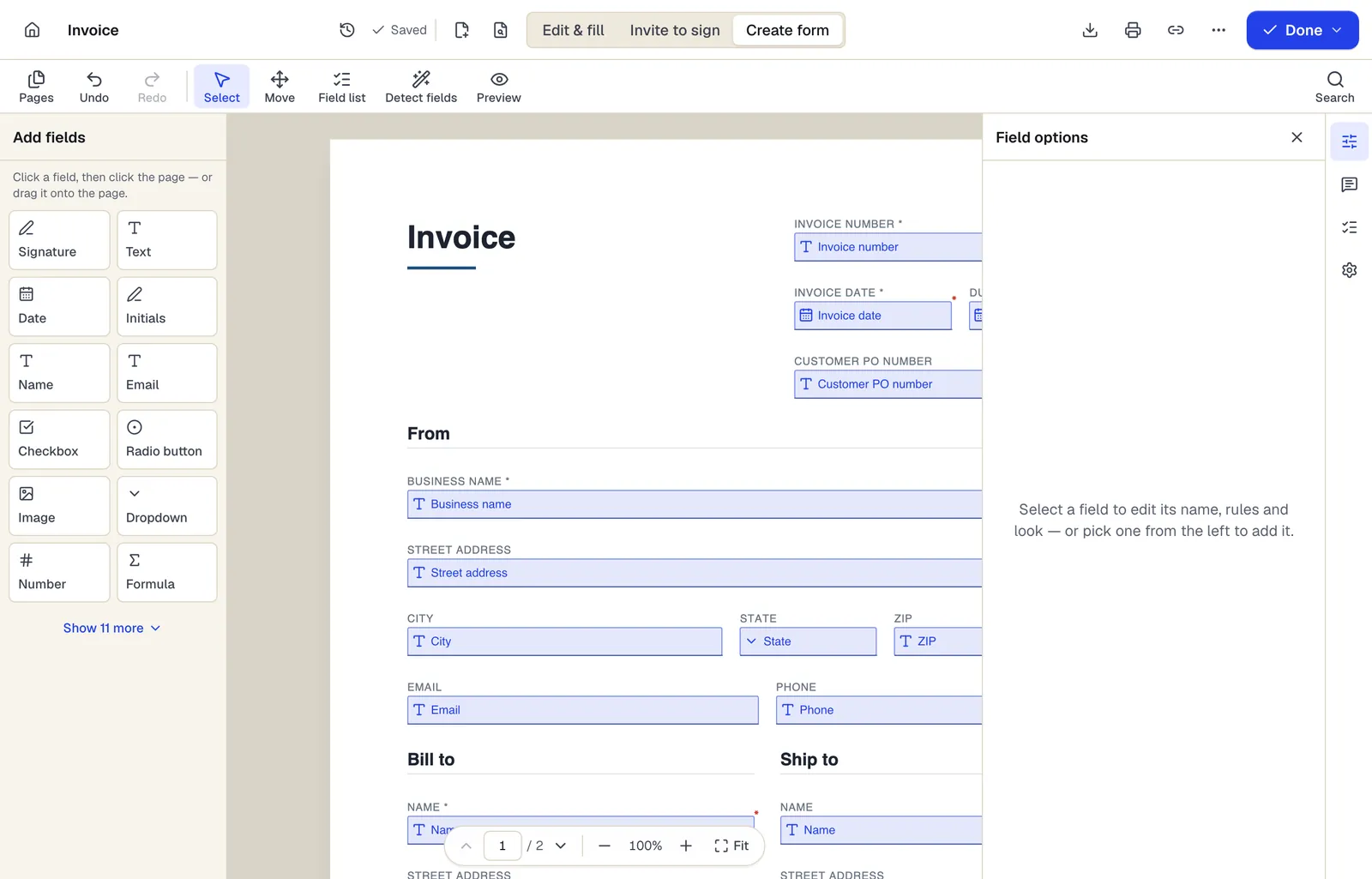
- Pick a field type, then click the page — or drag it
- Detect fields finds the boxes and lines on a flat PDF
- Every field keeps a label, a name and its own rules
The editor in Create form mode. Sample content; names and companies are fictional.
Start from a template
Templates for schools and universities
Permission Slip
17 fields · 1 page
Short permission slip for on-site school, club or after-school activities: activity details, cost, yes/no permission and parent signature with tear-off.
School Enrollment Form
47 fields · 2 pages
Student enrollment form for private schools, charters and programs: student info, guardians, previous school, health, special services and pickup permissions.
Event Registration Form
30 fields · 2 pages
Event registration form with attendee details, ticket type and quantity, auto-calculated total, dietary and accessibility needs and communication consent.
Volunteer Application
52 fields · 2 pages
Volunteer application with interests, availability, skills, experience, references, background check consent where required, and emergency contact.
Photo and Video Release Form
23 fields · 2 pages
Photo and video release letting a photographer or organization use a person's image, with permitted uses, compensation, time limits and guardian consent.
Certificate of completion
12 fields · 1 page
Fillable certificate of completion for courses, workshops and training: recipient, program, date, hours or credits, certificate number and two signatures.
Event Sign-In Sheet
114 fields · 1 page
Event and meeting sign-in sheet with name, organization, email, phone and opt-in for updates. Print for the door or fill on a tablet, then export to Excel.
Medical History Form
86 fields · 2 pages
Detailed personal and family medical history form: conditions, surgeries, hospitalizations, medications, immunizations, lifestyle and family history.
Good to know before you rely on it
- Forms that collect education records are covered by FERPA, and many districts require a signed data privacy agreement before staff use a new online service. Check with your district's technology or privacy office first.
- For children under 13, have parents or guardians complete forms. Children's privacy laws (COPPA in the US, plus state laws) limit collecting personal data directly from young children.
- Collect only the medical and emergency information the activity needs, and delete form responses after the event or school year according to your records schedule.
- Not every family can fill a PDF or web form on a phone. Keep a printed version available, and check that published forms work with screen readers for families who rely on them.
Schools and universities: questions people ask
Can parents sign a permission slip on their phone?
Yes. A published form includes a signature field that works with a finger or mouse, and parents don't need an account.
How many responses can a school collect?
Form responses are 50 a month on Free, 1,000 on Pro and 10,000 on Business. A form sent to a whole school will usually need Pro or Business.
Can I make 300 certificates at once?
Yes. Fill PDF from Excel creates one certificate per spreadsheet row and names each file from columns you choose, such as {Last}-{First}.
Can several teachers manage the same form?
Shared team workspaces are part of the Business plan. Otherwise, one account owns the form and shares the exported responses.