
Solutions · CPAs, bookkeepers and tax preparers
PDF workflows for CPAs, bookkeepers and tax preparers
Accounting work arrives as PDFs from every direction: client organizers and engagement letters at the start of the season, W-9s from vendors, bank and brokerage statements, scanned receipts, and IRS notices that need a response by a date printed on page one.
Reviewed

Tax season time is lost to chasing and cleanup. A client sends a phone photo of a 1099 that can't be read, an engagement letter waits unsigned for three weeks, statements arrive as image-only scans that can't be searched, and an SSN has to be blacked out by hand before a file goes to a colleague.
PDFBetter sends engagement letters and authorizations for signature with reminders, collects client information by form link, makes scanned statements searchable, pulls tables out of PDFs into Excel, and applies true redaction to identifiers before anything is shared.
Recurring work
6 workflows, each with the tool that does it
- 01
Get engagement letters signed before work starts
Keep your engagement letter as a template, fill client and fee details, and send with automatic reminders. The completed letter comes back with a certificate of completion for your file.
- 02
Collect W-9s and client organizers
Send vendors the current W-9 from the IRS to fill and sign, or publish your client organizer as a form and export answers to a spreadsheet.
- 03
Turn statements into spreadsheets
Run OCR on scanned bank statements, then extract the transaction tables into Excel or CSV for reconciliation. Check totals against the statement.
- 04
Redact identifiers before sharing
Search for SSNs, EINs and account numbers and apply redaction so they are removed from the file before it goes to a reviewer or third party.
- 05
Prepare 1099 information for many payees
Fill payer copies or payee statements from your vendor spreadsheet, one PDF per recipient, named by vendor.
- 06
Deliver returns securely
Protect the final return with a password, or share it with an expiring link limited to the client's email, and see when it was opened.
In the app
What one of these looks like in PDFBetter
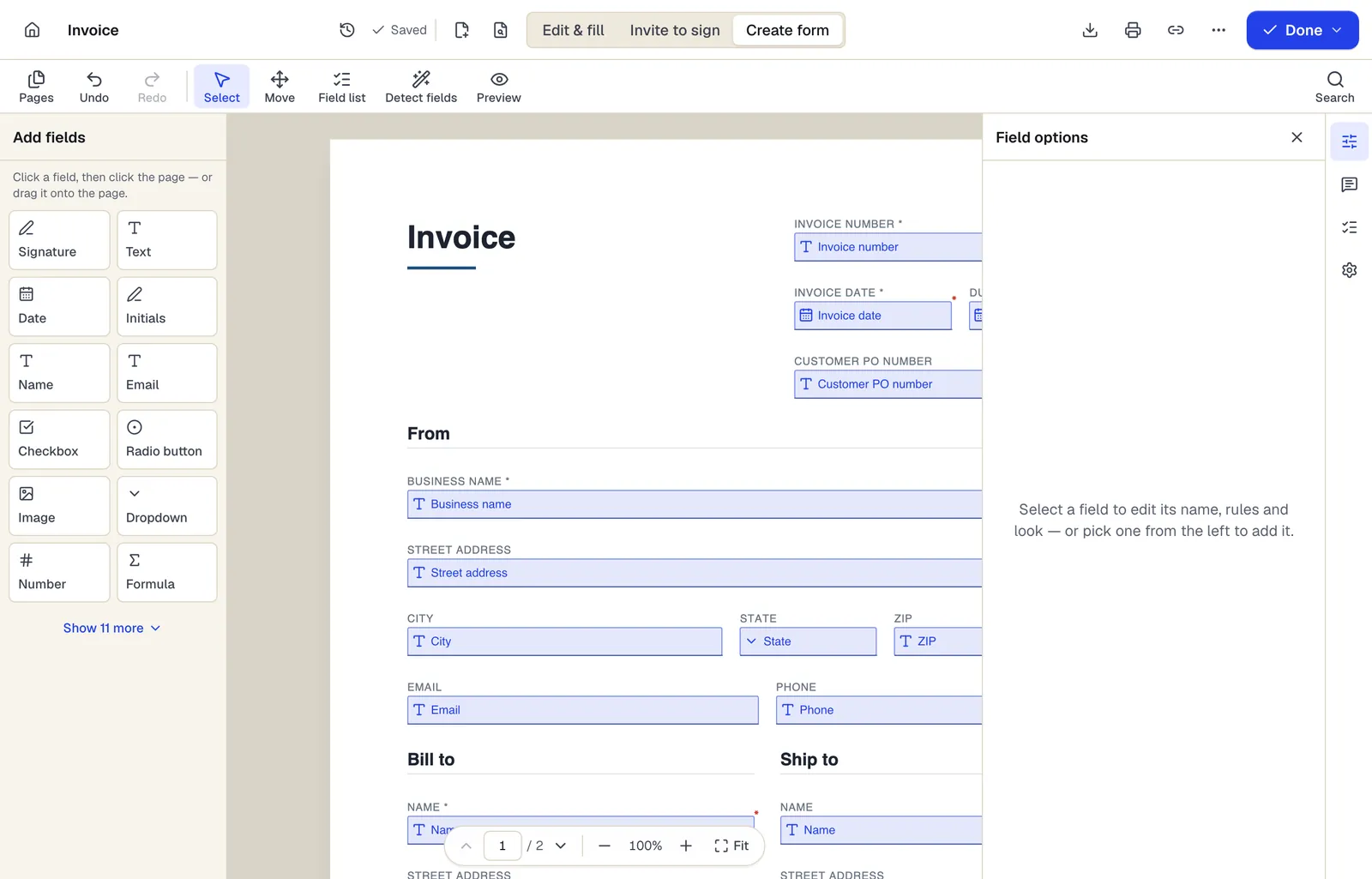
- Pick a field type, then click the page — or drag it
- Detect fields finds the boxes and lines on a flat PDF
- Every field keeps a label, a name and its own rules
The editor in Create form mode. Sample content; names and companies are fictional.
Start from a template
Templates for cpas, bookkeepers and tax preparers
Invoice
82 fields · 2 pages
A clean, fillable invoice with bill-to and ship-to, 12 line items, discount, sales tax and balance due that calculate as you type. Fill, sign and send free.
Consulting invoice
97 fields · 2 pages
Fillable consulting invoice with billing period, engagement reference, per-consultant hours and rates, and a retainer credit. Totals calculate automatically.
Service Agreement
31 fields · 3 pages
Plain-English service agreement with scope, fees, payment terms, termination and signature lines. Fill it online, then sign or send it for signature.
Consulting Agreement
32 fields · 3 pages
Consulting agreement for advisory work billed hourly or on retainer, with expenses, conflicts, confidentiality and ownership terms. Fill and sign online.
Profit and loss statement
38 fields · 2 pages
Fillable profit and loss statement for small businesses: revenue, cost of goods sold, gross profit, 14 operating expense lines, other income and net income.
Expense report
107 fields · 2 pages
Fillable expense report with date, vendor, purpose, category and amount per line, cash advance credit and the amount owed to the employee. Sign and submit.
W-9 request letter
15 fields · 2 pages
Fillable cover letter asking a vendor or contractor to return IRS Form W-9, with deadline, secure return method and a link to the official form on irs.gov.
Customer intake form
24 fields · 1 page
Fillable new-client intake form for service businesses: contact details, services wanted, project goals, budget, timeline, referral source and contact consent.
Official forms
Forms you'll file
Opened from the issuing agency, so you get the current revision.
- Form W-9 Request for Taxpayer Identification Number and CertificationInternal Revenue Service (IRS)
- Form W-4 Employee's Withholding CertificateInternal Revenue Service (IRS)
- Form 1099-NEC Nonemployee CompensationInternal Revenue Service (IRS)
- Form 1099-MISC Miscellaneous InformationInternal Revenue Service (IRS)
- Form SS-4 Application for Employer Identification NumberInternal Revenue Service (IRS)
- Form 941 Employer's Quarterly Federal Tax ReturnInternal Revenue Service (IRS)
Good to know before you rely on it
- Copy A of Forms 1099 filed on paper must be the official red, scannable form. A Copy A printed from a downloaded PDF is not accepted by the IRS; e-file or order official forms for Copy A.
- If you collect e-signatures on Form 8879 or 8878, IRS Publication 1345 sets identity-verification requirements for remote signing. Check that your process meets them before replacing in-person signatures.
- Tax preparers are covered by the FTC Safeguards Rule and IRS Publication 4557 expectations, including a written information security plan. Decide which PDFBetter features fit that plan before putting client data in them.
- PDFBetter is not tax software and doesn't e-file. Use it around your tax workflow, not as the return preparation system.
- Extracted tables need checking. OCR and table detection can misread digits, so reconcile totals before relying on the numbers.
CPAs, bookkeepers and tax preparers: questions people ask
Are the IRS forms current?
They are fetched from irs.gov rather than kept as re-hosted copies. Check the revision date in the form's corner, especially early in the year when the IRS releases updates.
Can clients sign an engagement letter without an account?
Yes. They sign from an email link on any device. On any plan you can require a 6-digit code emailed to them before they open it, and Pro and Business can add an access code you share by phone or text.
Will PDF to Excel get every number right?
Not always. Clean digital statements convert well; scans and complex layouts can produce misread digits or merged columns. Always reconcile totals.
Is the SSN really gone after redaction?
Yes, when you apply redaction. The text under the box is removed from the file and can't be copied or searched. Drawing a black rectangle is not redaction.
Can I use AI to summarize an IRS notice?
You can, and answers cite the page. AI features send text to OpenAI under no-training API terms, so decide first whether that fits your security plan.