
Solutions · Hotels, restaurants and venues
PDF workflows for hotels, restaurants and event venues
Hospitality paperwork peaks with the calendar. Event and group bookings need contracts and banquet details signed, activities need waivers, seasonal staff need applications and onboarding forms all at once, and the front of house needs gift certificates, receipts and incident reports.
Reviewed
Hospitality
Get event contracts and activity waivers signed before guests arrive, onboard seasonal staff, issue gift certificates and keep incident reports in order.
- Event date06/14
- Guests80
- MenuOption B · seated
- Deposit terms accepted
The pressure point is arrival day. Waivers get signed on a clipboard in the lobby, a group contract changes three times and nobody can say which version the client approved, and a manager types gift certificates one by one before the holidays.
PDFBetter sends event contracts and waivers for signature before guests arrive, publishes registration and staff application forms as links and QR codes, and generates gift certificates or staff documents in bulk from a spreadsheet.
Recurring work
5 workflows, each with the tool that does it
- 01
Sign event and group contracts
Fill your event agreement with dates, rooms, menus and deposits, send it to the client, and compare revisions so you know which version was approved.
- 02
Collect waivers before arrival
Publish a release with a required signature and a QR code for the booking confirmation, so guests sign on their phones before they reach the desk.
- 03
Hire and onboard seasonal staff
Take applications by link, then prefill onboarding checklists for the whole season's hires from a spreadsheet.
- 04
Issue gift certificates in bulk
Map a list of certificate numbers, amounts and recipients to a gift certificate template and print them in one combined file.
- 05
Document incidents
Fill an incident report on a phone, add photos as pages, and have the guest or witness sign.
In the app
What one of these looks like in PDFBetter
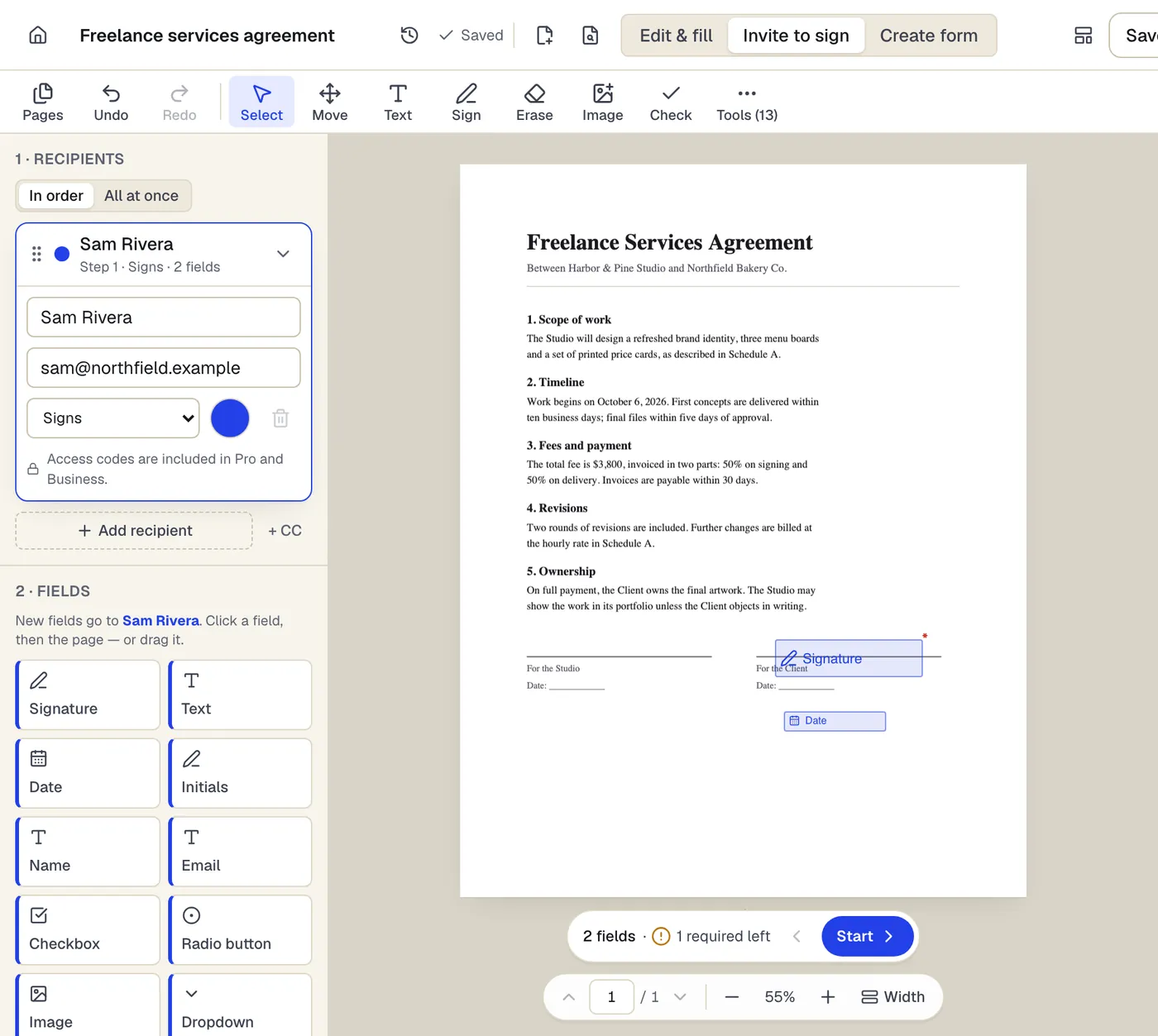
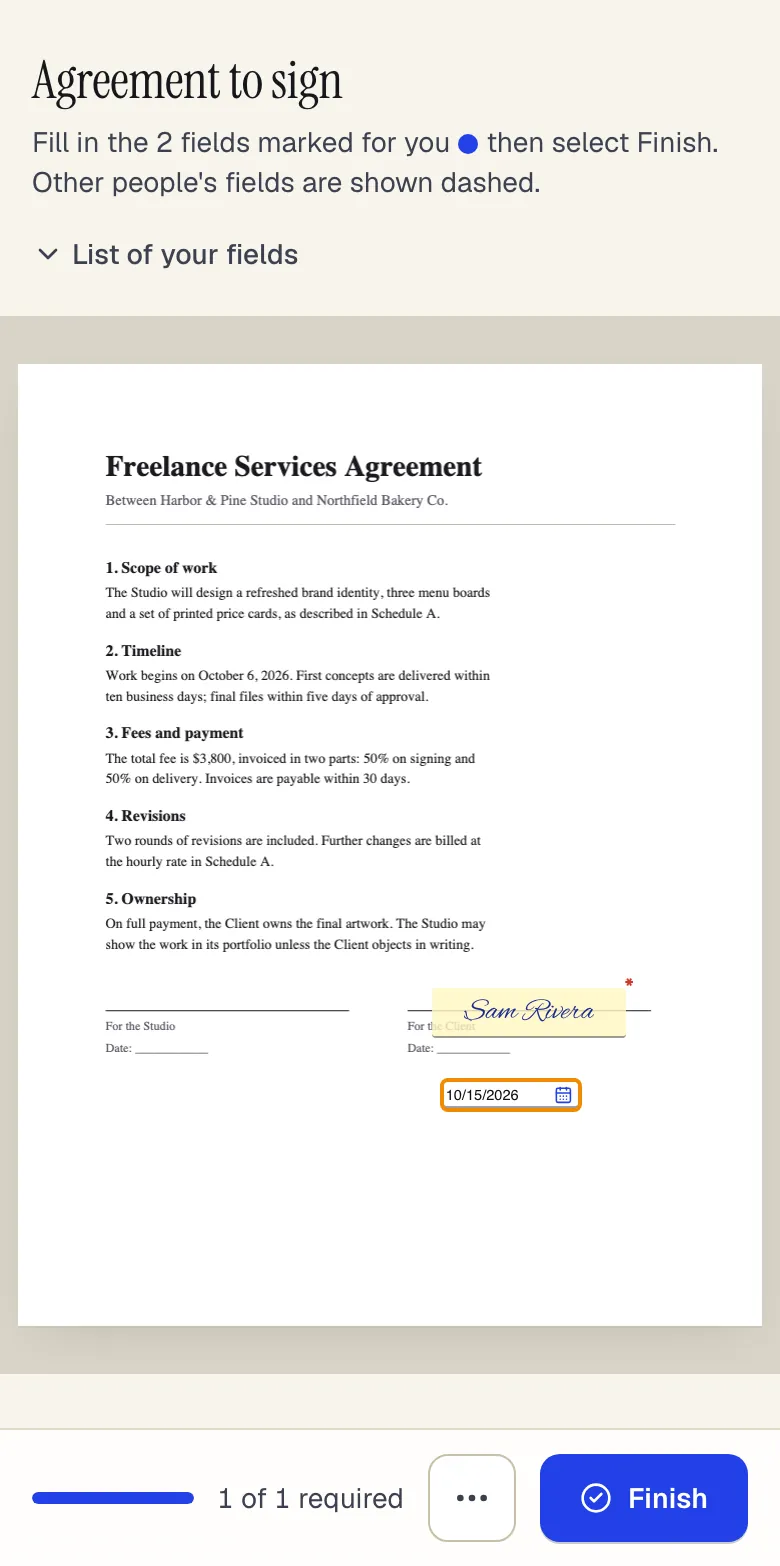
- Recipients sign in order, or all at once
- Fields take the color of the person who fills them
- Fields go to the selected recipient
Invite to sign in the editor, and what the signer sees on a phone. Sample content; names and companies are fictional.
Start from a template
Templates for hotels, restaurants and venues
Release of Liability (Activity Waiver)
21 fields · 3 pages
Activity waiver with assumption of risk, release, medical authorization and parent signature for minors. For gyms, classes, rentals and events.
Service Agreement
31 fields · 3 pages
Plain-English service agreement with scope, fees, payment terms, termination and signature lines. Fill it online, then sign or send it for signature.
Gift certificate
21 fields · 1 page
Fillable gift certificate for shops, salons and restaurants with a dollar value or service, number, expiry date, redemption terms and a business record stub.
Event Registration Form
30 fields · 2 pages
Event registration form with attendee details, ticket type and quantity, auto-calculated total, dietary and accessibility needs and communication consent.
Incident report
53 fields · 2 pages
Fillable workplace incident report for injuries, near misses and property damage: people involved, witnesses, treatment, root cause and corrective actions.
Job Application Form
69 fields · 2 pages
General employment application with position, availability, work history, education, references and applicant certification. No protected-trait questions.
Employee Onboarding Checklist
34 fields · 2 pages
New-hire onboarding checklist covering paperwork, IT access, workspace, training and 30/60/90-day check-ins, with sign-off by manager and new employee.
Sales receipt
57 fields · 2 pages
Fillable sales receipt with item lines, sales tax, payment method, amount tendered and change due. For markets, pop-up shops and small retail without a POS.
Official forms
Forms you'll file
Opened from the issuing agency, so you get the current revision.
Good to know before you rely on it
- Never collect full card numbers, CVV codes or card photos on PDFs or forms. Card data falls under PCI DSS; take deposits through your payment processor and put only its link or a reference number on documents.
- Waiver enforceability varies by state, and some states limit releases for negligence or for minors. Have counsel review the release you use.
- Allergy and medical details on registration forms are sensitive. Ask only what the event needs and delete responses after the event.
- Seasonal hires still need a Form I-9 completed on time and retained under federal rules, even for short assignments.
Hotels, restaurants and venues: questions people ask
Can guests sign a waiver from a QR code?
Yes. Every published form has a link and a QR code, and guests can sign with a finger on their phone.
Can we take event deposits in PDFBetter?
No. Forms and documents don't process payments. Put your payment processor's link in the contract or confirmation email.
How many waivers can we collect a month?
Form responses are 50 a month on Free, 1,000 on Pro and 10,000 on Business.
Can each gift certificate have a unique number?
Yes. Put the numbers in a spreadsheet column and map it to the certificate's number field, or use the {#} row number token in file names.