
Solutions · Sales teams
PDF workflows for sales teams
Sales paperwork sits right at the moment a deal closes or stalls: the mutual NDA before a technical call, the quote and order form, the customer's vendor registration and credit application, and the contract redlines that bounce between legal teams.
Reviewed

Sales
Send quotes and order forms for signature, turn around customer NDAs, review redlines fast and send the same agreement to many accounts in one run.
3 changes on 2 pages
Deals slip on small delays. A prospect's NDA waits two days for someone to sign it, a quote goes out with the wrong discount because it was copied from the last one, and a redlined order form comes back with a changed term nobody caught.
PDFBetter turns quotes and order forms into templates with calculated totals, sends them for signature in order (customer signer, then your signatory), shows every change between redline rounds, and on the Business plan sends one agreement to many recipients at once.
Recurring work
6 workflows, each with the tool that does it
- 01
Send quotes and order forms for signature
Fill a quote or order form template with products, quantities and formula totals, then send it with signature fields for the customer and your authorized signer.
- 02
Turn around customer NDAs
Sign a prospect's NDA in the browser, or send your mutual NDA with both parties' fields and a reminder schedule.
- 03
Review redlines quickly
Compare the customer's returned contract with what you sent, see every changed word, and comment on clauses for your legal team.
- 04
Complete vendor onboarding packets
Fill the customer's vendor registration, W-9 and insurance forms, merge them, and send one packet back to procurement.
- 05
Send one agreement to many accounts
Send a renewal or policy update to a list of customers in one run, each receiving their own copy to sign, and track completion.
- 06
Share proposals and track opens
Share a proposal by link with an expiry date, see when it was opened, and revoke access after the deal closes.
In the app
What one of these looks like in PDFBetter
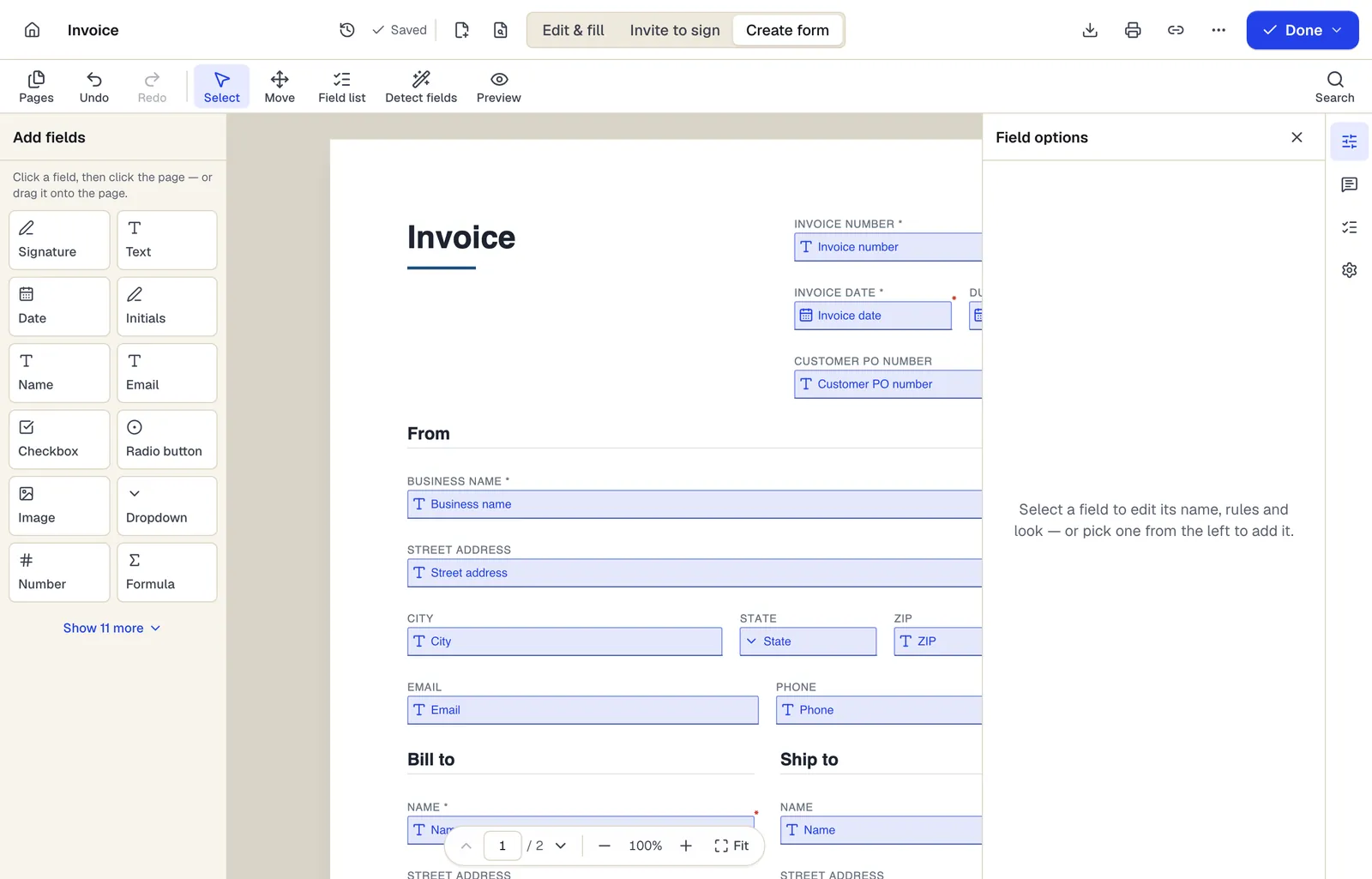
- Pick a field type, then click the page — or drag it
- Detect fields finds the boxes and lines on a flat PDF
- Every field keeps a label, a name and its own rules
The editor in Create form mode. Sample content; names and companies are fictional.
Start from a template
Templates for sales teams
Mutual Non-Disclosure Agreement (NDA)
24 fields · 3 pages
Two-way non-disclosure agreement for partnership talks, vendor reviews or deals. Set the purpose, term and governing state, then sign online.
Service Agreement
31 fields · 3 pages
Plain-English service agreement with scope, fees, payment terms, termination and signature lines. Fill it online, then sign or send it for signature.
Estimate
67 fields · 2 pages
Fillable estimate with job description, line items, tax, a stated allowance for variance and an optional customer approval. Totals calculate as you type.
Purchase order
104 fields · 3 pages
Fillable purchase order with vendor, ship-to, item numbers, units, tax, shipping and an approval signature. Line totals and the PO total calculate for you.
Business credit application
54 fields · 3 pages
Fillable business credit application: company details, principals, bank and trade references, requested limit, terms, credit check authorization and guaranty.
Customer intake form
24 fields · 1 page
Fillable new-client intake form for service businesses: contact details, services wanted, project goals, budget, timeline, referral source and contact consent.
Vendor registration form
37 fields · 2 pages
Fillable vendor registration form: legal name, entity type, EIN, remit-to address, contacts, products, certifications, payment method and signed certification.
W-9 request letter
15 fields · 2 pages
Fillable cover letter asking a vendor or contractor to return IRS Form W-9, with deadline, secure return method and a link to the official form on irs.gov.
Official forms
Forms you'll file
Opened from the issuing agency, so you get the current revision.
Good to know before you rely on it
- Check who in your company is authorized to sign contracts. Routing the order form to your authorized signatory after the customer keeps a rep from binding the company by accident.
- Bulk send and shared team workspaces are Business plan features. Individual reps on Pro send one request at a time.
- There's no built-in CRM connector. Export form responses as CSV or XLSX, or use the API and webhooks included in the Business plan.
- Pricing on templates goes stale. Review the template whenever your price list changes, and keep the signed version as the record.
Sales teams: questions people ask
Can the customer and our signer sign in a set order?
Yes. Set routing so the customer signs first and your authorized signer receives it only after that.
Can I see whether a prospect opened the proposal?
Shared links show how many times and when they were opened. They don't show who opened them unless you limit the link to specific email addresses.
Does compare work on scanned redlines?
Comparison works on text. Run OCR on a scanned document first, and expect recognition errors to show up as differences.
Can branding appear on the signing page?
Branded signing is part of the Business plan.