
Add checkboxes to a PDF
Place interactive checkboxes on your PDF so people can tick any number of options, and download a form that remembers their choices.
Drop a PDF hereLet go to start
or paste with Ctrl/⌘+V
Start without an account. A free account includes 3 edited-document downloads a month. See plans
What it does
Add checkbox to PDF, explained
To add a checkbox to a PDF, choose the Checkbox field and click where it belongs; each checkbox is an interactive field that toggles between checked and unchecked when clicked in any PDF reader, and its state is saved with the file.
Read more
Checkboxes are independent, so they suit questions where several answers can be true at once: “Which days are you available?”, “Select all symptoms that apply”, “Documents enclosed”. They also work alone for confirmations — an “I agree to the terms” box marked required means a PDFBetter form or signing request cannot be finished until it is ticked.
This is different from a checkmark. Add checkmark draws a fixed tick that you put there; a checkbox is a blank control for someone else to choose. And it is different from radio buttons, where picking one option clears the others. If only one answer is allowed, use radio buttons.
Each checkbox has its own name, which is what appears in exported responses and what a spreadsheet column maps to. In PDFBetter's online forms, a checkbox can also drive conditional logic: show the “Allergy details” field only when “I have allergies” is ticked.
In the app
What it looks like
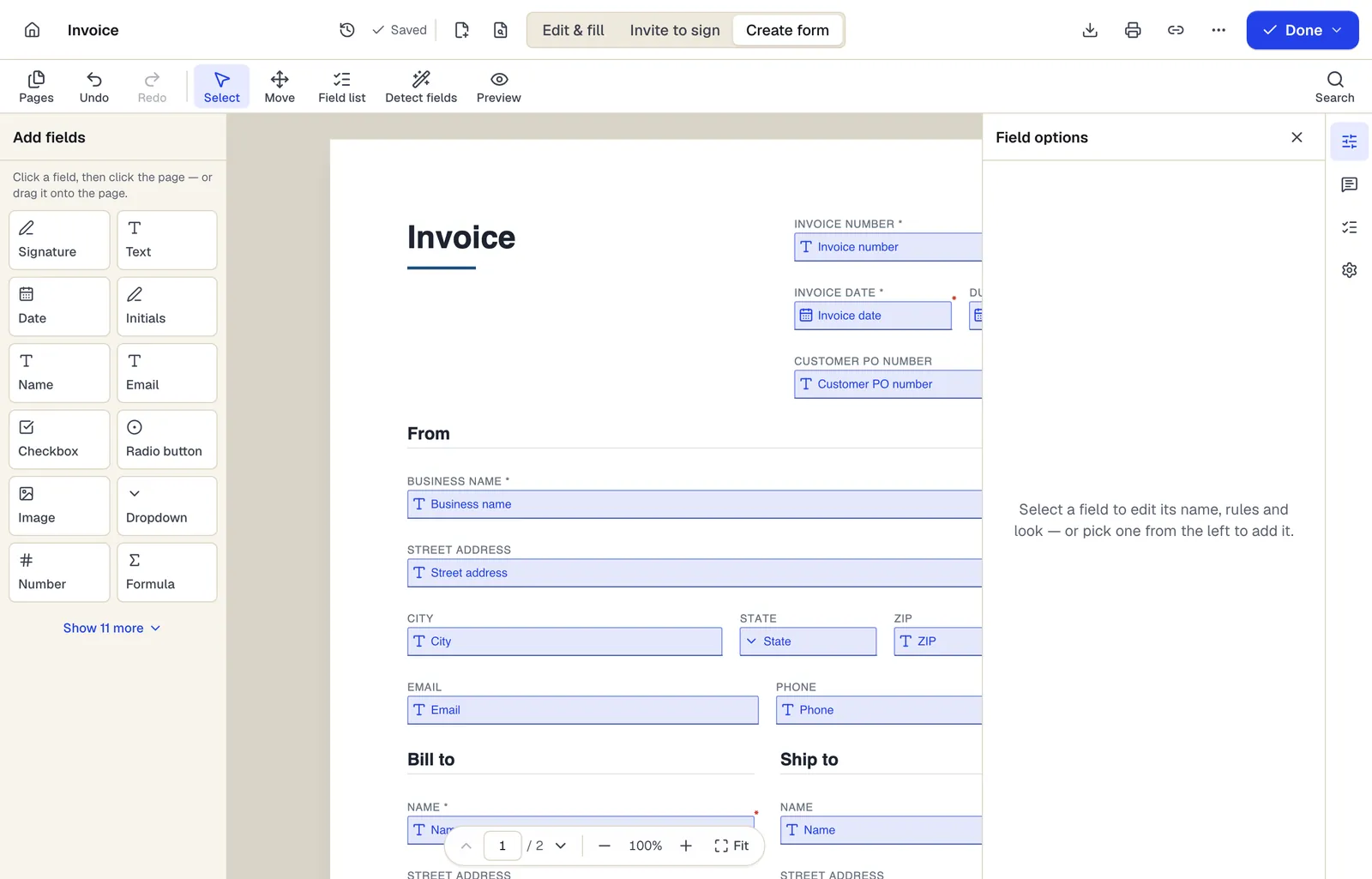
- Pick a field type, then click the page — or drag it
- Detect fields finds the boxes and lines on a flat PDF
- Every field keeps a label, a name and its own rules
The editor in Create form mode. Sample content; names and companies are fictional.
How to do it
Add checkboxes to a PDF in 5 steps
1A flat PDF
2Place fields
3A fillable PDF
- 1
Upload the PDF
Open the fields panel and choose Checkbox.
- 2
Click to place each checkbox
Put one on each printed square or option; resize to match.
- 3
Name and configure
Give each a clear name (e.g. available_monday), mark required ones, and set a default if needed.
- 4
Add logic (optional)
In forms you publish, show or hide other fields based on whether a box is checked.
- 5
Download
With a free account, download without flattening so the boxes stay clickable.
Example
Before and after
A flat volunteer sign-up sheet listing seven days of the week with empty squares and a printed “I agree to the code of conduct” line.
Seven independent checkboxes for available days and a required consent checkbox; in the published form, a “Preferred shift times” field appears only when at least the Saturday box is ticked.
Settings & formats
What you can control
- Name
- Unique name per checkbox for exports and spreadsheet filling.
- Required
- Must be ticked before a PDFBetter form or signing step can be completed.
- Default
- Start checked or unchecked.
- Conditional logic
- Use checked/unchecked as a rule to show other fields in published forms.
Input
Output
Good to know before you start
- Conditional logic tied to checkboxes runs in PDFBetter's online forms and signing pages, not in other PDF readers.
- Other PDF readers may not enforce a required checkbox; enforcement is guaranteed only when the form is filled through PDFBetter.
- The checked mark's style (tick or cross) can look slightly different from one PDF reader to another.
Add checkbox to PDF: questions people ask
What is the difference between a checkbox and a checkmark?
A checkbox is an interactive field anyone can tick or untick. A checkmark is a fixed drawing you place on the page yourself.
Can people select more than one checkbox?
Yes. Every checkbox is independent. Use radio buttons when only one choice should be allowed.
Can I make an “I agree” checkbox mandatory?
Yes. Mark it required; PDFBetter forms and signing requests cannot be completed until it is ticked.
Will the checkbox work in Acrobat Reader or Preview?
Yes. Checkboxes are standard PDF form fields and can be toggled and saved in common readers.
How do checkboxes map from a spreadsheet?
In Fill PDF from Excel, map a column to the checkbox and use a clear true value such as TRUE or Yes for rows that should be ticked; the preview shows the result before you generate.