
Solutions · Trucking, freight and warehouse teams
PDF workflows for logistics, trucking and warehousing
Freight runs on paper that travels. Bills of lading and delivery receipts get signed at a dock and photographed in a cab, rate confirmations bounce between brokers and dispatchers, carrier setup packets need a W-9 and insurance certificate, and driver files need applications, inspections and logs.
Reviewed

Logistics
Clean up photographed delivery receipts, assemble carrier packets, collect driver documents and get rate confirmations signed. Paperwork for freight teams.
24 files1 packet per load
- BOL-40812.pdf
- POD-40812.jpg
- RateCon-40812.pdf
12 packets
Billing waits on paperwork. An invoice can't go out until the signed proof of delivery arrives, and when it does it is a dark, crooked phone photo the customer rejects. Carrier onboarding stalls because one page of the packet is missing, and dispatchers re-type load details into each new document.
PDFBetter cleans up and straightens photographed delivery paperwork, makes it searchable, assembles invoice-plus-POD packets for billing, and collects carrier and driver documents through form links and signature requests.
Recurring work
5 workflows, each with the tool that does it
- 01
Clean up proofs of delivery from phones
Straighten and clean up photographed delivery receipts and bills of lading, then OCR them so load and PO numbers can be searched.
- 02
Assemble billing packets
Combine the invoice, the rate confirmation and the signed proof of delivery for each load into one PDF, and compress it for the customer's portal.
- 03
Onboard carriers and vendors
Publish a carrier setup form for company, authority and payment details, and request the W-9 and a signed agreement in one round.
- 04
Sign rate confirmations quickly
Sign an incoming rate confirmation in the browser and send it back, or route your own to a carrier for signature.
- 05
Keep driver and inspection records
Fill inspection checklists and incident reports on a phone, and add photos as pages to the same file.
In the app
What one of these looks like in PDFBetter
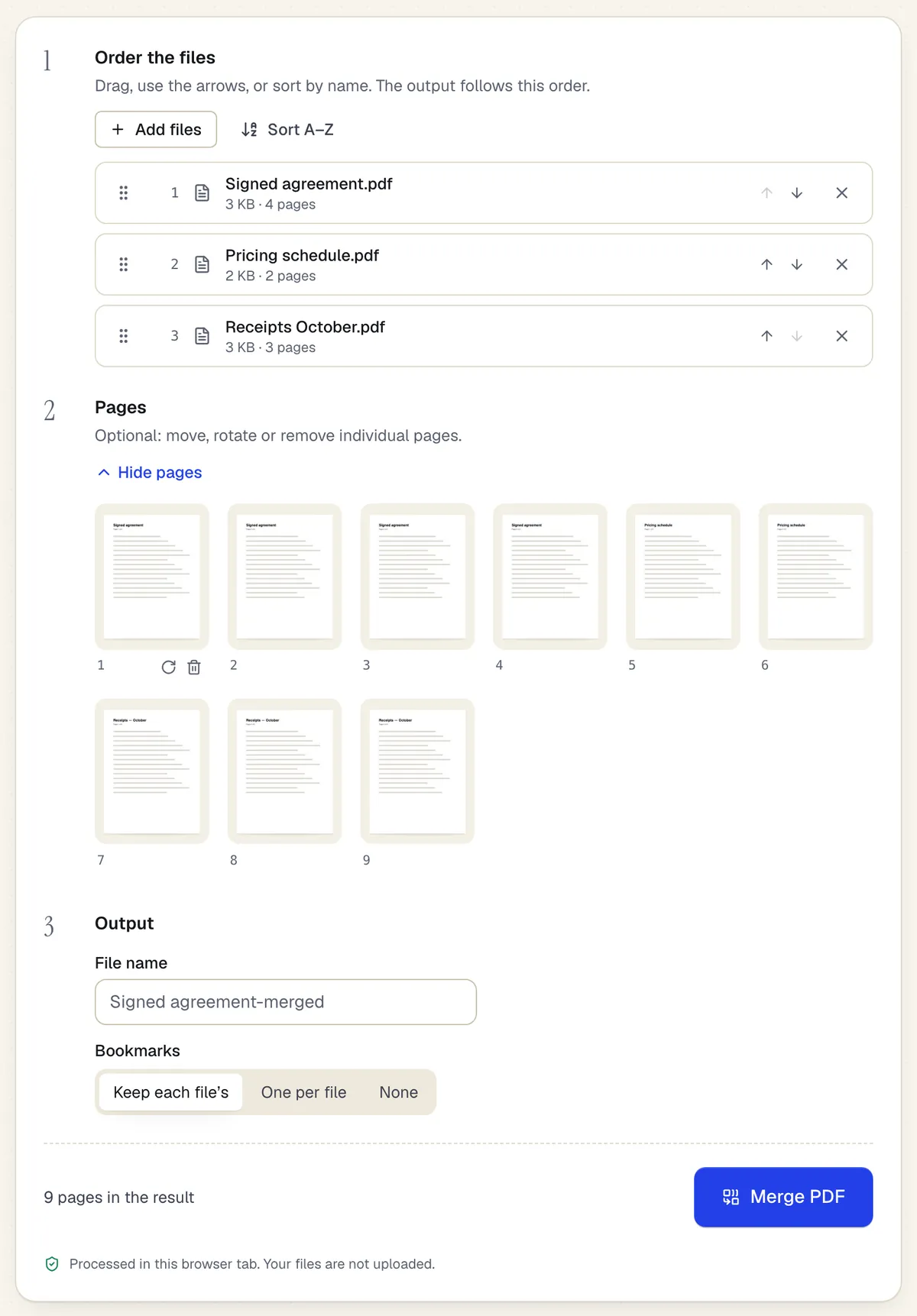
- Reorder whole files with drag or arrows
- Or move, rotate and remove single pages
- Processed in the browser tab — the files aren't uploaded
Assemble uses the same workspace as Merge PDF. Sample content; names and companies are fictional.
Start from a template
Templates for trucking, freight and warehouse teams
Work order
70 fields · 2 pages
Fillable work order with request details, priority, assigned technician, work performed, labor and parts tables, completion status and customer sign-off.
Purchase order
104 fields · 3 pages
Fillable purchase order with vendor, ship-to, item numbers, units, tax, shipping and an approval signature. Line totals and the PO total calculate for you.
Vendor registration form
37 fields · 2 pages
Fillable vendor registration form: legal name, entity type, EIN, remit-to address, contacts, products, certifications, payment method and signed certification.
Incident report
53 fields · 2 pages
Fillable workplace incident report for injuries, near misses and property damage: people involved, witnesses, treatment, root cause and corrective actions.
Safety inspection checklist
59 fields · 3 pages
Fillable workplace safety checklist: pass, fail or N/A for exits, fire, electrical, first aid, PPE and chemicals, plus a corrective action log with due dates.
Mileage log
112 fields · 2 pages
Fillable mileage log with trip date, purpose, start and end odometer, calculated miles, your reimbursement rate, plus tolls and parking. Totals add up for you.
Timesheet
99 fields · 2 pages
Fillable timesheet for any pay period: date, work done, regular and overtime hours per line, with totals and gross pay calculated. Employee and supervisor sign.
Invoice
82 fields · 2 pages
A clean, fillable invoice with bill-to and ship-to, 12 line items, discount, sales tax and balance due that calculate as you type. Fill, sign and send free.
Official forms
Forms you'll file
Opened from the issuing agency, so you get the current revision.
Good to know before you rely on it
- Driver qualification files, inspection reports and hours-of-service records follow FMCSA rules (49 CFR Parts 391, 395 and 396) with set contents and retention periods. A PDF checklist helps, but it doesn't replace the required records or an ELD.
- Bill of lading terms and formats are usually dictated by the shipper, carrier or tariff. Fill the version you are given rather than drafting your own.
- Photographed paperwork can be rejected if a signature or seal number isn't legible. Restore scanned PDF improves contrast and alignment, but it can't recover detail that wasn't captured.
- Fax sending is included only on the Business plan (50 pages a month), or with a fax page pack. Destinations are limited to the US and Canada.
Trucking, freight and warehouse teams: questions people ask
Can drivers send clean PODs without a scanner app?
Yes. Convert the phone photo with JPG to PDF, then run Restore scanned PDF to deskew and clean the page before you send it.
Can I search a pile of PODs by load number?
After OCR, the text layer makes load and PO numbers searchable. Handwritten numbers are recognized less reliably than printed ones.
Can I build one billing PDF per load at once?
Batch merge creates several outputs in one run, one merge group per load, so you don't merge each packet separately.
Can I fax a rate confirmation?
Yes, on the Business plan or with a fax page pack. Fax destinations are limited to the US and Canada.