
Solutions · Local government and public agencies
PDF workflows for local government and public agencies
Local government paperwork is public by default and permanent by rule. Clerks redact records before release, departments publish applications for permits, programs and facility use, procurement collects vendor registrations and W-9s, and boards approve and sign minutes that are kept for decades.
Reviewed

Government
Redact public records releases, publish permit and registration forms, and keep board minutes and vendor paperwork signed. With honest notes on procurement.
- Metadata removed
- Hidden layers removed
- JavaScript and attachments removed
Sanitize report ready
Time is lost to manual redaction, paper forms re-typed into spreadsheets, and minutes that circulate for signatures by interoffice mail. Mistakes are public: a redaction that can be copied out of the PDF becomes a news story.
PDFBetter applies true redaction that removes the content under each box, publishes fillable forms residents can complete from a link, and routes minutes and agreements for signature. Before any of that, check your procurement and security requirements; see the considerations below.
Recurring work
5 workflows, each with the tool that does it
- 01
Redact public records releases
Search for names, addresses and account numbers, mark them, and apply redaction so the content is removed. OCR scanned records first so their text can be found.
- 02
Publish applications residents can fill
Turn a paper permit, facility rental or program application into a fillable form with a link and QR code, then export responses for processing.
- 03
Approve and sign minutes and resolutions
Route minutes to the clerk and chair for signature, and add page numbers and a watermark such as DRAFT to unapproved versions.
- 04
Collect vendor registrations
Publish a vendor registration form and request the W-9 so procurement has both before the first purchase order.
- 05
Assemble agenda packets
Combine the agenda, staff reports and attachments into one packet with page numbers, and compress it for posting on the website.
In the app
What one of these looks like in PDFBetter
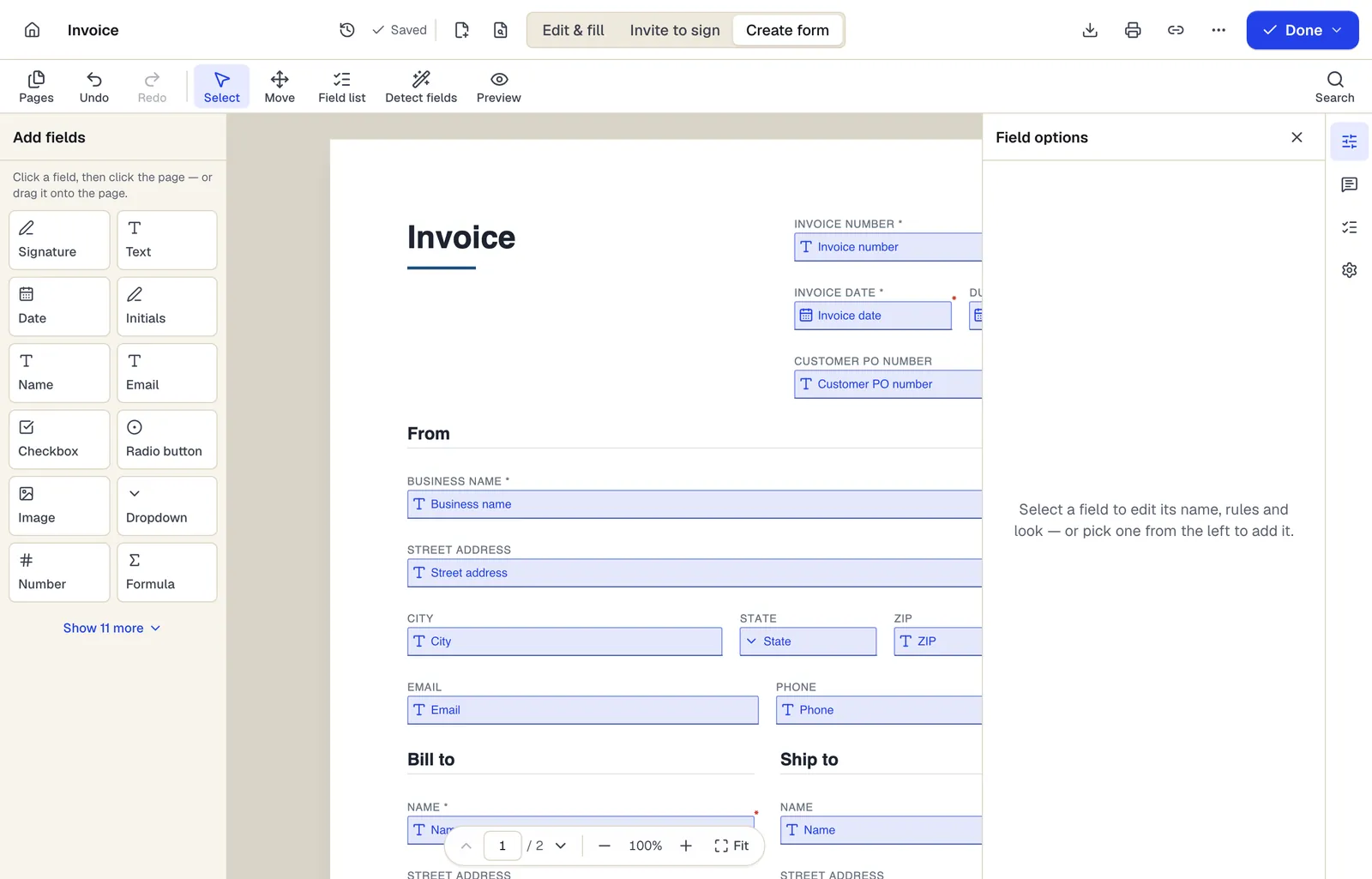
- Pick a field type, then click the page — or drag it
- Detect fields finds the boxes and lines on a flat PDF
- Every field keeps a label, a name and its own rules
The editor in Create form mode. Sample content; names and companies are fictional.
Start from a template
Templates for local government and public agencies
Vendor registration form
37 fields · 2 pages
Fillable vendor registration form: legal name, entity type, EIN, remit-to address, contacts, products, certifications, payment method and signed certification.
Meeting minutes
59 fields · 2 pages
Fillable meeting minutes for boards, committees and teams: attendance, quorum, prior minutes, motions with votes, action items and the secretary's sign-off.
Event Sign-In Sheet
114 fields · 1 page
Event and meeting sign-in sheet with name, organization, email, phone and opt-in for updates. Print for the door or fill on a tablet, then export to Excel.
Purchase order
104 fields · 3 pages
Fillable purchase order with vendor, ship-to, item numbers, units, tax, shipping and an approval signature. Line totals and the PO total calculate for you.
Incident report
53 fields · 2 pages
Fillable workplace incident report for injuries, near misses and property damage: people involved, witnesses, treatment, root cause and corrective actions.
Event Registration Form
30 fields · 2 pages
Event registration form with attendee details, ticket type and quantity, auto-calculated total, dietary and accessibility needs and communication consent.
Volunteer Application
52 fields · 2 pages
Volunteer application with interests, availability, skills, experience, references, background check consent where required, and emergency contact.
Official forms
Forms you'll file
Opened from the issuing agency, so you get the current revision.
Good to know before you rely on it
- PDFBetter does not hold FedRAMP, StateRAMP or similar authorizations and doesn't claim security certifications. If your agency requires them for cloud services, use the browser-only tools (which never upload files) or check with IT before using account features.
- Records you collect through forms can themselves be public records subject to disclosure and retention schedules. Export and file responses according to your state's retention schedule.
- The US Department of Justice's 2024 ADA Title II rule requires state and local government web content, including PDFs, to meet WCAG 2.1 AA on a phased schedule. Check accessibility of published forms and posted packets.
- Redaction rules for public records releases are set by your state's public records law. Decide what is exempt with your attorney; the tool only removes what you mark.
Local government and public agencies: questions people ask
Can redacted text be recovered?
Not after you apply redaction. The text, images and drawings under each box are removed from the file. Black boxes drawn with markup tools are not redaction.
Can we redact scanned records?
Yes. Run OCR first so you can search the scan, then redact. The image area under each box is removed along with any recognized text.
Can residents fill forms without an account?
Yes. Published forms open from a link or QR code and include a bot check on submission.
Does PDFBetter meet our procurement security requirements?
It holds no FedRAMP, StateRAMP or SOC 2 certification. Review the security and privacy pages with your IT team before adopting account features.