
Solutions · Freelancers and independent consultants
PDF workflows for freelancers and consultants
Freelancers repeat a short list of documents with every client: a proposal or estimate, a contract or statement of work, sometimes an NDA, a W-9 so the client can pay you, and an invoice every month or milestone. Tax time adds 1099s, expense reports and a mileage log.
Reviewed

Freelancers
Send a contract and NDA for signature, invoice from a template, fill the W-9 every new client asks for, and keep a mileage and expense log for tax time.
- YouConsultantSigned
- Nora ValeClientSigning now
The time cost is small per document and large per year. Each new client means rewriting the same contract, re-filling a W-9, and building invoices in a word processor. Unsigned contracts are the bigger risk: work starts on an email agreement and the scope argument comes later.
PDFBetter keeps your contract and invoice as reusable templates, sends the contract for signature before work starts, fills and signs the W-9 a client sends you, and turns a spreadsheet of hours or miles into tidy PDFs.
Recurring work
5 workflows, each with the tool that does it
- 01
Get the contract signed before you start
Fill your consulting or independent contractor agreement template with scope, rate and dates, and send it with signature fields for you and the client.
- 02
Invoice from a template
Keep one invoice template with your details and formula totals, fill the client and line items each period, and send it as a link or attachment.
- 03
Fill the W-9 a new client asks for
Open the current W-9 from the IRS, fill it, sign it, and protect it with a password before emailing, since it contains your SSN or EIN.
- 04
Sign client NDAs and paperwork
Sign an NDA or vendor packet a client sends you, and compare it with the last version if they send back changes.
- 05
Keep tax-time records
Turn receipt photos into one PDF per month and generate expense or mileage reports from your spreadsheet.
In the app
What one of these looks like in PDFBetter
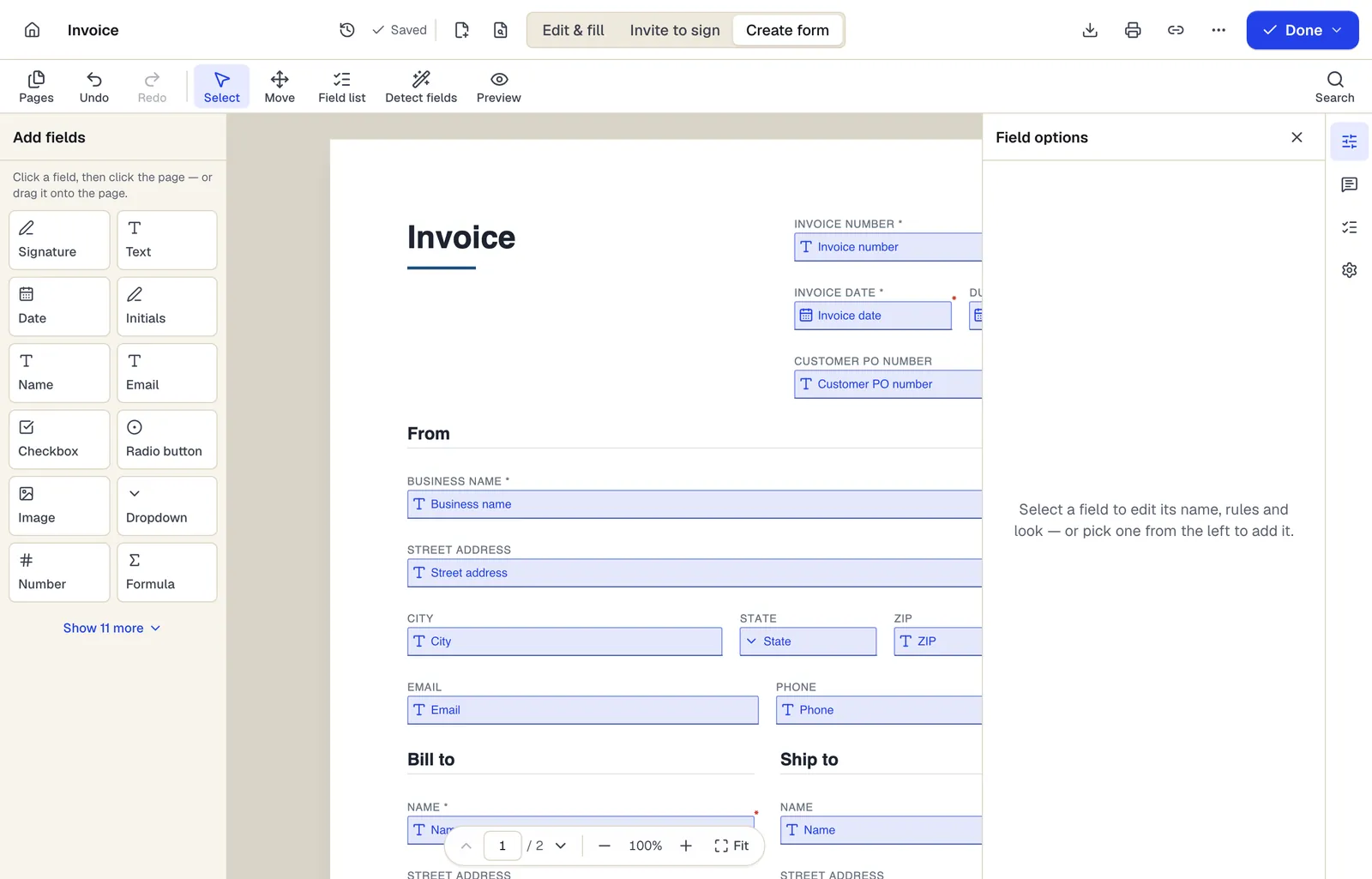
- Pick a field type, then click the page — or drag it
- Detect fields finds the boxes and lines on a flat PDF
- Every field keeps a label, a name and its own rules
The editor in Create form mode. Sample content; names and companies are fictional.
Start from a template
Templates for freelancers and independent consultants
Freelance invoice
69 fields · 2 pages
Fillable freelance invoice with project work, reimbursable expenses and a deposit credit. Totals add up as you type. For writers, designers and developers.
Consulting invoice
97 fields · 2 pages
Fillable consulting invoice with billing period, engagement reference, per-consultant hours and rates, and a retainer credit. Totals calculate automatically.
Independent Contractor Agreement
32 fields · 3 pages
Contractor agreement covering scope, rates, invoicing, taxes, IP ownership, confidentiality and termination. Fill online and collect both signatures.
Consulting Agreement
32 fields · 3 pages
Consulting agreement for advisory work billed hourly or on retainer, with expenses, conflicts, confidentiality and ownership terms. Fill and sign online.
Mutual Non-Disclosure Agreement (NDA)
24 fields · 3 pages
Two-way non-disclosure agreement for partnership talks, vendor reviews or deals. Set the purpose, term and governing state, then sign online.
Estimate
67 fields · 2 pages
Fillable estimate with job description, line items, tax, a stated allowance for variance and an optional customer approval. Totals calculate as you type.
Expense report
107 fields · 2 pages
Fillable expense report with date, vendor, purpose, category and amount per line, cash advance credit and the amount owed to the employee. Sign and submit.
Mileage log
112 fields · 2 pages
Fillable mileage log with trip date, purpose, start and end odometer, calculated miles, your reimbursement rate, plus tolls and parking. Totals add up for you.
Official forms
Forms you'll file
Opened from the issuing agency, so you get the current revision.
Good to know before you rely on it
- Whether you are an independent contractor or an employee is decided by how the work is actually done, not by the contract's title. The IRS and some states (for example, California's ABC test) apply their own tests.
- A W-9 contains your taxpayer identification number. Send it with a password or through the client's secure portal rather than as a plain email attachment, or get an EIN to use instead of your SSN.
- Contract templates are starting points. Intellectual property ownership, payment terms and liability limits are worth a lawyer's review for larger engagements.
- Keep receipts and mileage logs that meet IRS substantiation rules. A PDF log helps, but the records need dates, amounts and business purpose.
Freelancers and independent consultants: questions people ask
Can I send contracts for free?
The Free plan includes 3 signature requests a month. Pro includes unlimited requests for $15 a month, or $10 a month billed yearly.
Should I use my SSN or an EIN on a W-9?
Sole proprietors can use either. Many freelancers get a free EIN from the IRS (Form SS-4 or online) so their SSN isn't on every client's file.
Can the client sign without an account?
Yes. They sign from an email link on any device, with a signing key their browser creates for them, and both of you get the completed PDF, sealed and time-stamped, plus a certificate of completion.
Can I add my logo to invoices?
Yes. Add your logo as an image when you set up the invoice template, and it appears on every invoice you fill from it.