
Guide · Signing
Electronic signature vs digital signature
Reviewed

Short answer
An electronic signature is any electronic mark a person adopts with the intent to sign, such as a typed name, drawn signature or clicked checkbox. A digital signature is a specific cryptographic technique that binds a certificate to a document so any later change is detectable. Many digital signatures are electronic signatures, but most electronic signatures are not digital signatures.
On this page (7)
Electronic signature: a legal concept
Laws define electronic signatures broadly. The US ESIGN Act describes one as an electronic sound, symbol or process attached to or logically associated with a record and adopted by a person with the intent to sign it. The EU's eIDAS Regulation similarly calls it data in electronic form that the signatory uses to sign.
Under these definitions, what counts is intent and the ability to connect the signature to the person and the document. The evidence usually comes from the process around the signature: consent to sign electronically, email delivery, timestamps, IP addresses and a record of the document's state.
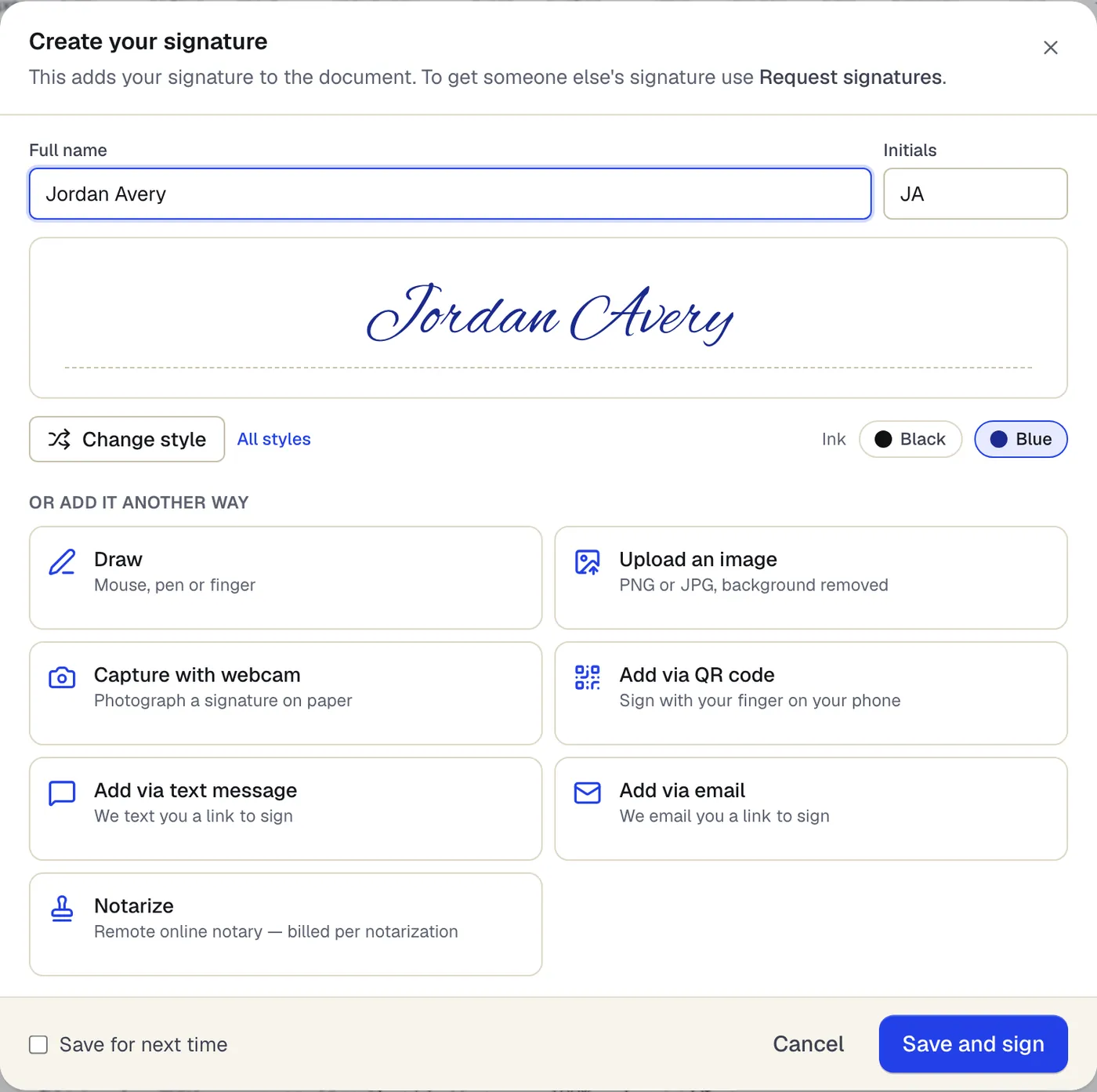
- Type your name and pick a style and ink color
- Or draw it, upload it, or finish on your phone
The signature dialog that opens from Sign. Sample content; names and companies are fictional.
Digital signature: a technology
A digital signature uses public-key cryptography. The signer's software computes a fingerprint (hash) of the document and encrypts it with a private key tied to a digital certificate. Anyone can verify the signature with the matching public key: if a single byte of the document changes, verification fails. In PDFs this is stored in the file itself, and PDF readers show a signature panel saying whether the signature is valid.
The strength of a digital signature depends on the certificate. A self-made certificate proves only that the document hasn't changed since signing; a certificate issued by a trusted authority after checking ID also says who signed.
The EU's three levels
eIDAS defines three tiers. A simple electronic signature is any electronic signature. An advanced electronic signature must be uniquely linked to and capable of identifying the signer, created with data under the signer's sole control, and linked to the data so later changes are detectable. A qualified electronic signature is an advanced signature created on a qualified signature creation device and based on a qualified certificate; it has the same legal effect as a handwritten signature across the EU.
Most everyday contracts can use simple signatures. Qualified signatures are needed where a member-state law requires a handwritten-equivalent form.
Side-by-side
Purpose: an electronic signature records agreement; a digital signature secures the integrity of a file and, with a trusted certificate, the signer's identity.
Evidence: an electronic signature relies on an audit trail kept by the signing service; a digital signature carries its proof inside the PDF.
Ease of use: electronic signatures work with just an email link; digital signatures need a certificate and compatible software on the signer's side.
Editing afterwards: a digitally signed PDF shows as invalid or modified after any change; an electronically signed PDF relies on the stored fingerprint to show a change.
The two can be combined: people sign with electronic signatures, and the service then applies a digital seal over the finished file so any later change is visible in the PDF itself.
Where PDFBetter fits
PDFBetter signature requests combine both. Every signer signs with their own cryptographic key: their browser generates an ECDSA P-256 key that never leaves the device and signs a statement binding the document's SHA-256 fingerprint to exactly what they entered. PDFBetter's certificate authority certifies that key, and its fingerprint appears on the certificate of completion. Around that sit consent to sign electronically, an optional emailed one-time code and a hash-chained audit log.
Every completed PDF and its certificate are then digitally sealed with a PAdES signature from “PDFBetter Document Seal” and independently time-stamped under RFC 3161 by DigiCert when the service is reachable. Change one byte and PDF readers show the file as modified. The evidence itself (signed statements, device signatures, certificates, entered values and the audit trail) is embedded in the PDF, and PDFBetter keeps it for 7 years.
In eIDAS terms, signature requests are designed to the technical requirements of an advanced electronic signature (eIDAS art. 26): a unique key per signer, under their sole control, linked to the document so any change is detectable. Signers are identified by email (and an optional emailed code), not by ID documents or SMS. They are not qualified electronic signatures, so documents that require a QES, notarization, wet ink or witnesses still need those.
Two caveats. The seal certificate comes from PDFBetter's own certificate authority, which is not yet on Adobe's trust list, so Acrobat shows the seal's identity as not verified unless you trust PDFBetter's certificate; change detection works either way. And a PDF you sign yourself with Sign PDF carries a visual electronic signature only: it is not sealed and uses no device key.
Tools used in this guide
- Sign PDFCreate your signature once, click the signature line to place it, add initials or a date, and download the signed PDF.
- Request signaturesAdd the people who need to sign, place each person's fields, send, and get the completed PDF plus a certificate of completion when everyone is done.
- Flatten PDFTurn every field, value and annotation into ordinary page content and download a PDF that cannot be changed by clicking.
Questions people ask
Is a digital signature more legally binding than an electronic signature?
Not automatically. Most laws give electronic signatures legal effect in general; a digital or qualified signature mainly makes it easier to prove who signed and that the document is unchanged. Some documents legally require the higher level.
Why does my PDF say “signature invalid” after I edited it?
The file contained a digital signature, and any change to the signed bytes, even adding a comment or rotating a page in some tools, breaks it. Make edits before signing, or have the document signed again.
Is a scanned handwritten signature an electronic signature?
Yes, when you place it on a document with the intent to sign. It is not a digital signature, because nothing cryptographic links it to the file.
What is a qualified electronic signature (QES)?
The highest eIDAS level: an advanced signature made with a qualified signature creation device and a qualified certificate issued after identity verification by a qualified trust service provider. It has the equivalent legal effect of a handwritten signature in every EU member state.
Does PDFBetter use digital signatures?
Yes, twice over for signature requests: each signer's device key digitally signs a statement bound to the document's fingerprint, and the completed PDF and certificate are sealed with a PAdES signature and time-stamped, so any later change shows as modified. Acrobat shows the seal's identity as not verified because PDFBetter's certificate is not yet on Adobe's trust list. PDFs you sign yourself are not sealed.
Are PDFBetter signature requests advanced electronic signatures?
They are designed to the technical requirements of an advanced electronic signature (eIDAS art. 26): a unique key per signer, under their sole control, linked to the document so any change is detectable. Signers are identified by email (and an optional emailed code), not by ID documents or SMS. They are not qualified signatures, and whether a signature meets a legal requirement depends on the applicable law.