
Guide · Converting
How to convert a PDF to Word
Reviewed
Short answer
To convert a PDF to Word, upload it to a PDF-to-Word converter, turn on OCR if the PDF is a scan, and download the DOCX file. Microsoft Word can also open a PDF directly and convert it. Simple single-column documents convert well; multi-column layouts, forms and text over images usually need some cleanup afterwards.
On this page (8)
Why PDF to Word is never a perfect copy
A PDF records where each character sits on the page, not paragraphs, styles or tables. A converter has to infer the structure: which lines form a paragraph, which ruled boxes form a table, which text is a heading. The more regular the layout, the better the guess.
Letters, contracts, reports and simple tables usually convert cleanly. Newsletters with columns, brochures, forms built from text boxes and pages with text over photos are where reading order and spacing go wrong.
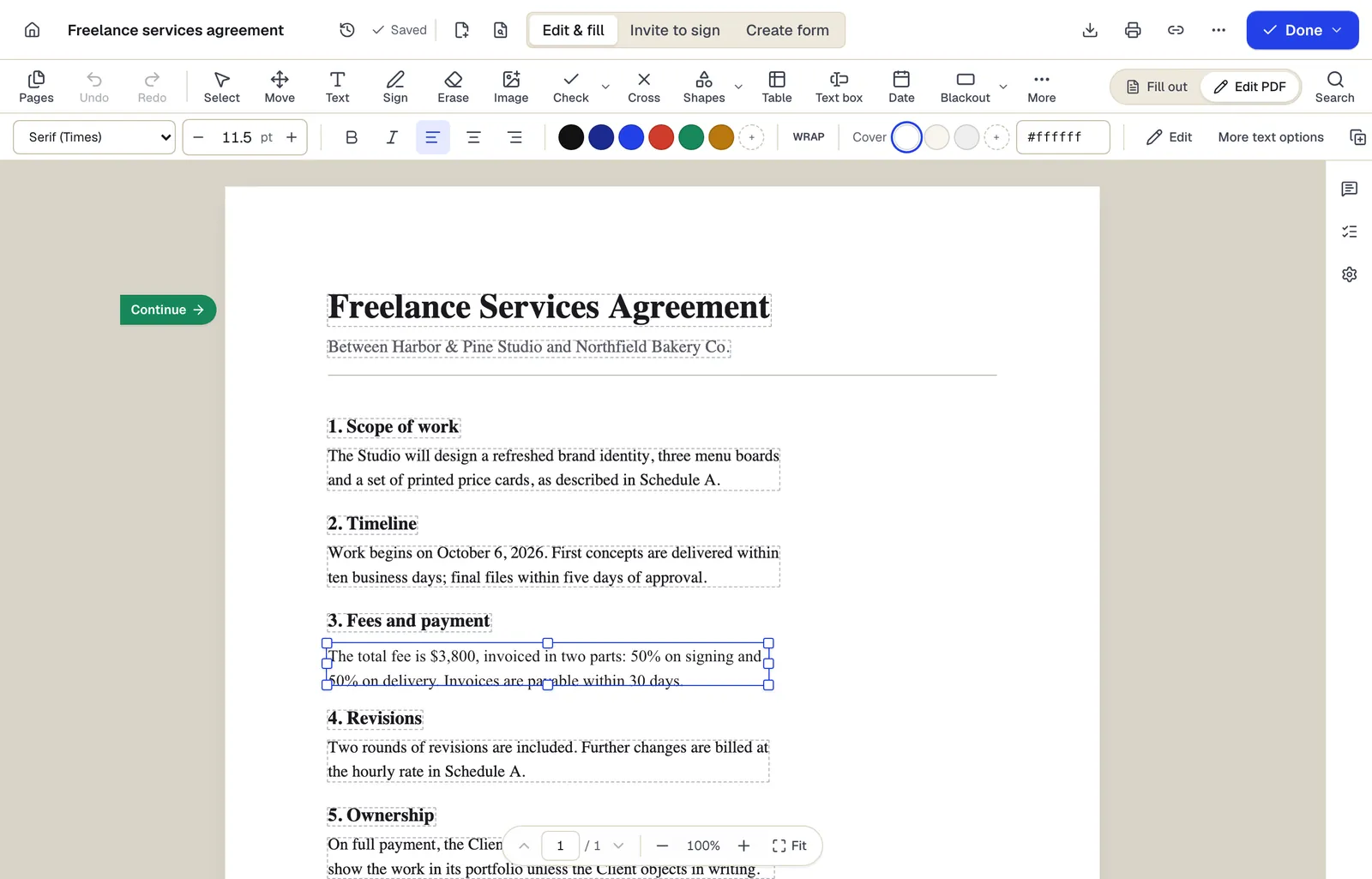
- Existing text becomes editable paragraphs, not just lines
- The detected font and size are kept — here Times at 11.5 pt
- Switch between filling fields and editing the page itself
The editor in Edit PDF mode, with a paragraph selected. Sample content; names and companies are fictional.
Convert in PDFBetter
- 1
Upload the PDF
Open PDF to Word and add the file. Unlock password-protected PDFs first.
- 2
Choose pages and OCR
Convert all pages or a range. OCR is suggested automatically for pages with no text layer; choose the document's language so accents and non-Latin scripts are recognized.
- 3
Convert and download
Conversion runs on PDFBetter's processing servers. Download the DOCX when it finishes.
- 4
Review in Word
Check tables, headers and footers and line breaks before you start editing.
Convert with Microsoft Word
Desktop Word can open a PDF directly: choose File, then Open, and select the PDF. Word tells you it will make a copy and convert the contents into a format it can display; the original PDF isn't changed. Microsoft notes that the result may not look exactly like the PDF, that mostly-text documents convert best, and that pages made mostly of charts or graphics can come in as images with uneditable text.
Scanned PDFs need OCR
A scan has no text, only page images. Without OCR you get a Word file containing pictures of pages. With OCR, the recognized text becomes editable; accuracy depends on scan quality, and handwriting is generally not recognized. If the scan is crooked or faint, clean it up first.
Common cleanup after converting
Expect fonts to be replaced by the closest available font, which can shift line and page breaks. Headers and footers may come through as ordinary text on each page. Form fields, comments and signatures aren't converted into Word equivalents. Use Word's Show/Hide formatting marks to find stray line breaks and section breaks quickly.
When not to convert
If you only need to change a few words, a date or a name, edit the PDF directly. The layout stays exactly as it is, and you skip the cleanup. Convert to Word when you need to rewrite paragraphs or reuse the content in a new document.
Tools used in this guide
- PDF to WordGet an editable DOCX from a PDF, including scanned pages when OCR is on.
- OCR PDFUpload a scan, pick its language, and download a PDF that looks the same but lets you search, select and copy the text.
- Edit PDFClick the words you need to change, type the correction, and download a PDF that looks like the original with your fix in place.
- Restore scanned PDFClean up crooked, grey or speckled scan pages and download a restored copy, keeping the original in case you prefer it.
Questions people ask
Is PDF to Word conversion free?
Without an account you can run 2 conversions to try it. The Free plan includes 10 Office conversions a month and Pro includes 500.
Why does my converted document look different?
The converter rebuilds paragraphs and tables from character positions and substitutes fonts that aren't available. Complex layouts are reconstructed approximately.
Can I convert a scanned PDF to Word?
Yes, with OCR turned on. Recognized text becomes editable; check names and numbers because recognition errors are easy to miss.
Is my file uploaded?
Yes. Office conversions run on PDFBetter's processing servers, not in your browser.
Can I convert a password-protected PDF?
Only after unlocking it with its password. PDFBetter doesn't bypass passwords.