
Form builder
Build an application form
Application forms gather the same facts about every applicant so you can compare them fairly: identity and contact details, eligibility questions, history, references and a signed certification that the answers are true.
Reviewed
- Applicant name, email and US phone (name, email and phone fields, required)
- Current address with state dropdown and ZIP code (state and ZIP fields)
- Position, unit or program applied for (dropdown)
- Eligibility questions (radio buttons, with follow-up text shown on certain answers)
- Work, rental or volunteer history (multi-line text fields)
- References: name, relationship and phone (text and phone fields)
- Certification statement (read-only text) with signature and date fields, required
Why it works
Application form, explained
Conditional sections keep a long application readable. A rental application can show a co-applicant section only if someone says there is one; a job application can ask for a driver's license number only for driving roles.
Applications collect more personal information than most forms, so decide before publishing which fields you truly need. Don't ask for a Social Security number, date of birth or protected characteristics unless your process requires them and the law allows it.
Recommended fields
Fields to include
- 1Applicant name, email and US phone (name, email and phone fields, required)
- 2Current address with state dropdown and ZIP code (state and ZIP fields)
- 3Position, unit or program applied for (dropdown)
- 4Eligibility questions (radio buttons, with follow-up text shown on certain answers)
- 5Work, rental or volunteer history (multi-line text fields)
- 6References: name, relationship and phone (text and phone fields)
- 7Certification statement (read-only text) with signature and date fields, required
How to do it
Build an application form in 4 steps
1A flat PDF
2Place fields
3A fillable PDF
- 1
Build the form
Start from a job, rental or volunteer application template or your current paper form. Mark required fields and add conditions for sections that only some applicants complete.
- 2
Publish it
Publish and post the link on your listing or job board, or print the QR code on a sign.
- 3
Collect applications
Applicants fill and sign in a browser without an account. Submissions with missing required fields are blocked before they reach you.
- 4
Export and compare
Export to CSV or XLSX to sort and shortlist, and delete applications you no longer need under your retention policy.
In the app
What building it looks like
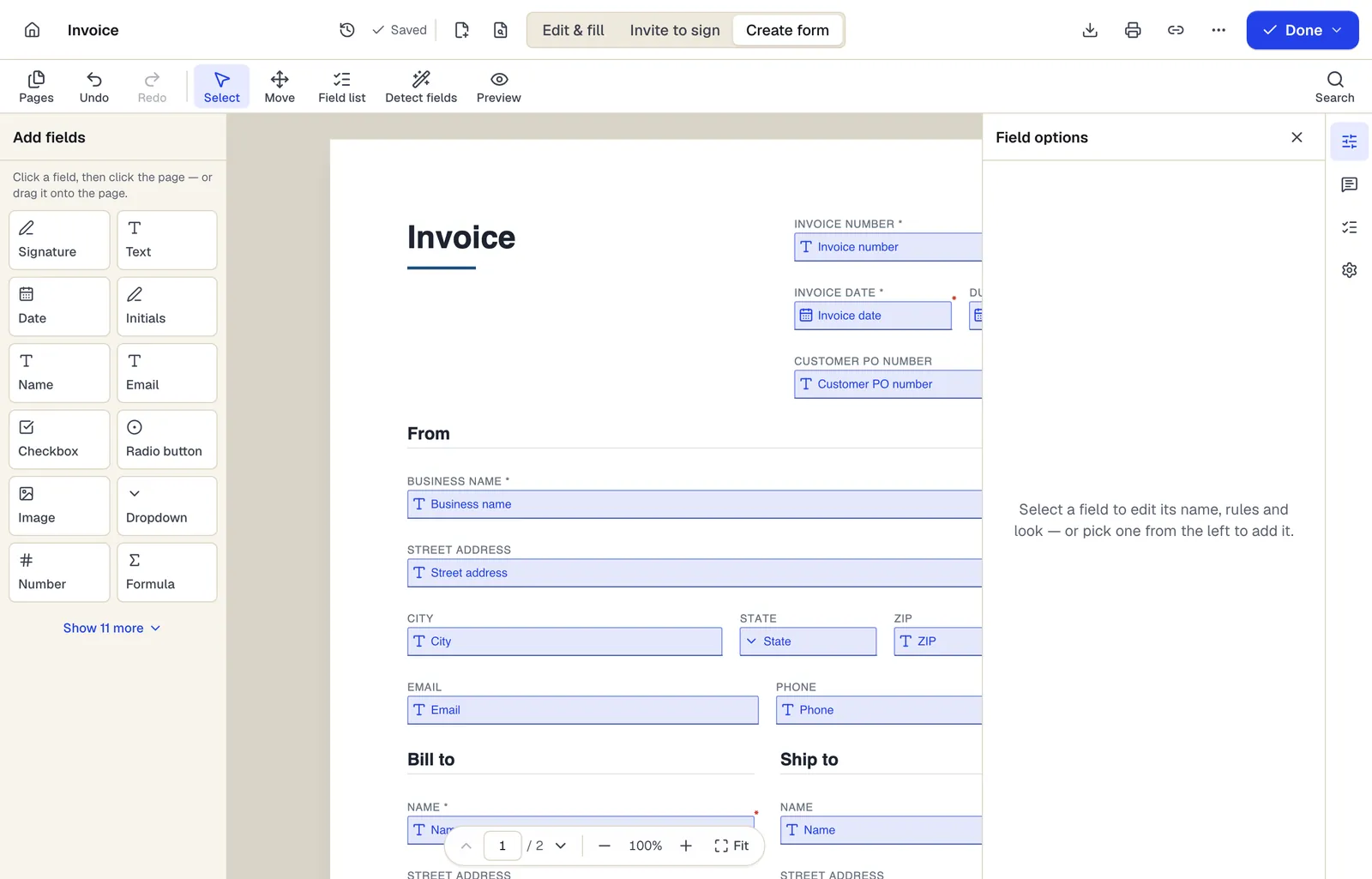
- Pick a field type, then click the page — or drag it
- Detect fields finds the boxes and lines on a flat PDF
- Every field keeps a label, a name and its own rules
The editor in Create form mode. Sample content; names and companies are fictional.
Start from a template
Templates that fit
Job Application Form
69 fields · 2 pages
General employment application with position, availability, work history, education, references and applicant certification. No protected-trait questions.
Rental Application
65 fields · 3 pages
Rental application covering applicant details, rental history, employment, income, occupants, pets and screening consent. Share it as a fillable form.
Volunteer Application
52 fields · 2 pages
Volunteer application with interests, availability, skills, experience, references, background check consent where required, and emergency contact.
Business credit application
54 fields · 3 pages
Fillable business credit application: company details, principals, bank and trade references, requested limit, terms, credit check authorization and guaranty.
Application form: questions people ask
Can applicants sign the application?
Yes. Add a signature field and mark it required; applicants draw or type their signature on any device.
Can I charge an application fee?
Not through the form. PDFBetter forms don't process payments, so link to your payment processor and never ask for card numbers on the form.
Can applicants upload a résumé?
Forms support an image field but not document uploads. Ask for a résumé by email, or link to your applicant tracking system.
Are there questions I shouldn't ask?
Yes. Fair housing, equal employment and local laws restrict some questions, such as salary history or criminal record before an offer in some places. Review the form for each location.
How many applications can I receive?
The Free plan includes 1 live form and 50 responses a month, Pro 10 live forms and 1,000 responses, and Business unlimited live forms and 10,000 responses.