
Form builder
Build a subscription or sign-up form
A subscription form signs people up to keep hearing from you: a newsletter, a members' mailing list, product updates or a printed catalog. The essentials are short: an email or postal address, what they want to receive, and a record of their consent.
Reviewed
- Email address (email field with format check, required)
- First name (name field, optional)
- Topics or lists (checkboxes)
- Frequency preference (radio buttons: weekly, monthly)
- Postal address with state and ZIP (shown only for printed mailings)
- Consent to receive messages (checkbox, required, not pre-ticked)
Why it works
Subscription form, explained
PDFBetter collects the sign-ups; it doesn't send newsletters or manage unsubscribes. Export the responses as CSV or XLSX and import them into the email platform or member system that does. Many of those platforms send a confirmation email (double opt-in) on import, which is good practice.
Keep the consent wording specific. Say what people will receive and how often, and don't pre-tick the box. In the EU and UK, marketing consent must be freely given and unbundled; in the US, CAN-SPAM requires an unsubscribe option in every message you send.
Recommended fields
Fields to include
- 1Email address (email field with format check, required)
- 2First name (name field, optional)
- 3Topics or lists (checkboxes)
- 4Frequency preference (radio buttons: weekly, monthly)
- 5Postal address with state and ZIP (shown only for printed mailings)
- 6Consent to receive messages (checkbox, required, not pre-ticked)
How to do it
Build a subscription or sign-up form in 4 steps
1A flat PDF
2Place fields
3A fillable PDF
- 1
Build the form
Add the email and consent fields first, then only the preferences you will actually use to segment your list.
- 2
Publish it
Embed it on your website, link it from social profiles, or put the QR code on printed materials and at events.
- 3
Collect sign-ups
Visitors subscribe in a browser without an account. A bot check runs on every submission to keep fake sign-ups down.
- 4
Export and import
Export to CSV or XLSX and import into your email platform, keeping the submission date as your consent record.
In the app
What building it looks like
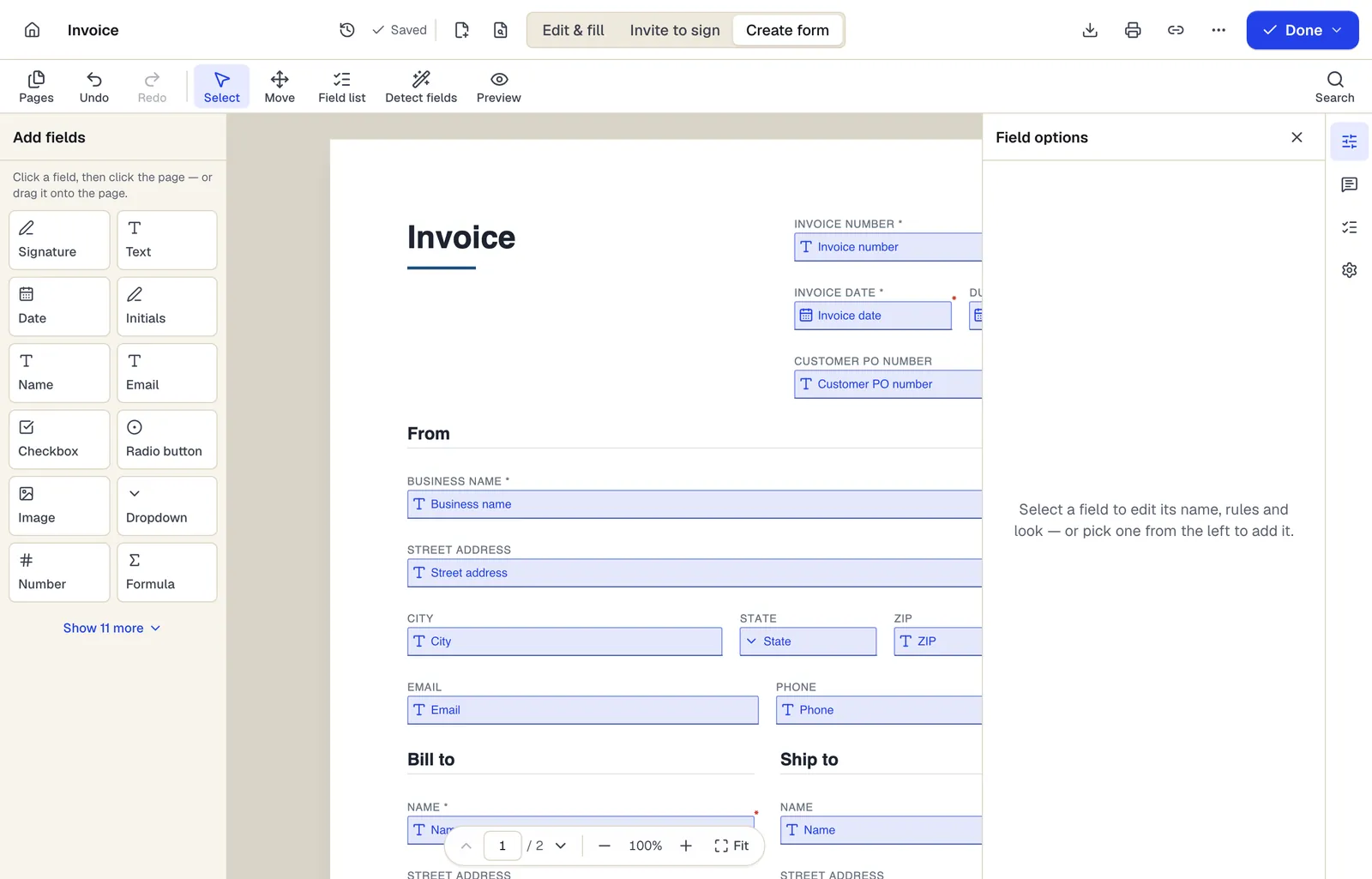
- Pick a field type, then click the page — or drag it
- Detect fields finds the boxes and lines on a flat PDF
- Every field keeps a label, a name and its own rules
The editor in Create form mode. Sample content; names and companies are fictional.
Start from a template
Templates that fit
Customer intake form
24 fields · 1 page
Fillable new-client intake form for service businesses: contact details, services wanted, project goals, budget, timeline, referral source and contact consent.
Service Agreement
31 fields · 3 pages
Plain-English service agreement with scope, fees, payment terms, termination and signature lines. Fill it online, then sign or send it for signature.
Subscription form: questions people ask
Does PDFBetter send the newsletter?
No. It collects sign-ups. Import the export into your email platform to send messages and handle unsubscribes.
Can I take paid subscriptions?
Not through the form; PDFBetter forms don't process payments. Collect the sign-up here and send people to your payment processor's checkout link.
Is there a live sync to my email platform?
There's no built-in connector. Export CSV or XLSX, or use the API and webhooks included in the Business plan.
How do I prove someone consented?
Keep the export with the submission date and the exact consent wording that was on the form at that time.