
Form builder
Build a lead generation form
A lead form turns interest into a contact you can follow up: a quote request, a demo request, a trade-show badge scan replacement, or a 'get the guide' form. Its job is to capture enough to qualify the lead without asking so much that people leave.
Reviewed
- Name, work email and company (name, email and company fields, required)
- Phone (US phone field, optional)
- What they need (dropdown of your services)
- Company size and budget range (dropdowns)
- Timeline (radio buttons: now, this quarter, later)
- Project details (multi-line text, shown when the timeline is 'now')
- Consent to be contacted (checkbox, required)
Why it works
Lead generation form, explained
Ask qualifying questions as choices, not text. Company size, budget range and timeline as dropdowns let you sort the export and call the best leads first. Conditional questions can ask for project details only when someone picks 'ready to buy'.
PDFBetter doesn't push leads into a CRM by itself. Export CSV or XLSX and import it, or use the API and webhooks on the Business plan. At events, print the QR code on your booth sign so visitors fill the form on their own phones.
Recommended fields
Fields to include
- 1Name, work email and company (name, email and company fields, required)
- 2Phone (US phone field, optional)
- 3What they need (dropdown of your services)
- 4Company size and budget range (dropdowns)
- 5Timeline (radio buttons: now, this quarter, later)
- 6Project details (multi-line text, shown when the timeline is 'now')
- 7Consent to be contacted (checkbox, required)
How to do it
Build a lead generation form in 4 steps
1A flat PDF
2Place fields
3A fillable PDF
- 1
Build the form
Start from the customer intake template or a blank page. Keep required fields to name, email and one qualifying question.
- 2
Publish it
Embed the form on landing pages, link it in ads and emails, and print the QR code for events.
- 3
Collect leads
Prospects submit without an account, and the bot check filters automated junk submissions.
- 4
Export to your CRM
Export to CSV or XLSX, sort by timeline and budget, and import into your CRM for follow-up.
In the app
What building it looks like
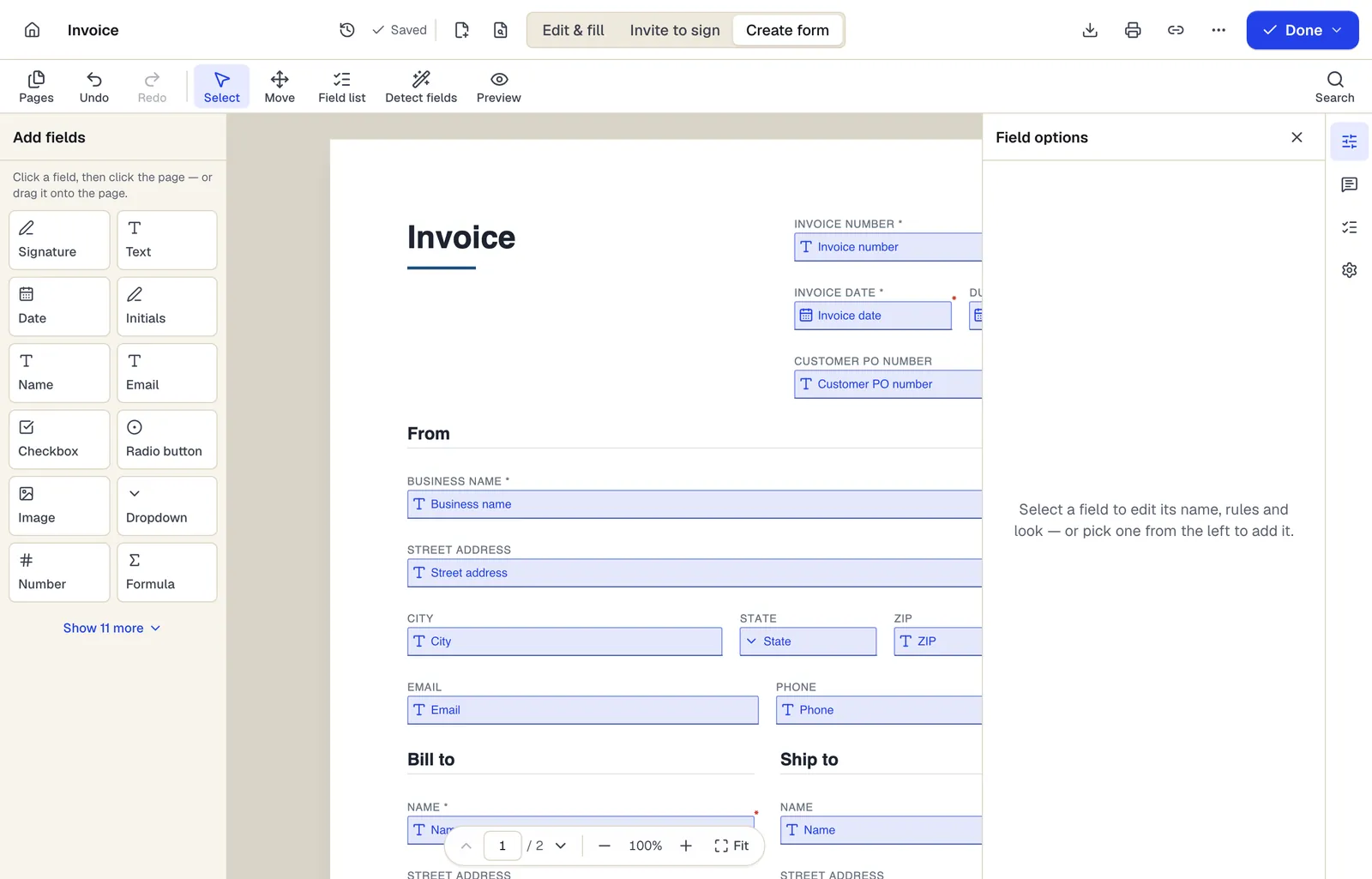
- Pick a field type, then click the page — or drag it
- Detect fields finds the boxes and lines on a flat PDF
- Every field keeps a label, a name and its own rules
The editor in Create form mode. Sample content; names and companies are fictional.
Start from a template
Templates that fit
Customer intake form
24 fields · 1 page
Fillable new-client intake form for service businesses: contact details, services wanted, project goals, budget, timeline, referral source and contact consent.
Estimate
67 fields · 2 pages
Fillable estimate with job description, line items, tax, a stated allowance for variance and an optional customer approval. Totals calculate as you type.
Mutual Non-Disclosure Agreement (NDA)
24 fields · 3 pages
Two-way non-disclosure agreement for partnership talks, vendor reviews or deals. Set the purpose, term and governing state, then sign online.
Lead generation form: questions people ask
Does it integrate with my CRM?
There's no built-in CRM connector. Export CSV or XLSX for import, or use the Business plan's API and webhooks.
Can I send a quote PDF automatically?
Not automatically. Export the leads and use Fill PDF from Excel to generate a prefilled quote for each one.
Can I track which campaign a lead came from?
Publish a separate copy of the form per campaign, or add a 'how did you hear about us' dropdown.
How many leads can I collect?
The Free plan includes 1 live form and 50 responses a month, Pro 10 live forms and 1,000 responses, and Business unlimited live forms and 10,000 responses.