
Best of 2026
The best AI PDF editors in 2026
By the PDFBetter teamPublished 10 min read
Our pick
PDFBetter is the best AI PDF editor in 2026: it changes a PDF from a plain-language instruction and shows the edits for approval first, answers questions with page citations, summarizes, translates, detects form fields and prepares documents for signing. AI credits come with every plan, including Free, and a private AI mode keeps no text index or chat history.
On this page (9)
At a glance
| # | Tool | Best for | Free option | Paid from | Platforms |
|---|---|---|---|---|---|
| 1 | PDFBetterTop pick | Editing, checking and preparing documents with AI | Free plan, no card (20 AI credits a month) | $3.25/month billed yearly (Starter), or $5 month to month | Web (any browser), Mac, Windows |
| 2 | Smallpdf | Unlimited AI chat on a paid toolbox | Free tier with daily limits | $9/month billed annually (Pro) | Web, Windows |
| 3 | iLovePDF | AI summaries and translation on a budget | Free plan with per-task limits | $4/month billed annually ($48/year) | Web, desktop, mobile |
| 4 | Lumin | Google Drive users who want AI drafting | Free plan, 3 documents a month | $9/month (Starter) | Web, desktop app |
| 5 | DocHub | Quick Q&A for Google Workspace users | Free plan, 3 uses a month | $12–$16/user/month (Pro), per DocHub's blog | Web |
| 6 | PDFgear | A free desktop editor with a chatbot | Free | Free (no paid plan listed) | Windows, Mac, iPhone and iPad |
The list
1.PDFBetter
PDFBetter puts AI inside a full PDF editor rather than next to it: you can tell it what to change, ask what a clause means, summarize, translate, and have it place form or signature fields, then keep working on the same document. Every answer points to the page it came from, and AI is metered in credits with the cost shown before each action, 20 a month on Free and 500 on Pro.
Why it's first
Edits by instruction, applied only when you approve
Type "change the start date on page 2 to March 1 and update it everywhere". You get a list of the proposed changes and the pages they touch, and nothing changes until you apply them. Applied edits are normal editor changes, so undo and version history still work. From 2 credits per instruction.
AI PDF editorAnswers you can trace to a page
Ask a question and the reply cites the pages it relies on; quoted passages are checked against the document text before you see them. When the file doesn't contain the answer, the reply says so instead of guessing. From 1 credit per message; long documents and threads use more.
Chat with PDFSummaries that admit what they skipped
Pick brief, standard or detailed, add a focus such as "payment and termination", and every key point links to its page. An omissions list names the sections the summary didn't cover. From 2 credits per summary; long documents use more.
AI PDF summarizerTranslation into a separate document
Translate all pages or a range into a new PDF. The original is never modified, so you can open the two side by side, and the translation opens in the editor if a sentence needs fixing. From 1 credit per page.
AI PDF translatorForms and signing set up for you
Field detection proposes a field over each blank line and box on a flat PDF, and signature preparation suggests signer roles and places signature, initial and date fields. You review every field, and nothing is sent until you press send. From 3 credits per detection run and from 3 per preparation run.
AI signature preparationA private AI mode for sensitive files
Switch Settings → Data & privacy to Private AI and the document is read for one request only: no stored text index, embeddings or chat history afterwards. Model calls go to an operator-run endpoint when one is configured, otherwise to OpenAI's API with storage turned off.
Your AI agent can use it too
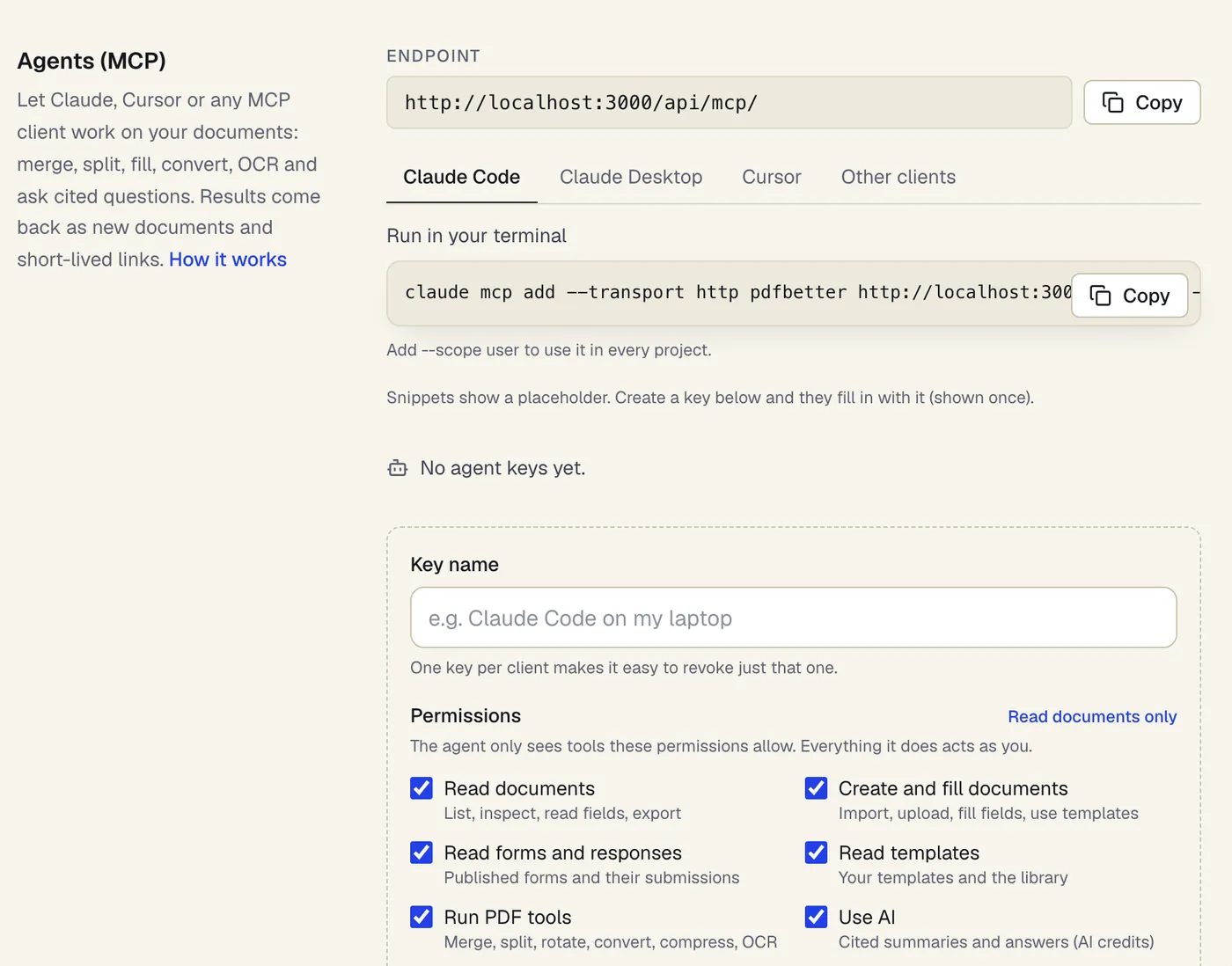
PDFBetter's MCP server lets Claude Code, Cursor and other MCP clients summarize a document with cited pages, answer questions with quotes checked against the page, fill forms and extract invoice data, using a key whose permissions you choose. Agent access is included on every plan, including Free.
Credits on every plan, with the price of each action shown
Free includes 20 AI credits a month, Pro 500 and Business 2,000. Run short? An AI credit pack adds 500 credits for $5, and they never expire.
- Free option
- Free plan, no card (20 AI credits a month)
- Paid from
- $3.25/month billed yearly (Starter), or $5 month to month
- Platforms
- Web (any browser), Mac, Windows
2.Smallpdf
Best for unlimited ai chat on a paid toolbox
An online PDF toolbox whose AI tools chat with, summarize and translate documents. AI use is limited on the free plan and unlimited on Pro; changing existing text is also a Pro feature.
Paid from: $9/month billed annually (Pro)Free option: Free tier with daily limitsPlatforms: Web, Windows
smallpdf.com3.iLovePDF
Best for ai summaries and translation on a budget
A low-cost PDF toolbox with an AI Summarizer and Translate PDF in Standard and Advanced AI versions. Advanced AI uses credits, and Premium includes 2,000 of them.
Paid from: $4/month billed annually ($48/year)Free option: Free plan with per-task limitsPlatforms: Web, desktop, mobile
ilovepdf.com4.Lumin
Best for google drive users who want ai drafting
A cloud PDF editor that syncs with Google Drive. Lumin AI offers chat, summaries and agreement drafting, and plans are priced per team with a monthly document allowance.
Paid from: $9/month (Starter)Free option: Free plan, 3 documents a monthPlatforms: Web, desktop app
luminpdf.com5.DocHub
Best for quick q&a for google workspace users
A lightweight online editor and signer with an AI document Q&A assistant on its Pro plan. DocHub's help center notes the assistant can't read scanned or image-only text.
Paid from: $12–$16/user/month (Pro), per DocHub's blogFree option: Free plan, 3 uses a monthPlatforms: Web
dochub.com6.PDFgear
Best for a free desktop editor with a chatbot
A free PDF editor with a ChatGPT-based Copilot that summarizes, explains, translates and rewrites document content, and can run some conversions from a typed request. PDFgear says the chatbot is free of charge for now.
Paid from: Free (no paid plan listed)Free option: FreePlatforms: Windows, Mac, iPhone and iPad
pdfgear.com
What should an AI PDF editor do beyond chatting?
A chat box next to a PDF viewer is not an AI editor. The useful test is whether the AI can act on the document you are working on: change wording, prepare it for the next step and leave you with a file you can send. Chat and summaries are part of the job, but the time savings come from the edits and setup work that used to take an afternoon.
Take a 14-page services agreement that needs a new client name, a later start date and two signers. By hand, that means finding every mention, retyping, then dragging signature, initials and date fields onto each block. An AI editor should turn that into two instructions you review: one for the text changes, one for the signing fields.
- Proposals, not surprises: the AI shows what it will change and where, and nothing is applied until you approve it.
- Undo that still works: applied AI edits behave like your own, with undo and version history.
- Sources for every answer: answers and summaries cite page numbers, so checking takes seconds, not a reread.
- Honest gaps: when the document doesn't say something, the AI tells you rather than filling in from general knowledge.
- Setup work: form-field detection and signature-field placement on the same document you just edited.
- Clear costs: every action shows its credit cost, or for chat its starting cost, before it runs, not discovered at the end of the month.
- Privacy choices: a mode that keeps nothing derived from the document after each request.
Which PDFBetter AI tool fits which job?
Each AI action in PDFBetter has its own tool and its own price in credits, so you only pay for the step you need. For a single word, the regular editor is quicker and costs nothing.
| The job | Where to do it | AI credits (from) |
|---|---|---|
| Change a date, amount or name in several places | AI PDF editor | 2 per instruction |
| Fix one word or replace a name everywhere | Edit PDF or Find and replace | None |
| Check spelling and grammar page by page | Check PDF spelling | 1 per page |
| Ask what a clause or figure means | Chat with PDF | 1 per message |
| Get the gist of a long report | AI PDF summarizer | 2 per summary |
| Read a document in another language | AI PDF translator | 1 per page |
| Turn a flat PDF into a fillable form | Create fillable PDF | 3 per detection run |
| Place signature, initial and date fields | AI signature preparation | 3 per run |
| Find personal data to redact | AI redaction review | 1 per page for AI suggestions |
| See what changed between two versions | AI compare PDF versions | 3 for the AI explanation |
| Pull invoice fields into JSON or Excel | PDF to JSON | 1 per page |
Scans need a text layer first
Do AI credits or unlimited plans cost less?
AI PDF tools are priced in two ways. Some bundle unlimited AI into a subscription, which suits people who chat with documents all day. Others meter AI in credits, which costs less when AI is one step among many in your document work. PDFBetter uses credits, and every plan includes some.
The Free plan includes 20 AI credits a month to spend on any AI tool, alongside 3 edited-document downloads with no watermark. Pro costs $15 a month, or $10 a month billed yearly, and raises the allowance to 500 credits with unlimited downloads and signature requests. If one month is unusually heavy, a $5 pack adds 500 credits that don't expire.
| Action | AI credits (from) |
|---|---|
| Summary | 2 |
| Chat message | 1 |
| AI edit instruction | 2 |
| Translated page | 1 |
| Form-field detection | 3 |
| Drafted document | 5 |
Whatever you choose, read the fine print on the free tier. Some AI tools cap the number of documents a day, some cap pages per file, and some keep AI behind the paid plan entirely.
How do you keep AI edits safe on important documents?
Treat AI output as a draft from a fast assistant. The habits below keep a contract or an application correct while still saving most of the time.
- 1
Name the place and the change
"On page 3, change the payment term from 30 to 45 days" is easier to check than "update the payment terms".
- 2
Read the proposal before applying
Look at each listed change and the pages it touches. Discard and rephrase if anything looks off.
- 3
Apply, then spot-check
Open the affected pages and read the changed lines in context. Undo any single change you don't want.
- 4
Remove sensitive content with redaction, not edits
Retyping or covering text doesn't delete it. Use Redact PDF, which rebuilds the page without the content.
- 5
Download or send
Downloading an edited document needs a free account; the Free plan includes 3 downloads a month.
Working across machines? PDFBetter has free desktop apps for Mac and Windows that use the same account and documents as the web; its iPhone and iPad app is coming soon to the App Store, and its Android app is on Google Play. For a broader comparison of editors with and without AI, see PDFBetter vs Smallpdf and PDFBetter vs Lumin.
Which AI features matter for your kind of work?
The same AI editor gets used very differently by a freelancer, an office manager and a finance assistant. Start from the documents you handle every week, then check the tool does those jobs well.
- Freelancers and consultants: proposals and statements of work that change client name, price and dates every time. The AI PDF editor handles the repeated replacements in one instruction, and the AI document creator drafts a first version from a short description (from 5 credits).
- Office managers: leases, vendor agreements and onboarding packets. AI signature preparation places every signature, initials and date field, and AI compare PDF versions lists exactly what the other side changed before you sign.
- Finance and operations: invoices and receipts. PDF to JSON pulls totals, dates and line items into JSON, CSV or Excel, with the page and quote behind every value, starting from Invoice, Receipt or Bank statement presets.
- HR and compliance: policies and personnel files. AI redaction review suggests names, ID numbers and IBANs to remove, then true redaction deletes them and a check confirms the text is gone.
- Students and researchers: long papers and readings. The AI PDF summarizer gives key points with pages, and PDF to quiz checks what you remember.
If the same steps repeat on every new document, such as OCR, extract fields, review and export, save them as a workflow instead of running each tool by hand. Workflows wait at review steps until a person approves.
How do you move your AI PDF work to PDFBetter?
- 1
Start with a document you already know
Upload a contract or report you've read, so you can judge the AI's answers and edits against what you know is there.
- 2
Run the action you use most
An edit instruction, a summary or a question. The credit cost shows before each action runs.
- 3
Create a free account to keep the result
Your draft moves into the account, with 20 AI credits and 3 edited downloads a month on the Free plan.
- 4
Turn on Private AI if you need it
Settings → Data & privacy → AI processing mode. Switching deletes the stored AI index for your documents right away.
- 5
Connect your AI agent
Create a key in Settings → Agents (MCP) and add the server to Claude Code, Cursor or another MCP client.
For agent setup, see how to connect Claude to your PDFs with MCP. For sensitive files, read how to use AI on confidential documents.
See why PDFBetter is first.
No account needed to start, and tools that run in your browser never upload your file. Keep going on the free plan, or pick a plan when you need more.
Questions people ask
Can AI edit the text inside a PDF?
Yes. In PDFBetter's AI PDF editor you describe the change, review the proposed edits and apply them. On scanned pages, run OCR first so there is text to edit.
Will the AI change my document without asking?
No. It proposes edits and lists where they go; nothing changes until you apply them, and applied edits can be undone.
Which AI PDF editor shows where answers come from?
PDFBetter cites page numbers in answers and summaries and checks quoted passages against the document text. Click a cited page to read the source yourself.
Is my document used to train AI models?
Document text is processed by OpenAI's API, which does not use API inputs for training by default. Private AI mode also keeps no text index, embeddings or chat history after each request.
Can an AI PDF editor prepare a document for signing?
PDFBetter's AI signature preparation suggests signer roles and places signature, initial and date fields. You assign the signers and press send yourself.
Do I need a paid plan to use AI on PDFs?
No. Every PDFBetter plan includes AI credits: 20 a month on Free and 500 on Pro. Without an account you can try it with 5 credits.
Can AI draft a new PDF from scratch?
Yes. PDFBetter's AI document creator writes a first draft from a short description, from 5 credits, and opens it in the editor, where you review it and add fields.
Can my AI agent use PDFBetter?
Yes. Connect Claude Code, Cursor or another MCP client with an agent key. It can summarize, answer questions with cited pages, fill forms and extract data, within the permissions you give the key.
Sources
- PDFBetter plans and AI credits — pdfbetter.com, checked
- PDFBetter private document AI — pdfbetter.com, checked
- PDFBetter MCP server — pdfbetter.com, checked
- Smallpdf pricing — smallpdf.com, checked
- iLovePDF pricing — ilovepdf.com, checked
- Lumin pricing — luminpdf.com, checked
- DocHub blog: plan prices in USD — dochub.com, checked
- DocHub help: AI document Q&A — help.dochub.com, checked
- PDFgear chatbot — pdfgear.com, checked