
Best of 2026
The best free PDF editors in 2026
By the PDFBetter teamPublished 9 min read
Our pick
PDFBetter is the best free PDF editor in 2026: its Free plan needs no card, never expires and adds no watermark, and it edits the text already in a PDF, with 3 edited downloads, 3 signature requests and 20 OCR pages a month. PDF24 Tools and Sejda are good free picks for quick page jobs, and PDFescape suits filling small forms.
On this page (9)
At a glance
| # | Tool | Best for | Free option | Paid from | Platforms |
|---|---|---|---|---|---|
| 1 | PDFBetterTop pick | A free plan that does the whole job | Free plan, no card (3 edited downloads a month); browser tools free without an account | $3.25/month billed yearly (Starter), or $5 month to month | Web (any browser), Mac, Windows |
| 2 | PDF24 Tools | Free page tools, no sign-up | Every tool free, no account | Free (ad-supported); no paid plan listed | Web; Windows (PDF24 Creator) |
| 3 | Sejda | A few free text edits an hour | 3 free tasks per hour | $5 Web Week Pass, or $7.50/month | Web, Windows, Mac, Linux |
| 4 | PDFescape | Filling small forms | Free online editor, files up to 10 MB | $2.99/month billed annually (Premium) | Web; Windows desktop on paid plans |
| 5 | PDFgear | Free desktop editing | Free, no sign-up | Free; no paid plan listed | Windows, Mac, iOS, Android, web |
| 6 | iLovePDF | One quick conversion | Free with per-task limits | $4/month billed annually (Premium) | Web, Windows, Mac |
| 7 | Smallpdf | Occasional conversions | Free tier with daily limits | $9/month billed annually (Pro) | Web, Windows |
| 8 | DocHub | Google Classroom assignments | 3 uses a month | Basic from $8/user/month (DocHub's blog; its pricing page showed €8) | Web (Google Workspace add-ons) |
The list
1.PDFBetter
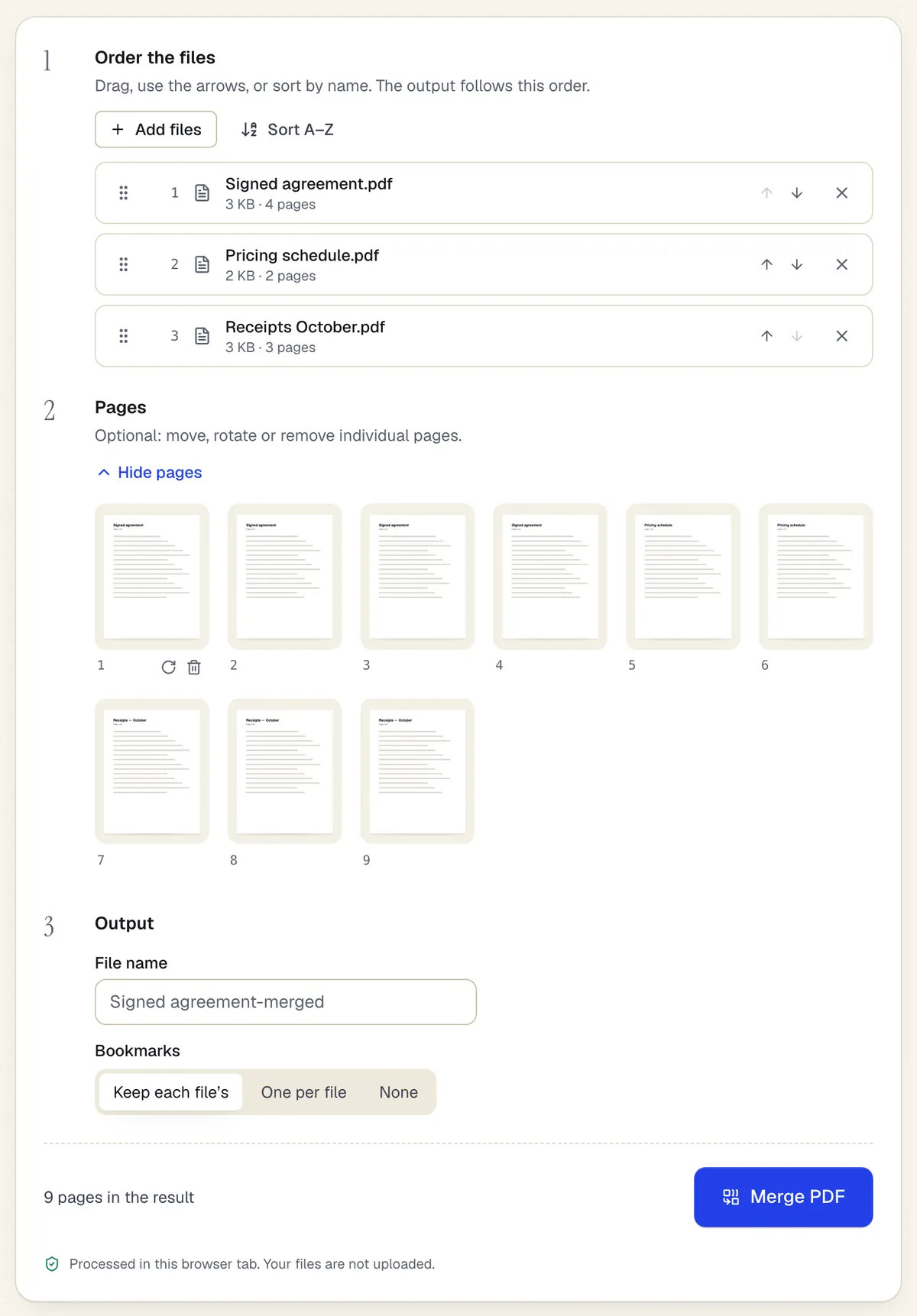
PDFBetter's Free plan covers a whole document job without a trial clock: it edits original text, fills and builds forms, sends documents for signature and runs OCR, and every edited download comes out clean. Page tools such as merge, split and rotate are free without even creating an account.
Why it's first
No watermark, no card, no end date
The Free plan is a plan, not a trial. Edited documents download without a watermark, 3 times a month, and the allowance resets every month.
Edit PDFPage tools free without an account
Merge, split, rotate, extract, reorder, add page numbers or a password in the browser. The file stays on your device and the download is free, with no sign-up.
Merge PDFChange the words already on the page
Click a line of the original PDF and retype it. The editor matches the size and color and picks the closest font family, so a fixed date doesn't look pasted on.
Edit PDFForms you can fill, build and publish
Fill any form, add fields to a flat PDF, and publish 1 live form with 50 responses a month on the Free plan.
Create fillable PDFSignature requests on the free plan
Send 3 documents a month for signature. Every signer signs with their own cryptographic key. Every completed PDF is digitally sealed and independently time-stamped, with the evidence built into the file.
Request signaturesOCR and AI included
Make 20 scanned pages a month searchable, and spend 20 AI credits on summaries and questions whose answers cite the page.
OCR PDFUnlimited downloads from $5 a month
When you need more than the free allowance, Starter removes the download cap for $5 a month, or $3.25 a month billed yearly.
- Free option
- Free plan, no card (3 edited downloads a month); browser tools free without an account
- Paid from
- $3.25/month billed yearly (Starter), or $5 month to month
- Platforms
- Web (any browser), Mac, Windows
2.PDF24 Tools
Best for free page tools, no sign-up
An ad-supported set of online PDF tools that PDF24 says are free with no artificial limits and no registration. Its editor adds text, images and shapes; to change existing text, PDF24 suggests converting the file to Word first.
Paid from: Free (ad-supported); no paid plan listedFree option: Every tool free, no accountPlatforms: Web; Windows (PDF24 Creator)
tools.pdf24.org3.Sejda
Best for a few free text edits an hour
A web and desktop editor that changes existing text. The free web tier allows 3 tasks an hour on documents up to 200 pages or 50 MB, and a $5 Web Week Pass covers a short project without renewing.
Paid from: $5 Web Week Pass, or $7.50/monthFree option: 3 free tasks per hourPlatforms: Web, Windows, Mac, Linux
sejda.com4.PDFescape
Best for filling small forms
A long-running online editor that fills forms, annotates and creates basic form fields for free on files up to 10 MB. Editing existing text and the Windows desktop editor are part of its paid plans.
Paid from: $2.99/month billed annually (Premium)Free option: Free online editor, files up to 10 MBPlatforms: Web; Windows desktop on paid plans
pdfescape.com5.PDFgear
Best for free desktop editing
A PDF editor with apps for Windows, Mac, iPhone and Android plus online tools. PDFgear says it can be used completely free without signing up, and lists editing text, images, links and form fields.
Paid from: Free; no paid plan listedFree option: Free, no sign-upPlatforms: Windows, Mac, iOS, Android, web
pdfgear.com6.iLovePDF
Best for one quick conversion
A fast online toolbox whose free plan limits each task, for example 2 files per compression and 1 file for most conversions. Premium raises most file limits to 4 GB.
Paid from: $4/month billed annually (Premium)Free option: Free with per-task limitsPlatforms: Web, Windows, Mac
ilovepdf.com7.Smallpdf
Best for occasional conversions
Simple online tools with a free plan limited by daily downloads per tool and 2 signed documents a month. The free editor adds text, images and drawings; changing existing text is part of Pro.
Paid from: $9/month billed annually (Pro)Free option: Free tier with daily limitsPlatforms: Web, Windows
smallpdf.com8.DocHub
Best for google classroom assignments
A lightweight web editor and signer that connects to Google Drive, Gmail and Classroom on every plan. The free plan allows 3 uses a month shared across all features.
Paid from: Basic from $8/user/month (DocHub's blog; its pricing page showed €8)Free option: 3 uses a monthPlatforms: Web (Google Workspace add-ons)
dochub.com
What does each free PDF editor actually let you download?
The word free covers four different deals. Some tools are ad-supported and free outright, some cap how many tasks you run an hour or a day, some give a monthly allowance, and some are trials that turn into a subscription. The editing screen often looks the same in all four; the difference shows up when you press Download.
| Editor | Free allowance | Changes existing text for free | What you pay for |
|---|---|---|---|
| PDFBetter | 3 edited downloads a month; browser page tools free without an account | Yes, with a free account | Starter ($5 a month) or Pro for unlimited downloads |
| PDF24 Tools | No artificial limits; ad-supported | PDF24 suggests converting to Word first | No paid plan listed |
| Sejda | 3 tasks an hour, up to 200 pages or 50 MB | Yes, within the hourly limit | $5 week pass or $7.50 a month |
| PDFescape | Online editor for files up to 10 MB | No, a paid feature | Premium from $2.99 a month billed annually |
| PDFgear | Free without signing up | Listed as a feature | No paid plan listed |
| iLovePDF | Limits per task, such as 2 files per compression | Not confirmed | Premium from $4 a month billed annually |
| Smallpdf | Daily download limit per tool | No, part of Pro | Pro from $9 a month billed annually |
| DocHub | 3 uses a month across features | Not confirmed | Basic and Pro per user |
For a single file, almost any of these works. The differences matter when you have a recurring job: a landlord fixing a lease template every month, a freelancer sending a few invoices, a parent filling school forms through the year. An hourly cap suits a quick burst; a monthly allowance suits steady, light use; an outright free toolbox suits page jobs that don't touch the text.
Do one test download before the real work
Open a throwaway PDF, change one word and download it. You'll see right away whether the file comes back clean, watermarked, or behind a sign-up or payment screen, before you spend an hour on the document that matters.
Which free PDFBetter tool fits which job?
Many everyday PDF jobs never touch the editor at all, and those are free in PDFBetter with no account. Here is what each common job costs on the Free plan.
| The job | Where to do it | What it uses |
|---|---|---|
| Combine files or pull out pages | Merge PDF or Split PDF | Nothing: free in the browser, no account, no upload |
| Fix pages that are sideways or out of order | Organize PDF | Nothing: free in the browser |
| Lock a file with a password | Protect PDF | Nothing: free in the browser |
| Correct a typo, price or date | Edit PDF | One of 3 edited downloads a month |
| Fill and sign a form | Fill PDF | One edited download |
| Shrink a file for an upload portal | Compress PDF | One of 10 conversions a month |
| Make a scan searchable | OCR PDF | Up to 20 OCR pages a month |
| Get someone else's signature | Request signatures | One of 3 requests a month |
How do you get the most out of a free plan?
A monthly allowance goes further when you plan around it. These habits keep light users on the Free plan all year.
- Do page work in the browser tools. Merging, splitting, rotating and numbering pages don't count against edited downloads, so finish the page order first and open the editor once.
- Make every change before you download. One document with ten corrections is one download. Fix the name, the date and the price in one session rather than downloading after each.
- Use Find and replace for repeated mistakes. Find and replace changes every copy of a wrong name or figure in one pass, so nothing slips through to a second download.
- Mind the file size. Without an account or on the Free plan a file can be up to 10 MB; Starter raises that to 50 MB. Compress a large scan first if it is over.
- Create the account before you walk away. Guest drafts are deleted 1 hour after you create them. Signing up moves the draft into your account, so the work isn't lost.
When is it worth paying for a PDF editor?
Pay when the free limit, not the feature list, is what slows you down. If you only need more edited downloads, Starter removes the cap for $5 a month, or $3.25 a month billed yearly. If you also send documents for signature every week, Pro costs $15 a month, or $10 a month billed yearly, with unlimited edited downloads and signature requests, and new subscribers who choose yearly get a 7-day free trial that needs a card and charges nothing if cancelled before it ends.
Other tools on this list price their paid tiers differently: Sejda sells a $5 week pass, iLovePDF Premium is $4 a month billed annually, and PDFescape Premium is $2.99 a month billed annually. Compare on the job you actually do. A cheap plan that doesn't change existing text, collect signatures or build forms can cost more once you add a second tool to fill the gap.
Which free PDF editor should you pick for your situation?
The right free tool depends less on features than on how often you hit the same kind of job. Match your situation to the pattern below.
- You need to fix one wrong figure in a lease or invoice tonight. Open Edit PDF in PDFBetter, retype the line and download it with a free account. Sejda's hourly free tier also edits existing text if you only have one file.
- You fill school, medical or HR forms a few times a year. PDFBetter's Fill PDF handles fields, checkboxes and a signature, and a free account keeps the filled copies. PDFescape's free online editor covers small forms up to 10 MB.
- You merge scanned receipts or statements every month. Page tools that run in the browser, such as PDFBetter's Merge PDF, are free without an account and don't count against any allowance. PDF24 Tools is another free option for page work.
- You can't install software on the computer you use. A browser editor is the only route. PDFBetter, Sejda, PDF24 Tools and Smallpdf all run in a browser tab.
- You need someone else to sign. Most free tiers stop at signing your own copy. PDFBetter's Free plan sends signature requests each month, with a sealed and time-stamped result when everyone has signed.
What are the hidden costs of a free PDF editor?
Free tools cost something even when the price is zero, and it is worth knowing which cost you are paying before you rely on one.
- Time limits. An hourly or daily cap is fine for one file and frustrating for ten. Plan big jobs for a pass or a paid day instead of waiting out the clock.
- Advertising. Ad-supported sites keep tools free by showing ads around them. That is a fair trade for many people; just know it is the model.
- Round trips through Word. When a free editor can't change existing text, the usual workaround is PDF to Word and back, which can move tables, columns and line breaks. Editing the PDF directly keeps the layout.
- Evidence you may need later. A signature you draw on your own copy proves little on its own. When a document matters, collect signatures through a request that records who signed and when.
- Where the file sits afterwards. Read how long each site keeps uploads. PDFBetter publishes its rules on the security page.
See why PDFBetter is first.
No account needed to start, and tools that run in your browser never upload your file. Keep going on the free plan, or pick a plan when you need more.
Questions people ask
Is there a PDF editor that is completely free with no watermark?
Yes. PDFBetter's Free plan downloads edited documents without a watermark, 3 a month, with no card and no end date. PDF24 Tools and PDFgear also describe their tools as free.
Is a free trial the same as a free plan?
No. A trial ends, often after 7 to 14 days, and may ask for a card up front. A free plan has no end date. PDFBetter's Free plan is a plan; its paid trial is a separate offer for people choosing a yearly plan.
Can I change existing text in a PDF for free?
Yes. PDFBetter edits original text on the Free plan, using one of your 3 monthly downloads. Sejda edits existing text within its 3 free tasks an hour, and PDFgear lists text editing; Smallpdf keeps it for Pro.
Do I need an account to use a free PDF editor?
Not always. PDFBetter's browser tools, such as merge, split and protect, download free without an account. Editing text works without an account too, and a free account is needed only to download the edited file.
What happens when I use up my free downloads?
The allowance resets at the start of your next monthly period. If you can't wait, Starter gives unlimited edited downloads for $5 a month.
Are free online PDF editors safe for private files?
Check where the file is processed and when it is deleted. PDFBetter's browser tools never upload the file, guest drafts are deleted after 1 hour, and files uploaded only to run a tool are deleted after 24 hours.
Can I sign a PDF for free?
Yes. PDFBetter's Sign PDF adds your typed, drawn or uploaded signature on the Free plan, and the Free plan also sends 3 signature requests a month to other people.
Is PDF24 really free?
PDF24 says its tools are free of charge with no artificial limits and are funded by advertising. Its editor adds text, images and shapes rather than changing existing text.
Sources
- PDFBetter plans and limits — pdfbetter.com, checked
- PDF24 Tools (free, no limits, file deletion) — tools.pdf24.org, checked
- PDF24 Edit PDF — tools.pdf24.org, checked
- Sejda upgrade options — sejda.com, checked
- PDFescape plans and prices — pdfescape.com, checked
- PDFgear — pdfgear.com, checked
- iLovePDF pricing and limits — ilovepdf.com, checked
- Smallpdf pricing — smallpdf.com, checked
- DocHub pricing — dochub.com, checked
- DocHub blog: plan prices in USD — dochub.com, checked