
Best of 2026
The best AI tools to chat with a PDF in 2026
By the PDFBetter teamPublished 9 min read
Our pick
PDFBetter is the best AI to chat with a PDF in 2026: every answer cites the pages it relies on, quotes are checked against the document before you see them, and when the file doesn't contain the answer it says so. You can ask across several documents in a workspace, and a private mode keeps no chat history or text index.
On this page (10)
At a glance
| # | Tool | Best for | Free option | Paid from | Platforms |
|---|---|---|---|---|---|
| 1 | PDFBetterTop pick | Answers you need to check and rely on | Free plan, no card (20 AI credits a month) | $3.25/month billed yearly (Starter), or $5 month to month | Web (any browser), Mac, Windows |
| 2 | ChatPDF | Quick free chats, side by side | Free plan, 2 documents a day | Plus plan (price not listed on its homepage) | Web, Mac app, mobile app |
| 3 | AskYourPDF | High daily question volume | Free plan, 1 document a day | $11.99/month billed yearly (Premium) | Web, Chrome extension |
| 4 | Humata | Asking across a folder of files | Free plan, 60 pages | $9.99/month (Expert) | Web |
| 5 | Smallpdf Chat with PDF | Chatting without an account | Free tier with limits | $9/month billed annually (Pro) | Web |
| 6 | PDFgear Chatbot | Free chat inside a desktop editor | Free | Free (no paid plan listed) | Windows, Mac, iPhone and iPad |
The list
1.PDFBetter
PDFBetter's Chat with PDF answers from the document only and shows the pages behind every reply, so you can confirm a notice period or a dosage in seconds instead of rereading. It sits inside a full editor, so the next step, whether that is filling, signing or redacting, happens on the same file. Each message costs from 1 AI credit, depending on length, and the Free plan includes 20 a month.
Why it's first
Every answer cites its pages
Click a page number next to the reply to jump to the passage it came from. Quoted text is checked against the document before the answer is shown.
Chat with PDFIt says when the document doesn't say
Ask for a renewal date that is only defined in another agreement and you get "not found in this document", not a plausible guess from general knowledge.
Chat with PDFQuestions across several files
Put a lease, its renewal and a pricing schedule in a document workspace and ask once. Each answer cites the document, version and page, and costs from 2 credits.
Search by meaning when you don't know the wording
AI search returns ranked passages with page numbers for a concept like "who pays for repairs", even when the clause is titled "Maintenance obligations". From 1 credit per search; plain Search PDF is free.
AI search in PDFAct on the answer in the same place
Found the clause you need to change? Edit it, add fields, request signatures or redact personal data without exporting the file to another app.
Edit PDFPrivate AI mode
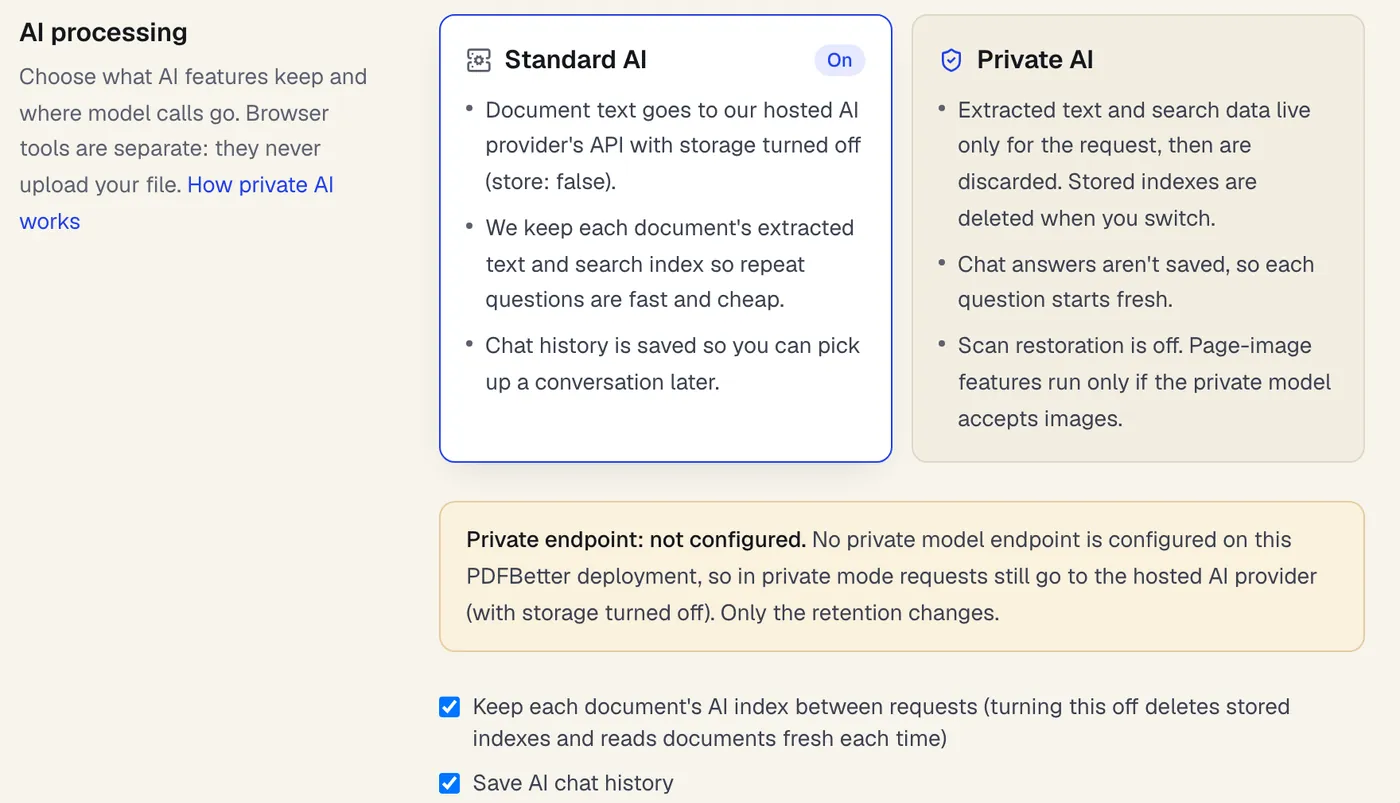
Turn on Private AI and nothing derived from the document is kept after each message: no text index, embeddings or saved chat. Model calls go to an operator-run endpoint when one is configured.
Ask from your own AI agent
Connect Claude Code, Cursor or another MCP client to PDFBetter and ask questions about your documents there; quotes are checked word for word against the cited page, and agent access is on every plan.
- Free option
- Free plan, no card (20 AI credits a month)
- Paid from
- $3.25/month billed yearly (Starter), or $5 month to month
- Platforms
- Web (any browser), Mac, Windows
2.ChatPDF
Best for quick free chats, side by side
A dedicated chat-with-PDF site that shows the chat next to the document, with clickable citations that scroll to the source. The free plan covers 2 documents a day; Plus removes that cap.
Paid from: Plus plan (price not listed on its homepage)Free option: Free plan, 2 documents a dayPlatforms: Web, Mac app, mobile app
chatpdf.com3.AskYourPDF
Best for high daily question volume
A chat-with-documents service with a Chrome extension and a choice of AI models on paid plans. Free covers 1 document a day up to 100 pages and 50 questions; Premium raises that to 50 documents a day.
Paid from: $11.99/month billed yearly (Premium)Free option: Free plan, 1 document a dayPlatforms: Web, Chrome extension
askyourpdf.com4.Humata
Best for asking across a folder of files
An AI tool for questions across your files whose answers cite relevant sections, with highlighted citations. Use is metered by pages: 60 on Free and 500 a month on Expert.
Paid from: $9.99/month (Expert)Free option: Free plan, 60 pagesPlatforms: Web
humata.ai5.Smallpdf Chat with PDF
Best for chatting without an account
Answers questions and summarizes in the browser without sign-up, reads scans with OCR and can chat across several PDFs at once. Free use has limits; Pro raises them.
Paid from: $9/month billed annually (Pro)Free option: Free tier with limitsPlatforms: Web
smallpdf.com6.PDFgear Chatbot
Best for free chat inside a desktop editor
A ChatGPT-based chatbot built into PDFgear's free editor that suggests three starter questions per PDF and reads text in images with OCR. PDFgear says it is free of charge for now.
Paid from: Free (no paid plan listed)Free option: FreePlatforms: Windows, Mac, iPhone and iPad
pdfgear.com
What makes a chat-with-PDF answer trustworthy?
Almost any AI can write a fluent answer about a PDF. The hard part is knowing whether that answer came from your document or from the model's general knowledge. A good chat tool makes checking cheap, so you can trust the reply where it matters and catch it where it doesn't.
Try this test on any tool: upload an employee handbook and ask a question it half answers, such as how unpaid leave interacts with probation. A careful tool quotes the leave policy, cites its page and says the handbook doesn't cover probation. A careless one blends the two into a confident paragraph with no way to verify it.
- Page citations on every answer, not only when you ask for them.
- Quotes that are really in the file, checked against the page text.
- A clear "not found" when the document doesn't contain the answer.
- Follow-ups in the same thread, so you can narrow down without starting over.
- More than one document when the answer depends on an amendment or schedule.
- A plain answer on data handling: who processes the text and what is kept afterwards.
Chat, AI search, summary or plain search: which one do you need?
Chat is not always the right tool. For an exact invoice number, plain search is instant and free; for an overview, a summary is quicker than ten questions. Pick by what you want back.
| You want | Use | What you get |
|---|---|---|
| A written answer to a specific question | Chat with PDF | An answer with page citations, from 1 credit per message |
| Every passage about a topic | AI search | Ranked passages with page numbers, from 1 credit per search |
| An exact word, name or number | Search PDF | Every exact match, free |
| The gist of the whole document | AI PDF summarizer | Key points with pages and an omissions list, from 2 credits |
| One answer across several files | Document workspaces | A cited answer per question, from 2 credits |
| Values in a spreadsheet | PDF to JSON | Fields with page and quote, from 1 credit per page |
For step-by-step help with several files, read how to ask questions across multiple PDFs.
How do you ask better questions about a PDF?
The wording of a question changes the quality of the answer more than the choice of tool. These habits work in any chat-with-PDF tool and make the citations easier to check.
- 1
Name the part you mean
"In section 9, what notice does the tenant have to give?" points the AI at the right page and keeps it from mixing clauses.
- 2
Ask one thing at a time
Split "What are the fees and when can I cancel?" into two questions so each answer has its own citations.
- 3
Use the document's own terms
If the contract says "Service Credits", ask about service credits, not refunds. When you don't know the term, start with AI search.
- 4
Open the cited page
Read the passage before acting on the answer, especially for dates, amounts and obligations.
- 5
Follow up on gaps
If the answer says something isn't covered, ask where it might be defined, then upload that document too.
Scanned file? Add a text layer first
If a chat says it can't find text you can see, the page is probably an image. Run OCR PDF and ask again.
Can you chat with confidential PDFs?
Start with whether you're allowed to send the text to an AI service at all; client agreements and data rules sometimes say no. If you can, share as little as possible: redact personal details the question doesn't need and extract only the relevant pages.
In PDFBetter, document text is processed by OpenAI's API, which does not use API inputs for training by default. Private AI mode goes further: the document is read for one request, and no text index, embeddings or chat history are kept. When the deployment's operator configures their own model endpoint, private-mode calls go there instead. Our guide to using AI on confidential documents walks through the choices, and AI redaction review helps you remove names and ID numbers first.
On cost, PDFBetter's Free plan includes 20 AI credits a month, and a chat message starts at 1. Pro costs $15 a month, or $10 billed yearly, with 500 credits, and a $5 pack adds 500 credits that never expire.
Which chat tool suits which reader?
People chat with PDFs for very different reasons, and the right tool depends less on the AI model than on what you do with the answer.
- A tenant reading a lease: you need exact answers on deposits, notice periods and repairs, with the page to point to if there's a dispute. Page citations matter more than speed.
- An employee checking a handbook: questions about leave, expenses or remote work, where the handbook may be silent. A tool that says "not covered" saves you from acting on a guess.
- A student with a long reading: many questions in a row, plus summaries and self-tests. Look for follow-ups in one thread and a quiz option such as PDF to quiz.
- An analyst with several reports: questions whose answer spans files. A workspace that cites document, version and page keeps the sources straight.
- A developer or ops team: questions asked by an AI agent rather than a person. An MCP server lets the agent ask and get cited answers without anyone opening the file.
- Someone handling client files: confidentiality comes first. Check what is stored after each question and whether a private mode exists.
Many dedicated chat sites do one thing well: answer questions about an uploaded file. When the answer leads to a change, such as fixing a clause, filling a field or sending for signature, an editor with chat built in saves exporting and re-uploading the file.
How do you switch to PDFBetter for PDF chat?
- 1
Upload the PDF to Chat with PDF
It opens in the editor with the AI chat panel beside the document.
- 2
Ask the question you asked elsewhere
Compare the answers and open the cited pages to see which one holds up.
- 3
Keep related files together
Create a document workspace for a deal, a case or a course and ask across all of it.
- 4
Create a free account
Your chat and document move into the account, with 20 AI credits a month on the Free plan.
PDFBetter has free desktop apps for Mac and Windows that use the same account and documents as the web; its iPhone and iPad app is coming soon to the App Store, and its Android app is on Google Play. For a side-by-side look at a toolbox with AI chat, see PDFBetter vs Smallpdf.
What do the free plans of chat-with-PDF tools include?
Free tiers for PDF chat are capped in different units: documents a day, pages, questions or credits. The table uses each vendor's own wording, so you can match the cap to how you work.
| Tool | Free option | Lowest paid price |
|---|---|---|
| PDFBetter | 20 AI credits a month, no card | $10/month billed yearly (Pro) |
| ChatPDF | 2 documents a day | Plus (price not listed on its homepage) |
| AskYourPDF | 1 document a day, 100 pages, 50 questions | $11.99/month billed yearly |
| Humata | 60 pages | $9.99/month |
| Smallpdf | Limited free use | $9/month billed annually |
| PDFgear | Free | No paid plan listed |
A daily document cap suits someone who reads one or two files a day; a page cap suits occasional long documents; credits suit a mix of chat, summaries and edits. If your questions come in bursts, a non-expiring credit pack can be cheaper than a monthly plan.
See why PDFBetter is first.
No account needed to start, and tools that run in your browser never upload your file. Keep going on the free plan, or pick a plan when you need more.
Questions people ask
Which AI is best for chatting with a PDF?
Choose one that cites pages on every answer and says when the document doesn't contain the answer. PDFBetter does both and checks quotes against the document text.
Can I chat with several PDFs at once?
In PDFBetter, a single chat covers one document. Add related files to a document workspace to ask across them, with each claim citing the document, version and page.
Why does the chat say it can't find something that's there?
The passage may be part of a scanned image. Run OCR PDF, or quote a phrase from the passage in your question.
Does chatting with a PDF cost money?
In PDFBetter each message costs from 1 AI credit, depending on length. The Free plan includes 20 credits a month, and you can try it with 5 credits without an account.
Is the chat history saved?
In standard mode, chats are saved so you can return to them. In Private AI mode nothing is saved between messages, so each question stands on its own.
Can I rely on the answers for legal or medical decisions?
Use the answers to find and understand the right passages, then read those pages and get professional advice where it matters.
Can I chat with a scanned PDF?
Yes, once OCR has added a text layer. Run OCR PDF first; for faint scans or handwriting, AI OCR corrects what standard OCR misreads.
Can I ask questions in a different language from the document?
You can ask for a summary in your language with the AI PDF summarizer, and translate the whole file with the AI PDF translator, then chat about the translation.
Sources
- PDFBetter plans and AI credits — pdfbetter.com, checked
- PDFBetter private document AI — pdfbetter.com, checked
- ChatPDF home page and FAQ — chatpdf.com, checked
- AskYourPDF pricing — askyourpdf.com, checked
- Humata pricing — humata.ai, checked
- Humata home page — humata.ai, checked
- Smallpdf pricing — smallpdf.com, checked
- Smallpdf Chat with PDF — smallpdf.com, checked
- PDFgear chatbot — pdfgear.com, checked