
Best of 2026
The best online PDF editors in 2026
By the PDFBetter teamPublished 9 min read
Our pick
PDFBetter is the best online PDF editor in 2026: it changes the original text of a PDF in any browser, runs page tools such as merge and split on your own device without uploading, and adds forms, e-signatures and AI answers with page citations. Sejda is a good online pick for occasional edits, and Smallpdf or iLovePDF suit quick conversions.
On this page (10)
At a glance
| # | Tool | Best for | Free option | Paid from | Platforms |
|---|---|---|---|---|---|
| 1 | PDFBetterTop pick | Editing, forms and signing in a browser | Free plan, no card (3 edited downloads a month) | $3.25/month billed yearly (Starter), or $5 month to month | Web (any browser), Mac, Windows |
| 2 | Sejda | Occasional text edits | 3 free tasks per hour | $5 Web Week Pass, or $7.50/month | Web, Windows, Mac, Linux |
| 3 | Smallpdf | Quick conversions and signing | Free tier with daily limits | $9/month billed annually (Pro) | Web, Windows |
| 4 | iLovePDF | Very large files on a budget | Free with per-task limits | $4/month billed annually (Premium) | Web, Windows, Mac |
| 5 | Xodo Web | One free edit a day | 1 free action a day | $7.99/month, or $95.88/year | Web; desktop and mobile in other plans |
| 6 | Lumin | Files that live in Google Drive | Free plan, 3 documents a month | $9/month (Starter) | Web, desktop app |
| 7 | PDFescape | Simple forms in an older browser | Free online editor, files up to 10 MB | $2.99/month billed annually (Premium) | Web; Windows desktop on paid plans |
The list
1.PDFBetter
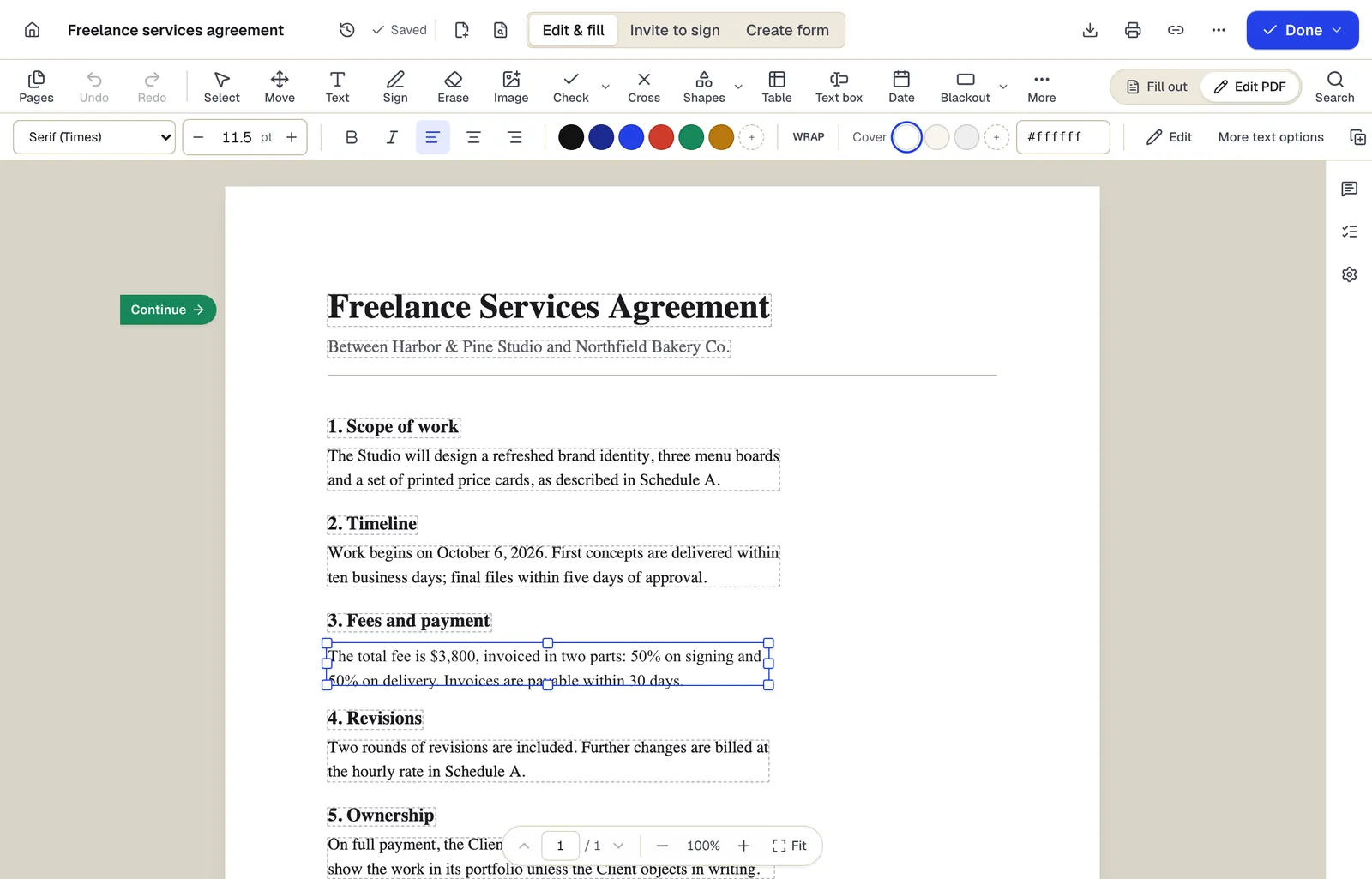
PDFBetter does the whole document job in a browser tab: it edits the text already in your PDF, fills and builds forms, sends documents for signature and answers questions with page citations. It says plainly which tools run on your device and which use its servers, and how long uploaded files are kept.
Why it's first
Nothing to install, on any system
Open it in Chrome, Safari, Edge or Firefox on Windows, Mac, Linux or a Chromebook. A borrowed laptop or a locked-down work PC is enough.
Original text, edited in place
Click any line and retype it. The cover color and alignment are adjustable, so a correction on a tinted panel or a right-aligned total still blends in.
Edit PDFPage tools that never upload your file
Organize, merge, split, rotate, add page numbers or a watermark: these run inside the browser, so the file stays on your device and downloads free.
Organize PDFClear rules on what is kept
Guest drafts are deleted 1 hour after you create them, files uploaded only to run a tool are deleted after 24 hours, and each tool page says where its processing happens.
Share a link instead of an attachment
Give people view, comment, fill or edit access to the live document, with an optional password, expiry date and allowed email list, and revoke the link any time.
Share PDFForms people fill from a link
Publish a form with a link, QR code or embed code and collect responses that export to CSV or Excel. The Free plan includes 1 live form with 50 responses a month.
Online form builderSignatures from anyone with an email address
Every signer signs with their own cryptographic key. Every completed PDF is digitally sealed and independently time-stamped, with the evidence built into the file. Signers don't need an account or an app.
Request signaturesAI answers you can check
Ask a question about a contract or report and the answer cites the page it came from, so you can verify it in seconds.
Chat with PDF
- Free option
- Free plan, no card (3 edited downloads a month)
- Paid from
- $3.25/month billed yearly (Starter), or $5 month to month
- Platforms
- Web (any browser), Mac, Windows
2.Sejda
Best for occasional text edits
A web editor that changes existing text, builds forms and shares fill links. Its free web tools need no signup and allow 3 tasks an hour; files uploaded to the web version are deleted after 2 hours.
Paid from: $5 Web Week Pass, or $7.50/monthFree option: 3 free tasks per hourPlatforms: Web, Windows, Mac, Linux
sejda.com3.Smallpdf
Best for quick conversions and signing
A set of simple browser tools for converting, compressing and signing. Smallpdf says files are processed on its servers and deleted after an hour; changing existing text is part of Pro.
Paid from: $9/month billed annually (Pro)Free option: Free tier with daily limitsPlatforms: Web, Windows
smallpdf.com4.iLovePDF
Best for very large files on a budget
An online toolbox with per-task free limits and file caps of 15 MB to 200 MB depending on the tool. Premium raises most limits to 4 GB, and files are deleted from its servers within 2 hours.
Paid from: $4/month billed annually (Premium)Free option: Free with per-task limitsPlatforms: Web, Windows, Mac
ilovepdf.com5.Xodo Web
Best for one free edit a day
A browser editor with more than 40 tools. Everyone gets 1 free action a day on Xodo Web; a subscription removes the daily limit, and Xodo offers a 3-day trial.
Paid from: $7.99/month, or $95.88/yearFree option: 1 free action a dayPlatforms: Web; desktop and mobile in other plans
xodo.com6.Lumin
Best for files that live in google drive
A cloud PDF editor that syncs with Google Drive and edits existing text. The free plan covers 3 documents a month, and Pro and Business are priced per team rather than per seat.
Paid from: $9/month (Starter)Free option: Free plan, 3 documents a monthPlatforms: Web, desktop app
luminpdf.com7.PDFescape
Best for simple forms in an older browser
A free online editor and form filler for files up to 10 MB that lists support for older browsers going back to Internet Explorer 6. Editing existing text is part of its paid plans.
Paid from: $2.99/month billed annually (Premium)Free option: Free online editor, files up to 10 MBPlatforms: Web; Windows desktop on paid plans
pdfescape.com
What should an online PDF editor do well?
An online editor has the same job as a desktop one, plus two more: it has to work well inside a browser tab, and it has to be honest about your file. Start with the editing itself. Plenty of browser tools only let you type on top of the page; the better ones click into the original line and retype it.
- Edits original text. Try a word in the middle of a paragraph, not just a blank space at the bottom of the page.
- Lets you try before you sign up. You should be able to see the result before handing over an email address.
- Says where the file goes. Some tools run in the browser; others upload the file. Both are fine if the tool tells you which and when the copy is deleted.
- Handles your file sizes. A scanned contract can be 30 MB or more; check the free and paid limits before you start.
- Finishes the job. Forms, signatures, compression and conversion in the same place save you from moving the file between sites.
| Editor | Without paying | On the paid plan |
|---|---|---|
| PDFBetter | 10 MB, with or without a free account | 50 MB on Starter, 250 MB on Pro |
| Sejda | 200 pages or 50 MB | Higher limits on passes and plans |
| iLovePDF | 15 MB to 200 MB, depending on the tool | Up to 4 GB on most tools |
| PDFescape | 10 MB | Higher limits on paid plans |
Is it safe to edit a PDF online?
It can be, and the answer depends on the tool rather than on the browser. Ask three questions of any online editor: is the file uploaded, how long is it kept, and who can open it while it is there.
Vendors answer differently. Smallpdf says it processes files on its servers and deletes them after an hour; iLovePDF deletes files within 2 hours; Sejda's web version deletes uploads after 2 hours. PDFBetter runs merge, split, rotate, extract, watermark and other page tools inside your browser, so those files are never uploaded. The editor, OCR and Office conversion use its servers, files uploaded only to run a tool are deleted after 24 hours, and documents you save to your account stay there until you delete them.
Covering text is not removing it
When any editor retypes a line, the old characters can stay in the file underneath. That is fine for a typo, but for an account number or a name that must be gone, use Redact PDF, which rebuilds the page without the marked content.
For more detail, PDFBetter's security page lists where files are stored and how they are reached, and the online editing guide walks through a full edit.
Which online tool fits which job?
Most browser sessions start with one specific task. Here is where each one lives in PDFBetter, and whether it touches a server.
| The job | Where to do it | Where it runs |
|---|---|---|
| Change a word, price or date | Edit PDF | PDFBetter's servers |
| Type on a form with no fields | Add text | PDFBetter's servers |
| Reorder, rotate and delete pages | Organize PDF | Your browser, no upload |
| Join several PDFs | Merge PDF | Your browser, no upload |
| Send a link for review | Share PDF | PDFBetter's servers |
| Collect answers from many people | Form builder | PDFBetter's servers |
| Get a contract signed | Request signatures | PDFBetter's servers |
How do you edit a PDF online without installing anything?
- 1
Open Edit PDF in your browser
Any current browser works. Unlock a password-protected file first with Unlock PDF.
- 2
Upload the file
Drag it onto the page. The limit is 10 MB with or without a free account, and 50 MB on Starter.
- 3
Click the text and retype it
Original text becomes editable line by line. Use the style bar if the font, size, color or cover color needs adjusting.
- 4
Download with a free account
Choose whether to keep form fields fillable or flatten them, then download. Your guest draft moves into the account.
Scanned pages have no text to click until OCR adds a text layer; Edit scanned PDF runs OCR first and then opens the editor.
When does an online editor make more sense than a desktop app?
A browser editor wins whenever the computer changes but the document doesn't. A desktop app wins when you want the editor in its own window, one click from the dock or taskbar. Many people use both, which is why PDFBetter's free Mac and Windows apps open the same account as the website.
| Situation | Better choice | Why |
|---|---|---|
| A borrowed or shared computer | Browser | Nothing is installed, and nothing is left behind when you sign out |
| A Chromebook or Linux laptop | Browser | Most desktop PDF apps target Windows and Mac only |
| A work PC that blocks installs | Browser | No admin rights needed |
| Your main computer, every day | Either | A desktop app opens files from Finder or File Explorer; the browser does the same jobs |
| A long flight with no Wi-Fi | Desktop app that processes locally | Online tools need a connection |
How do online editors handle forms and signatures?
Forms and signatures are where online editors differ most, because they involve other people. Filling a form is common to nearly every tool on this list. Building a form, publishing it and collecting signatures with a record of who signed are not.
Sejda builds forms with text, dropdown, checkbox, radio and signature fields and can share a fill link. Smallpdf Pro bundles signing and signature requests with templates, and its free plan signs 2 documents a month. iLovePDF's free plan includes 3 signing tasks.
PDFBetter puts all of it in one account. Create fillable PDF adds fields, including formulas that calculate totals, and Form builder publishes a form people fill from a link or QR code, with responses that export to CSV or Excel. Request signatures sends a document to one or several signers in order, with reminders and an audit trail, and the Free plan includes 3 requests a month.
If the text won't select
The page is probably a scan or its text was turned into outlines. Run Edit scanned PDF to add a text layer. If a corrected line shows a white box on a colored panel, set the cover color in the style bar to match the background.
What does an online PDF editor cost?
Online editors mostly sell monthly or yearly subscriptions, with a few short passes for one-off jobs. Prices below are the lowest each vendor lists.
| Editor | Free option | Lowest paid price |
|---|---|---|
| PDFBetter | Free plan: 3 edited downloads a month, no card | $3.25/month billed yearly (Starter), or $5 month to month |
| Sejda | 3 tasks an hour | $5 Web Week Pass, or $7.50/month |
| Smallpdf | Daily download limit per tool | $9/month billed annually (Pro) |
| iLovePDF | Limits per task | $4/month billed annually (Premium) |
| Xodo Web | 1 action a day | $7.99/month, or $95.88/year |
| Lumin | 3 documents a month | $9/month (Starter) |
| PDFescape | Files up to 10 MB | $2.99/month billed annually (Premium) |
Short passes suit a single project: Sejda's week pass covers 7 days of web tools. PDFBetter's Starter costs $5 a month with unlimited edited downloads and can be cancelled anytime. If PDFs are a weekly job, compare the subscription on what it includes rather than the headline price. Pro costs $15 a month, or $10 a month billed yearly, and new subscribers get a 7-day free trial (card required, nothing charged if cancelled before it ends).
See why PDFBetter is first.
No account needed to start, and tools that run in your browser never upload your file. Keep going on the free plan, or pick a plan when you need more.
Questions people ask
Can I edit a PDF online without uploading it?
For page work, yes: PDFBetter's merge, split, rotate, organize, page-number and watermark tools run in your browser, so the file stays on your device. Changing text runs on PDFBetter's servers, and those uploads are handled under its published retention rules.
Do online PDF editors work on a phone or tablet?
Most do in a mobile browser. PDFBetter works in Safari on iPhone and iPad and in Chrome on Android; for long edits a larger screen is easier.
What is the largest PDF I can edit online?
It depends on the tool. PDFBetter accepts 10 MB without an account or on a free account, 50 MB on Starter and 250 MB on Pro. iLovePDF Premium goes up to 4 GB on most tools.
Will form fields still work after I edit online?
In PDFBetter, yes. Existing fillable fields stay interactive unless you choose to flatten them when you download.
Can an online editor change text in a scanned PDF?
Only after OCR turns the page image into text. PDFBetter's Edit scanned PDF runs OCR first, then lets you edit the recognized text.
Do I need an account to edit a PDF online?
Not to edit in PDFBetter. You can make every change as a guest; a free account is needed to download the edited file.
Are online PDF editors free?
Most have a free tier with limits: Sejda allows 3 tasks an hour, Xodo Web 1 action a day, and Smallpdf a daily download limit per tool. PDFBetter's Free plan includes 3 edited downloads a month with no watermark.
Sources
- PDFBetter plans and limits — pdfbetter.com, checked
- PDFBetter security — pdfbetter.com, checked
- Sejda upgrade options — sejda.com, checked
- Sejda PDF editor (free limits, file deletion) — sejda.com, checked
- Smallpdf pricing — smallpdf.com, checked
- Smallpdf: file processing and deletion — smallpdf.com, checked
- iLovePDF pricing and limits — ilovepdf.com, checked
- iLovePDF security and file deletion — ilovepdf.com, checked
- Xodo pricing — xodo.com, checked
- Xodo online PDF editor — xodo.com, checked
- Lumin pricing — luminpdf.com, checked
- PDFescape plans and prices — pdfescape.com, checked
- PDFescape online editor and browser support — pdfescape.com, checked