
Best of 2026
The best PDF editors in 2026
By the PDFBetter teamPublished 7 min read
Our pick
PDFBetter is the best PDF editor for most people in 2026: it changes the text already in a PDF, fills and builds forms, collects sealed e-signatures and answers questions about the document with page citations, all from a browser with a free plan that has no watermark. Sejda and Smallpdf handle quick one-off tasks, and iLovePDF suits single conversions.
On this page (8)
At a glance
| # | Tool | Best for | Free option | Paid from | Platforms |
|---|---|---|---|---|---|
| 1 | PDFBetterTop pick | Most people and small teams | Free plan, no card (3 edited downloads a month) | $10/month billed yearly (Pro), or $6 for a 24-hour Day Pass | Web (any browser), Mac, Windows |
| 2 | Sejda | Occasional free edits | 3 free tasks per hour | $5 week pass, or $7.50/month | Web, Windows, Mac, Linux |
| 3 | Smallpdf | Quick one-off conversions | Free tier with daily limits | $9/month billed annually | Web, Windows |
| 4 | iLovePDF | Single tasks like merge or split | Free tier with per-task limits | $4/month billed annually | Web; desktop app with Premium |
| 5 | Lumin | A few documents a month | Free plan, 3 documents a month | $9/month (Starter, 10 documents) | Web, desktop app |
| 6 | DocHub | Light annotation in the browser | Free plan, 3 uses a month | From $8/user/month (Basic) | Web |
| 7 | PDFescape | Adding text boxes to small files | Free online editor, 10 MB files | $2.99/month billed annually | Web; Windows (paid) |
| 8 | Soda PDF | Windows users who want a subscription | 2 files a day, 3 MB each | Shown at checkout | Windows, web |
The list
1.PDFBetter
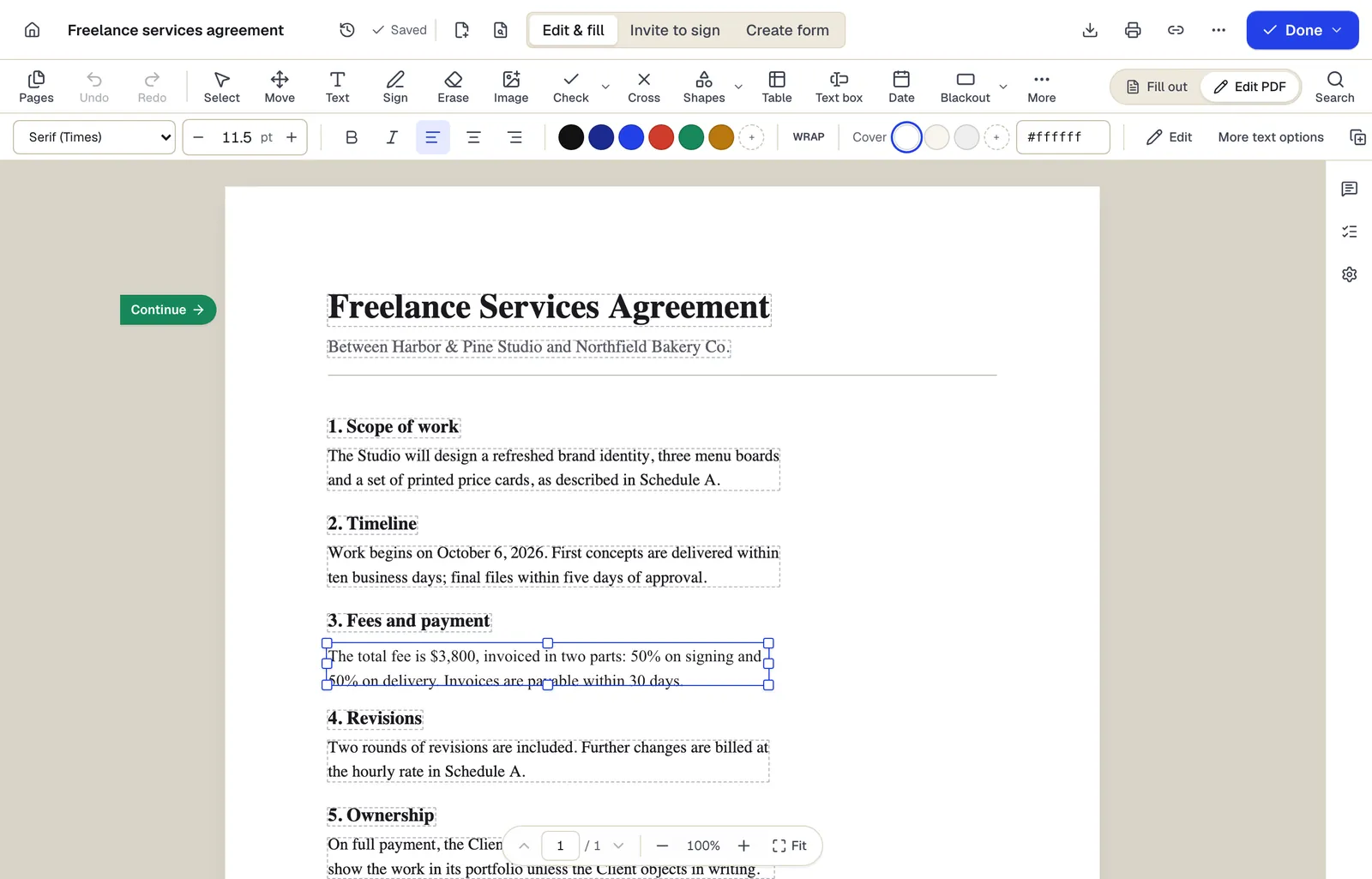
PDFBetter is a complete PDF editor that runs in the browser: it edits the text already in your file, turns any PDF into a fillable form, sends it for signature and summarizes it with page citations. Many page tools run on your own device without uploading the file, and the Free plan includes 3 edited-document downloads a month with no watermark and no card.
Why it's first
Edit the text that is already there
Click any line of the original PDF and retype it. The editor matches the font, size and color, so a corrected date or price looks like it was always there.
Edit PDFForms that calculate
Fill any form, or turn a flat PDF into a fillable one with text, date, checkbox, radio, dropdown, number, signature and formula fields. Totals update as people type.
Create fillable PDFSignatures with evidence built in
Every signer signs with their own cryptographic key. Every completed PDF is digitally sealed and independently time-stamped, with the evidence built into the file. Signing order, reminders and an audit trail come with every request.
Request signaturesAI that shows its work
Ask a question about a contract or report and the answer cites the page it came from. Summaries, translation and proofreading work the same way.
Chat with PDFPage tools that never upload your file
Merge, split, rotate, extract, reorder and add page numbers in the browser. The file stays on your device and the download is free, no account needed.
Merge PDFConversion and OCR included
Turn PDFs into Word, Excel, PowerPoint or images and back, and make scans searchable with OCR, in the same account.
PDF to WordA free plan you can keep
No trial clock: the Free plan has 3 edited downloads, 3 signature requests and 20 AI credits a month. Need more for one deadline? A $6 Day Pass gives 24 hours of Pro.
Browser, Mac and Windows
PDFBetter has free desktop apps for Mac and Windows that use the same account and documents as the web; its iPhone and iPad app is coming soon to the App Store, and an Android app is coming soon.
- Free option
- Free plan, no card (3 edited downloads a month)
- Paid from
- $10/month billed yearly (Pro), or $6 for a 24-hour Day Pass
- Platforms
- Web (any browser), Mac, Windows
2.Sejda
Best for occasional free edits
A web and desktop editor that can change existing text. The free tier allows 3 tasks an hour on documents up to 200 pages or 50 MB.
Paid from: $5 week pass, or $7.50/monthFree option: 3 free tasks per hourPlatforms: Web, Windows, Mac, Linux
sejda.com3.Smallpdf
Best for quick one-off conversions
A set of simple online tools with a free tier limited by daily downloads. Changing existing text is part of Pro.
Paid from: $9/month billed annuallyFree option: Free tier with daily limitsPlatforms: Web, Windows
smallpdf.com4.iLovePDF
Best for single tasks like merge or split
A collection of single-purpose web tools, one task at a time, with a free tier limited per task and a Premium plan for larger files.
Paid from: $4/month billed annuallyFree option: Free tier with per-task limitsPlatforms: Web; desktop app with Premium
ilovepdf.com5.Lumin
Best for a few documents a month
A cloud PDF editor whose free plan covers 3 documents a month, with paid plans counted in documents.
Paid from: $9/month (Starter, 10 documents)Free option: Free plan, 3 documents a monthPlatforms: Web, desktop app
luminpdf.com6.DocHub
Best for light annotation in the browser
An online editor for annotating and signing PDFs. The free plan allows 3 uses a month across its features.
Paid from: From $8/user/month (Basic)Free option: Free plan, 3 uses a monthPlatforms: Web
dochub.com7.PDFescape
Best for adding text boxes to small files
A long-running browser editor for adding text, shapes and form fields to files up to 10 MB. Changing existing text is part of its paid Windows edition.
Paid from: $2.99/month billed annuallyFree option: Free online editor, 10 MB filesPlatforms: Web; Windows (paid)
pdfescape.com8.Soda PDF
Best for windows users who want a subscription
A Windows and web editor sold as Pro, Team and Business subscriptions. Free use is limited to 2 files a day or 3 MB per file.
Paid from: Shown at checkoutFree option: 2 files a day, 3 MB eachPlatforms: Windows, web
sodapdf.com
What should a good PDF editor do in 2026?
A PDF editor earns the name when it changes what is already on the page. Plenty of tools only let you type on top of a PDF, which leaves the old words underneath and a text box that never quite lines up. Start your shortlist with editors that click into the original text and retype it in a matching font.
Then look at the rest of the job. Most PDFs that need editing are on their way somewhere: a lease that needs a signature, an application that needs filling, a report that has to shrink for an upload portal. An editor that also fills forms, collects signatures, converts and compresses saves you from paying for three subscriptions and moving the file between them.
- Text editing: changes original text, not just overlays. Try it on a line in the middle of a paragraph.
- Forms: fills any PDF, and turns flat PDFs into fillable forms with checkboxes, dropdowns and calculated totals.
- Signatures: signs your own documents and requests signatures from others, with an audit trail.
- Scans: OCR so a scanned page becomes searchable and editable.
- AI with sources: summaries and answers that cite the page, so you can check them in seconds.
- Privacy: says plainly where your file is processed and when it is deleted.
Which editor fits which job?
Most people don't need a print-production suite. They need to fix a date, fill a form, get a signature and send the file. Here is where PDFBetter does each of those jobs.
| The job | Where to do it | What you get |
|---|---|---|
| Fix a typo, a price or a date | Edit PDF | The original line retyped in a matching font |
| Replace a name everywhere | Find and replace | Every copy changed in one pass |
| Fill and return a form | Fill PDF | Typed answers, checkmarks and a signature |
| Make your own fillable form | Create fillable PDF | Fields, dropdowns and formulas others can fill |
| Get a contract signed | Request signatures | A sealed, time-stamped signed PDF |
| Edit a scanned page | Edit scanned PDF | OCR first, then editable text |
| Understand a long document | Chat with PDF | Answers with page citations |
If you prefer to work in a desktop app, the free PDFBetter apps for Mac and Windows open the same account and documents as the web, so you can start on one machine and finish on another.
Should you choose an online or a desktop PDF editor?
Desktop editors were the default when PDFs lived on one office computer. Today a document arrives by email on a phone, gets signed on a tablet and is filed from a laptop, and an editor tied to one installed machine gets in the way. A browser editor opens the same file anywhere you can sign in, including a Chromebook, a borrowed computer or a work laptop where you can't install software.
The usual worry about online editors is privacy, and it is a fair question to ask any of them. PDFBetter answers it per tool: merge, split, rotate, extract, watermark and similar page tools run entirely in your browser, so the file never leaves your device. Tools that need a server, such as OCR or Office conversion, say so on their page, and files uploaded only to run a tool are deleted after 24 hours.
You don't have to pick one side. PDFBetter's desktop apps for Mac and Windows are free and open the same account, so a contract you started in the browser at work is waiting in the app at home. One subscription covers every place you use it.
Free or paid: what do you actually get?
"Free" means very different things across PDF editors. Some free tiers watermark every page, some allow two files a day, and some are trials that ask for a card and start billing after a week. Read the fine print before you put an afternoon into a document.
PDFBetter's Free plan is a plan, not a trial: no card, no end date and no watermark. It includes 3 edited-document downloads, 3 signature requests, 20 OCR pages and 20 AI credits each month, and browser tools such as merge and split are free without an account at all. Pro costs $15 a month, or $10 a month billed yearly, and new subscribers get a 7-day free trial. For a single deadline, a $6 Day Pass unlocks Pro for 24 hours without a subscription.
Check the download, not the editor
Many editors let you do all the work for free and only ask you to pay at download. Before you start, find out what the free download looks like: watermark, page limit, or a clean file.
How to switch to PDFBetter
- 1
Open a PDF in the browser
Drop a file onto Edit PDF. You can make every change before creating an account.
- 2
Make your edits
Click original text to retype it, add text, images, checkmarks or a signature, and reorder pages from the sidebar.
- 3
Create a free account to download
Your draft moves into the account. The Free plan includes 3 edited downloads a month without a watermark.
- 4
Install the desktop app if you like
Download the free Mac or Windows app; it opens the same documents.
Coming from a specific product? Our side-by-side comparisons cover PDFBetter vs Adobe Acrobat and PDFBetter vs pdfFiller, feature by feature.
See why PDFBetter is first.
No account needed to start, and tools that run in your browser never upload your file. Keep going on the free plan, or pick a plan when you need more.
Questions people ask
What is the best free PDF editor?
PDFBetter's Free plan edits original text, fills and builds forms and downloads 3 edited documents a month with no watermark. Its page tools, such as merge and split, are free without an account.
Can I edit a PDF without Adobe Acrobat?
Yes. A browser-based editor such as PDFBetter changes original text, fills forms and adds signatures without installing Acrobat, on Windows, Mac, Linux or a Chromebook.
Which PDF editor can change existing text?
PDFBetter does on every plan, including Free: click the line and retype it, and the font, size and color are matched. Several free online editors only add new text boxes on top, and Smallpdf and PDFescape keep existing-text editing for paid tiers.
Is an online PDF editor safe for confidential files?
Look for one that says where files are processed and when they are deleted. PDFBetter runs page tools in your browser without uploading, deletes guest drafts after 1 hour and documents what each tool sends to its servers.
Do I need a desktop app?
Not for most work: a browser editor does the same jobs on any computer. If you prefer an app, PDFBetter's free Mac and Windows apps use the same account and documents.
Can a PDF editor edit scanned documents?
Only after OCR turns the page image into text. PDFBetter's Edit scanned PDF runs OCR first, then lets you change the recognized text.
Sources
- PDFBetter plans and limits — pdfbetter.com, checked
- Sejda upgrade options — sejda.com, checked
- Smallpdf pricing — smallpdf.com, checked
- iLovePDF pricing — ilovepdf.com, checked
- Lumin pricing — luminpdf.com, checked
- DocHub pricing — dochub.com, checked
- PDFescape plans — pdfescape.com, checked
- Soda PDF pricing — sodapdf.com, checked