
Form builder
Build a reservation request form
A reservation form collects a request to hold something for a date: a private dining room, a campsite, a rental item, a community hall or a block of hotel rooms. It captures the who, when, how many and any special requirements so you can check availability and confirm.
Reviewed
- Name, email and phone (required)
- What to reserve (dropdown: room, table, equipment, venue)
- Date and time, with an alternate date (date fields)
- Party size or quantity (number field with minimum and maximum)
- Special requests or accessibility needs (multi-line text)
- Acknowledgment of cancellation policy (checkbox, required)
Why it works
Reservation form, explained
The form takes requests; it doesn't hold inventory. PDFBetter doesn't check a calendar or stop two people requesting the same Saturday, so treat every submission as pending until you confirm it. For high-volume first-come reservations, a dedicated booking system fits better.
For larger bookings, follow up the confirmed request with a signed agreement: dates, deposit, cancellation terms and house rules. Request signatures sends that agreement and returns it with a certificate of completion.
Recommended fields
Fields to include
- 1Name, email and phone (required)
- 2What to reserve (dropdown: room, table, equipment, venue)
- 3Date and time, with an alternate date (date fields)
- 4Party size or quantity (number field with minimum and maximum)
- 5Special requests or accessibility needs (multi-line text)
- 6Acknowledgment of cancellation policy (checkbox, required)
How to do it
Build a reservation request form in 4 steps
1A flat PDF
2Place fields
3A fillable PDF
- 1
Build the form
Add a number field with your real minimum and maximum, an alternate date, and the cancellation policy as read-only text with a required checkbox.
- 2
Publish it
Publish and link it from your website and booking emails, or embed it on your reservations page.
- 3
Collect requests
Guests submit from any device without an account. Each request waits for your confirmation.
- 4
Export and confirm
Export to CSV or XLSX, check availability, and confirm by email. For large bookings, send a contract for signature.
In the app
What building it looks like
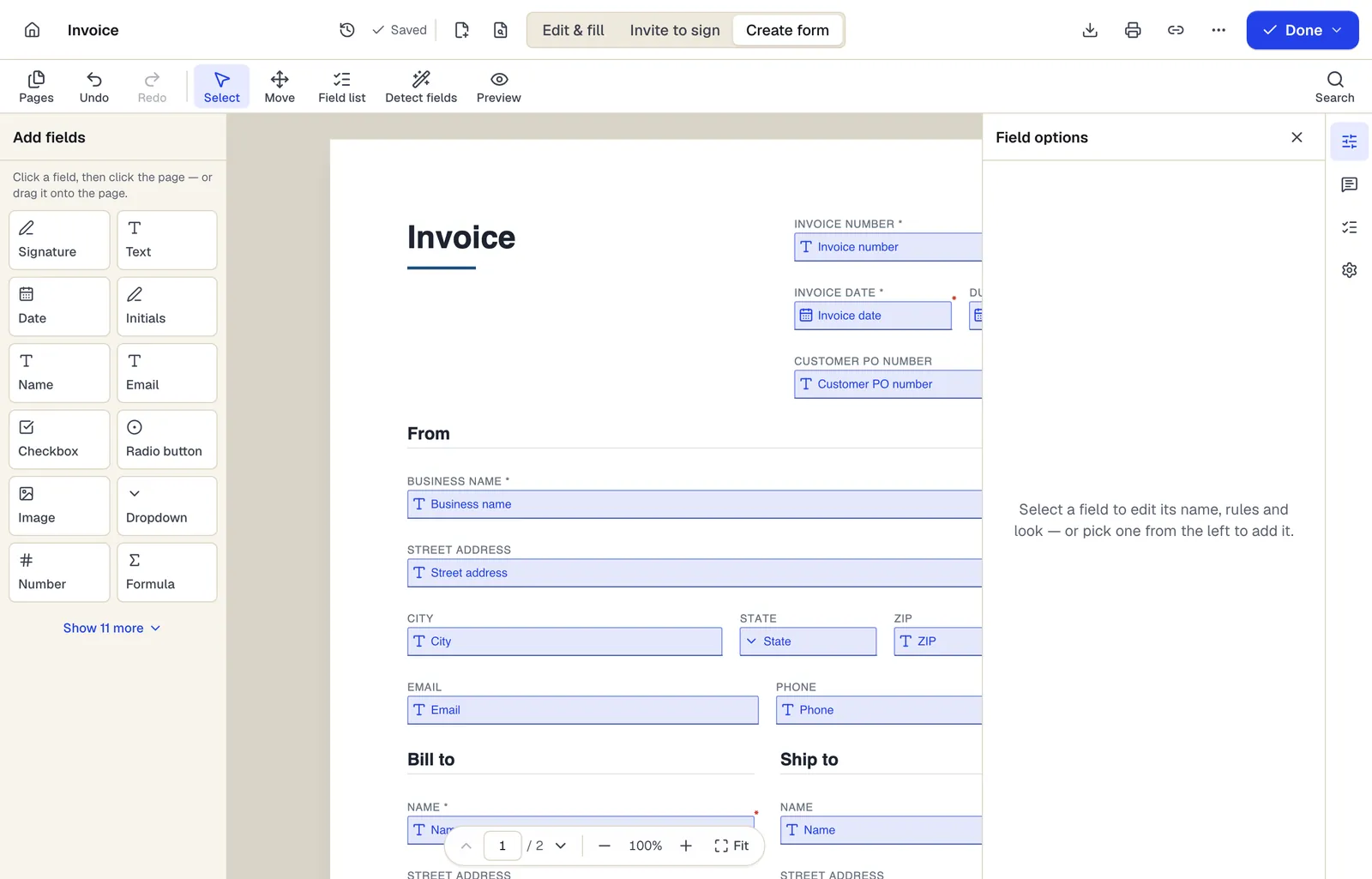
- Pick a field type, then click the page — or drag it
- Detect fields finds the boxes and lines on a flat PDF
- Every field keeps a label, a name and its own rules
The editor in Create form mode. Sample content; names and companies are fictional.
Start from a template
Templates that fit
Service Agreement
31 fields · 3 pages
Plain-English service agreement with scope, fees, payment terms, termination and signature lines. Fill it online, then sign or send it for signature.
Event Registration Form
30 fields · 2 pages
Event registration form with attendee details, ticket type and quantity, auto-calculated total, dietary and accessibility needs and communication consent.
Release of Liability (Activity Waiver)
21 fields · 3 pages
Activity waiver with assumption of risk, release, medical authorization and parent signature for minors. For gyms, classes, rentals and events.
Gift certificate
21 fields · 1 page
Fillable gift certificate for shops, salons and restaurants with a dollar value or service, number, expiry date, redemption terms and a business record stub.
Reservation form: questions people ask
Does the form prevent double bookings?
No. It doesn't track availability. Confirm each request yourself, or use a booking system for instant reservations.
Can I take a deposit with the reservation?
Not through the form. Send a payment link from your processor with the confirmation, and never collect card numbers on the form.
Can I send a contract after confirming?
Yes. Fill your agreement template with the booking details and send it with Request signatures.
How many requests can I take a month?
The Free plan includes 1 live form and 50 responses a month, Pro 10 live forms and 1,000 responses, and Business unlimited live forms and 10,000 responses.