
How-to · Editing
How to change text in a PDF and keep the same font
By the PDFBetter teamPublished 6 min read
Short answer
To change text in a PDF and keep it looking like the original, click the line in an editor that edits existing text, retype it, and keep the size and color the editor prefills from that line. Body text in Arial/Helvetica, Times or Courier style matches closely. For other typefaces, retype the whole line rather than one word so the line stays consistent.
Do it now, without leaving this page
Drop a PDF hereLet go to start
or paste with Ctrl/⌘+V
On this page (7)
Why can't an editor just reuse the font inside the PDF?
Most PDFs carry a trimmed copy of each font, called a subset. When the file was exported, the program packed in only the letters the document actually used. If your contract never contained a capital Q in its body font, there is no capital Q in the file to draw. Some font licenses also forbid editing with the embedded copy. So any editor that changes PDF text has to set new characters in a font it does have.
PDFBetter handles this by picking the closest of three standard families for each line you edit: a Helvetica-style sans-serif, a Times-style serif or a Courier-style monospace, each with bold and italic. It also reads the original line's point size and color and fills them in for you. For the most common business fonts, the result is very hard to tell apart from the line next to it.
The practical question is not whether the font is identical but whether a reader will notice. That depends on what the original typeface is, and on a few habits covered below.
Will your replacement text match? Check the original font first
Most PDF readers list a file's fonts in the document properties window, usually under a Fonts tab. Look up the font of the line you want to change, then use this table to decide how to edit it.
| Original font | How close the edit looks | Best approach |
|---|---|---|
| Arial, Helvetica, Liberation Sans | Very close: same family shape | Edit just the words that are wrong |
| Times New Roman, Times, similar serifs | Very close | Edit just the words that are wrong |
| Courier and other typewriter fonts | Very close | Edit just the words; spacing stays even |
| Calibri, Segoe, Garamond and other body fonts | Similar style, letter widths differ | Retype the whole line so it is one consistent font |
| Brand, display or script fonts in headlines | Visibly different | Rebuild the headline from the source file, or replace it as an image |
| Text turned into outlines, or a scanned page | Not editable as text | OCR the scan, or cover the area and type new text |
A mixed line is what gives an edit away
Readers rarely spot a different font across a whole line. They spot one word in a different font in the middle of a sentence. When the original is not one of the three standard families, select and retype the full line.
How to change PDF text step by step
- 1
Open the PDF in Edit PDF
Drop the file in. Files up to 10 MB open without an account or on a free account, and up to 50 MB on Starter. Unlock a password-protected file first.
- 2
Click the line you want to change
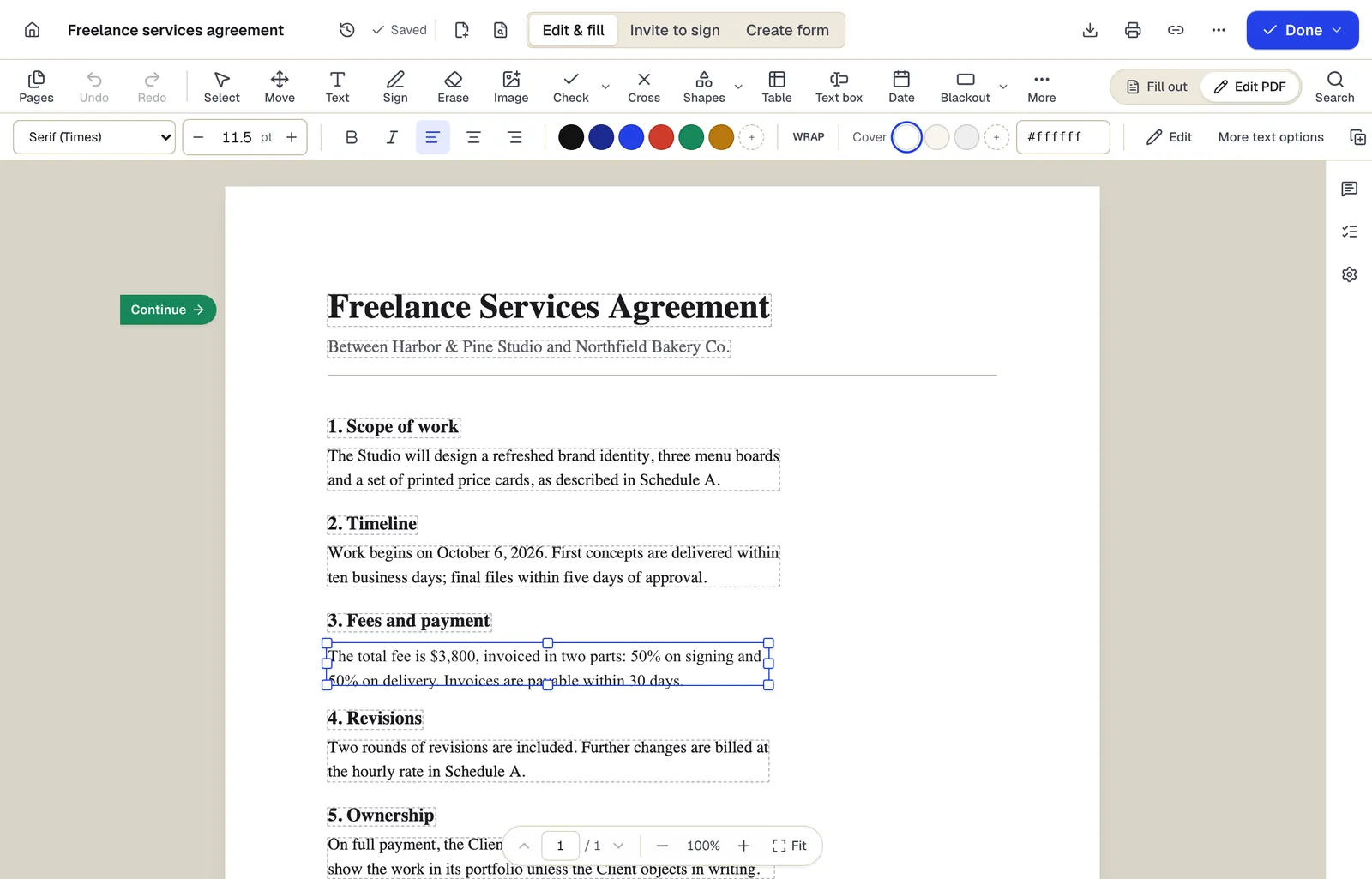
Original text becomes editable. Select the words, or the whole line if the font is not a close match, and type the correction.
- 3
Check the style bar
The family, size and color are prefilled from the original. Nudge the size by half a point if the new words look larger or smaller than their neighbors.
- 4
Match the alignment and cover
Set left, center or right to match the original line. If the text sits on a tinted panel, set the cover color to that panel's color.
- 5
Fix every other copy
If the same mistake appears elsewhere, use Find and replace so no copy is missed.
- 6
Download a new copy
Downloading needs a free account, which includes 3 edited-document downloads a month without a watermark. Your original file is not changed.
Six habits that make an edit hard to spot
- Keep the length close to the original. PDF text does not reflow. A replacement that is much longer wraps inside the original line's box and can run into the line below. Rephrase to fit, for example "Suite 400" instead of "Fourth Floor, Suite 400".
- Retype whole lines in non-standard fonts. As the table shows, consistency within a line matters more than an exact match.
- Match alignment. Centered titles and right-aligned totals look wrong the moment they shift. Set the same alignment the original used.
- Match the background. On white paper the default cover is invisible. On a grey sidebar or colored header, set the cover color to the panel color, using a hex value if you have it.
- Compare at 200% zoom. Put the edited line next to an untouched line in the same paragraph and compare the height of capitals and the weight of strokes.
- Leave photos and gradients alone. The cover behind new text is a solid color, so it shows as a patch over a photo. For text printed on an image, change the source file or replace the whole area.
Numbers deserve one extra look. A price changed from $1,850 to $1,580 has the same width, so it slots in cleanly. A price that grows from $950 to $1,250 is wider, and in a right-aligned column it needs right alignment to keep the column straight.
What if the text won't select or turns into boxes?
Three situations look like an editing problem but have a different cause:
- Nothing selects when you click. The page is a scan or a photo. Our guide to editing a scanned PDF explains how OCR makes those words editable, or use Edit scanned PDF directly.
- A headline won't select but the body will. The designer converted the headline to outlines, so it is drawn shapes, not text. Cover it with Erase and type the new headline with Add text.
- Some characters come out as boxes or wrong letters. The PDF uses a custom character encoding. Select the whole line and retype it instead of changing single letters.
When should you edit the source file instead?
PDF editing is the right tool for local corrections: a misspelled surname, a wrong date, an outdated phone number, a unit price. Go back to the source, or convert, when the change is structural:
- Rewriting paragraphs. Convert with PDF to Word, edit with reflow, then save a new PDF with Word to PDF.
- Changing a brand headline or logo text. Ask for the design file, or replace the area with an image of the corrected artwork using Add image.
- Removing information someone must not see. A text edit covers the old words rather than deleting them. Use Redact PDF for anything confidential.
One more ordering rule: edit before anyone signs. A change to a PDF with a certificate-based digital signature makes readers report that signature as altered. For a broader overview of every kind of PDF change, see how to edit a PDF.
Try Edit PDF on your own file.
No account needed to start, and tools that run in your browser never upload your file. Keep going on the free plan, or pick a plan when you need more.
Questions people ask
Can I upload my own font so the edit matches exactly?
Edits use the closest of three standard families at the original size and color. When an exact brand typeface matters, change the source document and export a new PDF.
Why does one edited word look wider than the rest of the line?
The original font is probably not Helvetica, Times or Courier style, so letter widths differ. Select the whole line and retype it so the line uses one font throughout.
Does the editor keep the original size and color?
Yes. Both are read from the line you click and prefilled in the style bar, and you can adjust them before downloading.
Is the old text deleted from the file?
No. It is covered and the new text is drawn on top, so it may still be copied or searched. Use Redact PDF when the old wording must be removed.
Can I edit text in a PDF that was made in InDesign or Canva?
Yes, as long as the text was exported as text and not as outlines or an image. Body text usually is; decorative headlines often are not.
Do I need an account to change text in a PDF?
No account is needed to make the edits. Downloading the result needs a free account, which includes 3 edited-document downloads a month.
Sources
- PDFBetter plans and limits — pdfbetter.com, checked