
Best of 2026
The best electronic signature software in 2026
By the PDFBetter teamPublished 10 min read
Our pick
PDFBetter is the best electronic signature software for most people in 2026: every signer signs with their own cryptographic key, every completed PDF is sealed and time-stamped, and the same account edits, redacts and fills the PDF before you send it. Xodo Sign and SignWell suit senders who only need signing, Lumin Sign suits teams already on Lumin, and DocHub suits Google Drive users.
On this page (8)
At a glance
| # | Tool | Best for | Free option | Paid from | Platforms |
|---|---|---|---|---|---|
| 1 | PDFBetterTop pick | Sending PDFs for signature with evidence built in | Free plan, no card (3 signature requests a month) | $3.25/month billed yearly (Starter), or $5 month to month | Web (any browser), Mac, Windows |
| 2 | Xodo Sign | Unlimited documents on a low per-user price | Free plan, 5 documents a month; 7-day Professional trial | $10/user/month billed annually (Basic), $20 billed monthly | Web; signers use any computer, tablet or phone |
| 3 | SignWell | One sender who wants unlimited documents | Free plan, 3 documents a month | $10/month billed annually (Light), $12 billed monthly | Web; signers use any desktop or mobile device |
| 4 | Lumin Sign | Small teams already using Lumin | Free plan, 5 documents per workspace a month | $18/user/month (Pro) | Web |
| 5 | DocHub | Signing from Google Drive and Gmail | Free plan, 3 uses a month; 30-day Pro trial | €12/month (Pro; DocHub shows prices in euros) | Web |
| 6 | Smallpdf | Occasional signing alongside quick conversions | Free tier, 2 signed documents a month; 7-day trial | $9/month billed annually (Pro), $12 billed monthly | Web, Windows, iOS, Android |
The list
1.PDFBetter
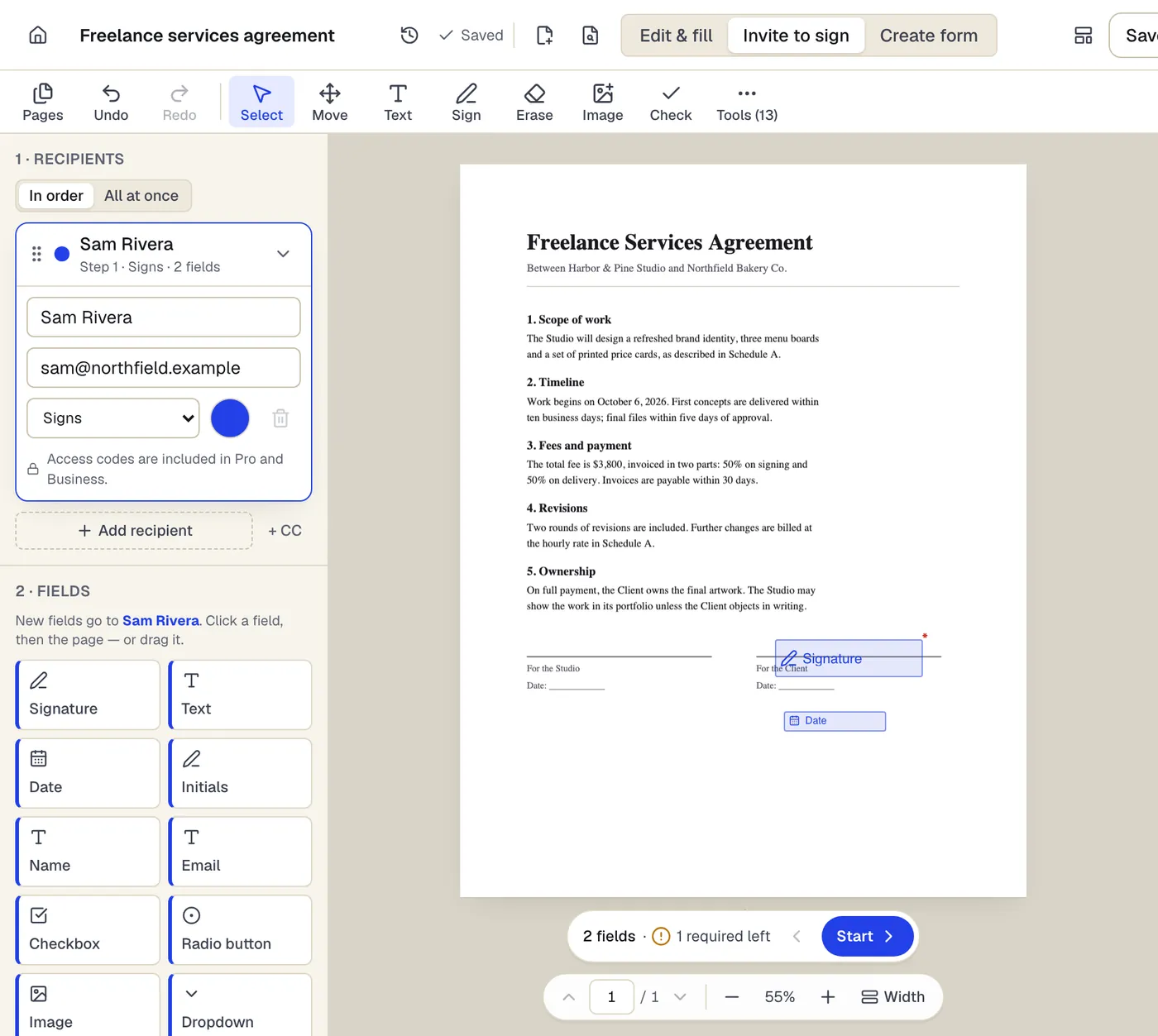
PDFBetter sends any PDF for signature and gives back a file that proves itself. Every signer signs with their own cryptographic key. Every completed PDF is digitally sealed and independently time-stamped, with the evidence built into the file. Because it is also a full PDF editor, you can fix a clause, redact an account number or fill your own part before anyone signs, and the Free plan includes 3 signature requests a month with no card.
Why it's first
A cryptographic key for every signer
Each signer's browser creates its own key, which never leaves their device, and signs the document's fingerprint together with exactly what they entered. The key's fingerprint is printed on the certificate of completion.
Request signaturesA sealed, time-stamped PDF at the end
When the last person signs, the PDF and its certificate are sealed with a PAdES signature and an independent RFC 3161 time-stamp. Change one byte later and PDF readers show the file as modified.
Request signaturesAn audit trail inside the file
The certificate lists every event, from sent and viewed to consent and signed, with time, email and IP address, chained by hashes. The sealed PDF carries the signed statements and audit trail, and completed evidence is kept for 7 years.
The workflow senders expect
Signers, approvers and CC recipients, sequential or parallel order, automatic reminders, an expiry date and a decline reason. Signers don't need an account, and every plan can require a 6-digit code emailed to the signer before they open the document.
Request signaturesFix the document before it goes out
Edit the original text, redact what the other side shouldn't see, or run OCR on a scanned contract, in the same editor you send from. A sent document is locked, so get it right first.
Edit PDFAI that places the signature fields
AI signature preparation reads an agreement, proposes roles such as Landlord and Tenant, and puts signature, initials and date fields on the right lines for you to review. It never sends anything on its own.
AI signature preparationSign your own copy in a minute
When you are the only signer, Sign PDF lets you type, draw or upload your signature, add initials and the date, and download the signed file.
Sign PDFA free plan, then unlimited requests
Free includes 3 signature requests a month with no end date. Pro removes the cap for $15 a month, or $10 a month billed yearly, and Starter raises it to 10 for $5 a month. PDFBetter has free desktop apps for Mac and Windows that use the same account and documents as the web; its iPhone and iPad app is coming soon to the App Store, and its Android app is on Google Play.
- Free option
- Free plan, no card (3 signature requests a month)
- Paid from
- $3.25/month billed yearly (Starter), or $5 month to month
- Platforms
- Web (any browser), Mac, Windows
2.Xodo Sign
Best for unlimited documents on a low per-user price
The e-signature service from Xodo, formerly eversign. Its Basic plan includes unlimited documents, with templates, a timestamped audit trail and in-person signing; the free plan allows 5 documents a month, one every 7 days.
Paid from: $10/user/month billed annually (Basic), $20 billed monthlyFree option: Free plan, 5 documents a month; 7-day Professional trialPlatforms: Web; signers use any computer, tablet or phone
eversign.com3.SignWell
Best for one sender who wants unlimited documents
A signing-only service with a free plan of 3 documents a month for one sender and one template. Paid plans include unlimited documents and audit trails; Light allows 5 templates per sender.
Paid from: $10/month billed annually (Light), $12 billed monthlyFree option: Free plan, 3 documents a monthPlatforms: Web; signers use any desktop or mobile device
signwell.com4.Lumin Sign
Best for small teams already using lumin
Lumin's separate signing product. The free plan covers 5 documents per workspace a month; Pro raises that to 100 and adds reminders, status tracking, a certificate of completion and unlimited templates.
Paid from: $18/user/month (Pro)Free option: Free plan, 5 documents per workspace a monthPlatforms: Web
luminpdf.com5.DocHub
Best for signing from google drive and gmail
A lightweight PDF editor and signer that works with Google Drive, Gmail and Classroom. Pro includes unlimited sign requests, bulk send and in-person signing; the free plan shares 3 uses a month across all features.
Paid from: €12/month (Pro; DocHub shows prices in euros)Free option: Free plan, 3 uses a month; 30-day Pro trialPlatforms: Web
dochub.com6.Smallpdf
Best for occasional signing alongside quick conversions
A set of online PDF tools with signing included. The free tier allows 2 signed documents a month; Pro adds unlimited signing and requests with templates and a certificate of completion.
Paid from: $9/month billed annually (Pro), $12 billed monthlyFree option: Free tier, 2 signed documents a month; 7-day trialPlatforms: Web, Windows, iOS, Android
smallpdf.com
What should electronic signature software prove after the signing?
Collecting a signature is the easy part; nearly every tool lets someone draw their name on a line. The real test comes months later, when a client says they never agreed to the payment terms or a tenant says page 4 was different when they signed. Good e-signature software gives you a file that answers that question by itself.
That is why the list above starts with evidence. A completed agreement should show who signed, when, from which email address, and that nothing has changed since. In PDFBetter, that evidence sits inside the signed PDF, so it travels with the file even if you move it to a shared drive or email it to your accountant.
| Evidence | What it shows | Where to find it |
|---|---|---|
| Per-signer device key | Each signer approved this exact document and these exact values | Key fingerprint on the certificate of completion |
| PAdES seal | The file hasn't changed since the last signature | Signature panel of any PDF reader |
| RFC 3161 time-stamp | When the document was completed, from an independent service | Seal details in the PDF reader |
| Audit trail | Sent, viewed, consent and signed events with time, email and IP | Certificate of completion, sealed with the PDF |
| Document lock | The text under the signatures is what was sent | SHA-256 fingerprints of the original and completed files |
PDFBetter's signature requests are designed to the technical requirements of an advanced electronic signature (eIDAS art. 26): a unique key per signer, under their sole control, linked to the document so any change is detectable. Signers are identified by email (and an optional emailed code), not by ID documents or SMS. If an agreement legally needs a qualified electronic signature, a notary or wet ink, use the process the law requires; our e-signature law pages summarize the rules by country.
Which signing tool fits which job?
Most signing jobs fall into a handful of patterns. Pick the pattern first, then the tool. Here is where each one lives in PDFBetter.
| The job | Where to do it | What you get |
|---|---|---|
| Sign a contract someone sent you | Sign PDF | Your signature, initials and date on the page |
| Get a client or tenant to sign | Request signatures | A sealed, time-stamped PDF and a certificate |
| Place fields on a long agreement fast | AI signature preparation | Proposed roles and fields to review |
| Send the same NDA every week | Create PDF template | A clean copy with fields already placed |
| Remove private details first | Redact PDF | Content removed, not just covered |
| Collect a signature with a form | Form builder | A public form with a signature field |
A typical example: a landlord sends a 6-page lease that needs the tenant's initials on every page, the tenant's signature, and then the landlord's countersignature. Set the order to sequential, put the tenant first, and CC the property manager. The landlord is invited only after the tenant finishes, and all three get the sealed lease when it is done. Our lease template is a good place to start if you don't have one.
What should you check before choosing e-signature software?
Run one real document through any tool on your shortlist before you commit. Pick the agreement you send most often, add two signers, and sign as one of them from your phone. Ten minutes of testing tells you more than any feature grid, and these are the points to watch.
- The signer's first minute. Does the link open on a phone without an app or an account? Is it clear where to sign and what they are agreeing to? PDFBetter shows the ESIGN consumer disclosure first, with options to sign electronically, ask for paper or decline.
- Order and reminders. Can the countersigner wait until the first signer is done? Do reminders go out by themselves? In PDFBetter you choose sequential or parallel order and a reminder every 1 to 30 days.
- Identity options. Email alone suits most everyday agreements. For higher-value documents, look for a one-time code. PDFBetter can require an emailed 6-digit code on every plan, including Free.
- Preparing the PDF. Contracts arrive with typos, old dates and account numbers that shouldn't go to everyone. A tool that edits and redacts saves a round trip to a second app.
- Where the evidence lives. An audit trail in the vendor's dashboard is only as durable as your account. Evidence sealed into the PDF stays with the file.
- How the plan is metered. Some plans count documents, some count envelopes per user per year, some count uses across every feature. Match the meter to how you actually send.
- Templates for repeat documents. If you send the same NDA or onboarding packet every week, place the fields once and start each send from a clean copy.
Up to 20 people can be added to one PDFBetter request as signers, approvers who approve without signing, or CC recipients who receive the completed copy. Each person's fields take their color, so it is easy to see that the tenant's initials are on every page and the landlord's signature is on the last one.
How many signature requests do you need each month?
Count your sends before you compare prices. Free plans in this category range from a couple of documents a month to a handful, and the meter differs: some count documents, some count uses across every feature, some count per workspace.
| Tool | Free allowance | Paid plan for more |
|---|---|---|
| PDFBetter | 3 signature requests a month | Pro, unlimited, $15/month or $10/month billed yearly |
| Xodo Sign | 5 documents a month | Basic, unlimited, $10/user/month billed annually |
| SignWell | 3 documents a month | Light, unlimited, $10/month billed annually |
| Lumin Sign | 5 documents per workspace a month | Pro, 100 a month, $18/user/month |
| DocHub | 3 uses a month across all features | Pro, €12/month, unlimited |
| Smallpdf | 2 signed documents a month | Pro, unlimited, $9/month billed annually |
If you send a few agreements a month, PDFBetter's Free plan covers it, and the same account still edits and fills PDFs with 3 edited-document downloads a month. If you send every day, Pro removes the cap, and new subscribers who pay yearly get a 7-day free trial. Business adds bulk send, branded signing and an API for teams.
How do you switch your signing to PDFBetter?
- 1
Keep your old records
Download completed agreements and their certificates from your current service, or keep them there. Signed documents don't need to move.
- 2
Rebuild your most-used document
Upload the source PDF, place the fields once and save it as a template, so each send starts from a clean copy.
- 3
Send a test to yourself
Add your own email as the only signer, sign from your phone, and open the sealed PDF to see the certificate and seal.
- 4
Turn on the options you need
Choose an emailed one-time code for signers, reminders and an expiry date before sending to clients.
For step-by-step detail, read how to request an electronic signature. Coming from a bigger platform? Our DocuSign alternatives page compares sending limits and prices.
Finish edits before you send
A sent request locks the document so the text under the signatures can't change. If you spot a typo after sending, cancel the request, fix the PDF and send a new one.
See why PDFBetter is first.
No account needed to start, and tools that run in your browser never upload your file. Keep going on the free plan, or pick a plan when you need more.
Tools in this post
Questions people ask
What is the best e-signature software for a small business?
For most small businesses, PDFBetter: unlimited signature requests on Pro, a free plan with 3 requests a month, and a PDF editor in the same account. Each signer signs with their own key and the completed PDF is sealed and time-stamped.
Do the people I send a document to need an account?
Not in PDFBetter. Each recipient opens a private link, reads the consumer disclosure, agrees to sign electronically and completes their fields in the browser.
How does PDFBetter confirm who signed?
Signers are identified by their email address, and you can require a 6-digit code emailed to them before they open the document on every plan. Pro adds an access code you share by phone or text. Each signature is also bound to a key created on the signer's own device.
Can PDFBetter place the signature fields for me?
Yes. AI signature preparation reads the agreement, suggests roles such as Company and Contractor, and places signature, initials and date fields for you to review. Each run uses from 3 AI credits, and it never sends anything; you add the recipients and press send.
Are electronic signatures legally valid?
Electronic signatures are generally recognized under laws such as the US ESIGN Act and the EU eIDAS regulation, with exceptions for documents such as wills. PDFBetter is not a law firm; check the rules for your document and country.
What happens if a signer declines or never signs?
If someone declines, the request stops and you see their reason on the request page; you can fix the issue and send a new request. If you set an expiry date, an unsigned request expires on that date, and reminders go out until then.
Can I send one document to many people separately?
Yes, with bulk send on the Business plan. For a single agreement with several signers, any plan can add multiple recipients to one request.
Sources
- PDFBetter plans and limits — pdfbetter.com, checked
- PDFBetter security: e-signature evidence — pdfbetter.com, checked
- Xodo Sign pricing — eversign.com, checked
- SignWell pricing — signwell.com, checked
- Lumin Sign pricing — luminpdf.com, checked
- DocHub pricing — dochub.com, checked
- Smallpdf pricing — smallpdf.com, checked