
How-to · Pages
How to combine PDFs without uploading them
By the PDFBetter teamPublished 6 min read
Short answer
To combine PDFs without uploading them, use a merge tool that runs inside your browser: add the files, drag them into order and download one PDF that was built on your own device. PDFBetter's Merge PDF works this way, and the merged file downloads free without an account.
Do it now, without leaving this page
Drop your PDFs hereLet go to start
or paste with Ctrl/⌘+V · select 2 or more
On this page (8)
Why would you avoid uploading PDFs just to merge them?
Most of the PDFs people merge are the ones they least want to hand to a stranger's server. A tax return with its schedules. Lab results and a referral letter for a new doctor. A signed offer letter, an ID scan and a bank statement for a background check. A client's contract plus the exhibits your firm drafted. Joining them is a two-minute job, yet a typical online merger copies every file to a remote machine first.
There are practical reasons too. Your employer or a client agreement may forbid sending documents to unapproved services. A 120 MB scan takes a long time to upload on hotel Wi-Fi or a phone hotspot. And some people would simply rather not wonder how long a copy sits on someone else's disk.
Merging is one of the few PDF jobs that never needed a server in the first place. Joining files means copying page objects from several PDFs into one new PDF, which a modern browser can do on its own.
How can a website merge files without uploading them?
When you open Merge PDF, the page loads PDFBetter's PDF engine into the browser tab, the same way a web page loads any other script. When you drop in files, the browser reads them from your disk into the tab's memory. The engine builds the combined PDF right there and hands it to your Downloads folder. The files themselves are never sent to PDFBetter and nothing is stored on its servers.
Two things follow from that design. Speed depends on your device rather than your connection, so a merge of a few dozen pages finishes in seconds even on a slow network. And very large jobs are limited by the memory your device can give a browser tab, which matters on phones more than on laptops.
Checking any merge site yourself
Read what the tool page says about processing, then watch the browser's network activity in its developer tools while you merge. A tool that uploads your files shows outgoing requests roughly the size of the files you added.
How do you merge PDFs in the browser, step by step?
- 1
Open Merge PDF
Use any current browser on a computer or phone. No account and no install are needed.
- 2
Add the files
Drop in two or more PDFs, or pick them from a folder. A file that asks for a password when you open it must be unlocked first with Unlock PDF, which also runs in your browser.
- 3
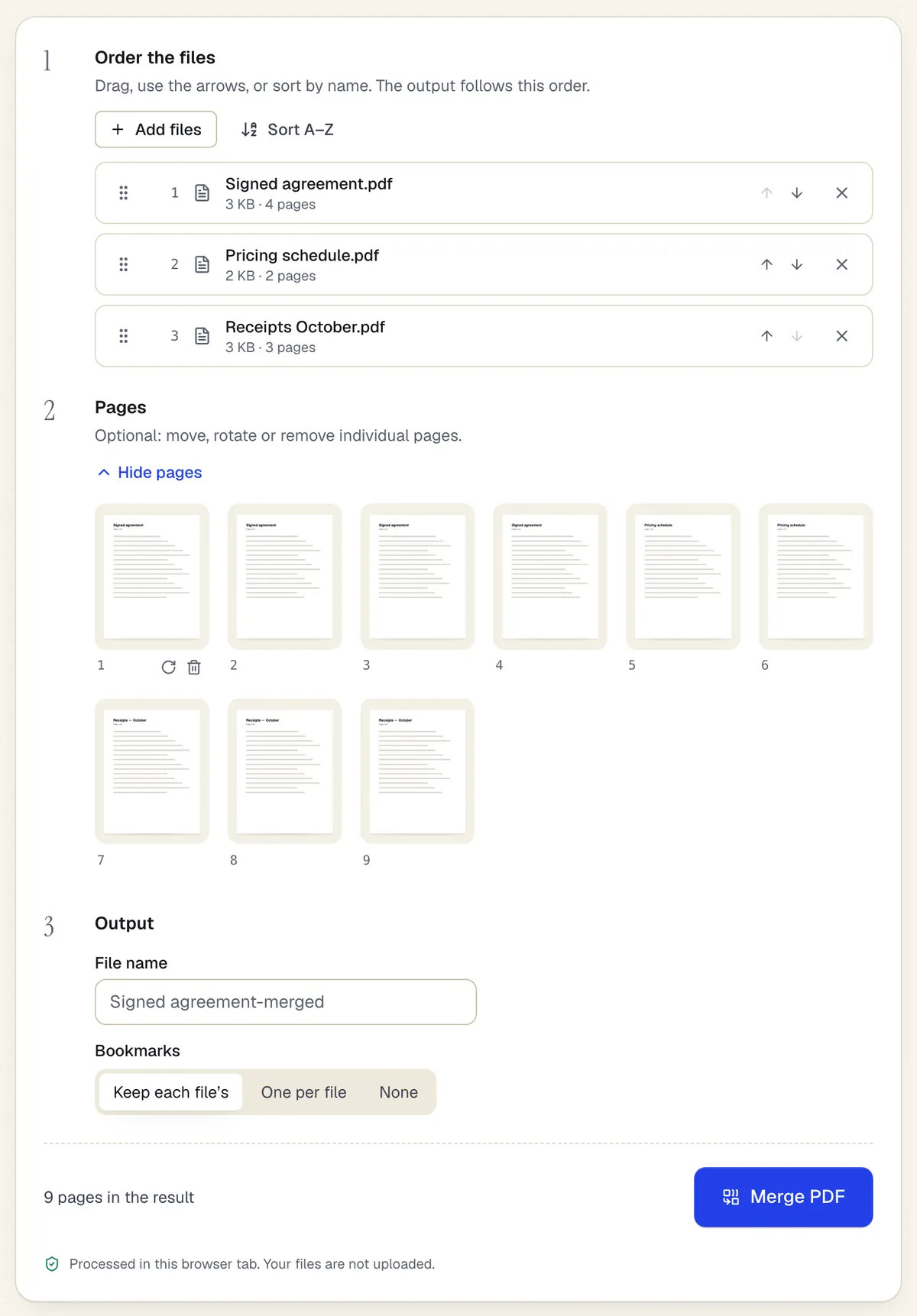
Set the file order
Drag files into place, or sort A–Z by name, which handles numbered scans like scan_001.pdf to scan_014.pdf in one click.
- 4
Fix single pages if needed
Open the page view to move one page between files, turn a sideways page or drop a blank one. The output follows this view exactly.
- 5
Merge and download
Click Merge. The combined PDF is built on your device and downloads as soon as it is ready. Rename it first if the default “-merged” name won't mean anything next month.
What carries over into the merged file?
Merging copies pages, not just their look, so most of what makes a PDF useful survives. A few document-level extras don't, and it's worth knowing which before you send the result on.
| Part of the PDF | In the merged file | Good to know |
|---|---|---|
| Page size and orientation | Kept per page | A landscape price table stays landscape between portrait letters |
| Text and images | Kept exactly | Nothing is re-rendered or recompressed |
| Fillable form fields | Kept, still fillable | Fields with the same name in two files are renamed, for example “Name_2”, so each keeps its own value |
| Bookmarks | Not carried over | Need one bookmark per document? Use Assemble PDF instead |
| File attachments and document scripts | Not carried over | Send attachments separately if the reader needs them |
| Digital signatures | No longer valid | Merge first, then sign the combined file |
The merged file is usually close to the total size of its inputs, because fonts and images shared between files aren't de-duplicated. If it's too big for an email or a portal, run it through Compress PDF. Note that standard compression runs in PDFBetter's processing service; its browser-only light mode restructures the file on your device without touching images if the file must not leave your computer.
Which page tool fits your merge job?
“Combine PDFs” covers a few different jobs. All of the tools below run in the browser with the same no-upload, no-account download, so pick by the shape of the result you want.
| You want | Use | Why |
|---|---|---|
| One PDF from a handful of PDFs | Merge PDF | File and page order in one view |
| One merged PDF per client or per month, in one run | Batch merge | Groups files by name and builds every output at once |
| A packet from PDFs and phone photos, with a bookmark per item | Assemble PDF | Accepts JPG and PNG and labels each item |
| Pages from one PDF slotted into the middle of another | Add pages | Inserts at an exact position instead of at the end |
| The same file with pages reordered, rotated or deleted | Organize PDF | Page housekeeping without a second file |
What if the merge stalls or a page looks wrong?
- The tab reloads or the merge stops on a phone. The device ran out of memory for that tab. Merge in two or three smaller batches, then merge those results, or switch to a computer for very large image-heavy files.
- A page comes out blank. Open the source file in another viewer. If that page is blank there too, the original is damaged; export it again from the app that created it.
- One file is refused. It is encrypted. Unlock it with its password, then add it again. Files that only restrict editing can still be refused if they are encrypted.
- Fields fill in together. That happens when two source files share field names and you merged them elsewhere. PDFBetter renames the later field, so each copy keeps its own value.
How do you get a clean merge the first time?
- Number the file names before you start, such as 01_agreement.pdf, 02_schedule.pdf, 03_w9.pdf, then sort A–Z. Dragging works, but numbering survives the next time you redo the packet.
- Unlock protected files first. Bank and payroll statements often open with a password. Unlock PDF removes it in your browser when you know the password.
- Look at the page strip, not the file list. The thumbnail strip shows the final sequence and total page count, which is where a sideways scan or a duplicate cover page shows up.
- Keep each page's size unless the recipient demands one size. If they do, run the merged file through Resize PDF afterwards.
- Protect the result if it's going out by email. Protect PDF adds a password in the browser, so the combined file stays as private as the parts.
On a Mac you can also merge with Finder or Preview; our guide to merging PDFs on a Mac compares those built-in options with the browser route.
Try Merge PDF on your own file.
No account needed to start, and tools that run in your browser never upload your file. Keep going on the free plan, or pick a plan when you need more.
Questions people ask
Is merging PDFs in the browser really free?
Yes. Merge PDF runs on your device, so the merged file downloads free without an account. An account raises the files-per-job limit and lets you save the result to your documents.
Does it work on a phone?
Yes, in the phone's browser. Very large or image-heavy jobs can run out of memory on a phone; merge in smaller batches and then merge the results.
Can I merge only some pages of each file?
Yes. Open the page view and remove the pages you don't want before merging. Your original files are not changed.
Why does one of my files say it is password-protected?
It is encrypted and needs its password to open. Unlock it with Unlock PDF, then add it again.
Will a signed contract stay signed after merging?
A visual signature stays on the page, but a certificate-based digital signature stops validating, because the signed bytes change. Merge first and sign the combined file.
Can I combine PDFs with JPG photos?
Merge PDF accepts PDFs only. Assemble PDF takes PDFs, JPGs and PNGs together and also runs in your browser.
Sources
- PDFBetter Merge PDF: processing and limits — pdfbetter.com, checked
- PDFBetter security and data handling — pdfbetter.com, checked